curl -command line tool for clent-side internet transfers with URLs libcurl - library for client-side internet transfers with URLs
- Always and only client-side
- An internet transfer: upload or download or both
- Endpoint described with a URL
curl does internet transfers:
- A server is a remote machine running server software
- curl acts as a client on the network
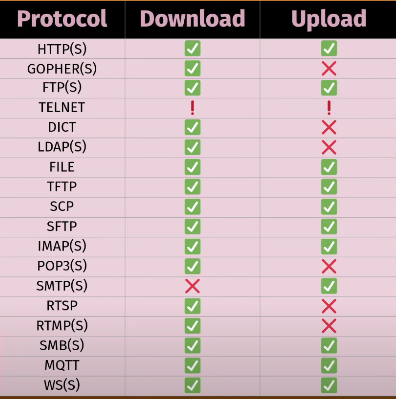
- curl connects to a server in order to do internet transfers (download and upload)
- a stream of data from or to a server
- the data can be anything: text, images, maps, code, film, sound
- curl does not care; curl does not know
authenticated vs unauthenticated protocols:
- always use authenticated protocols, means they use TLS or SSH
- never disable server verification (—insecure) in production
- unauthenticated transfers can be eavesdropped and tampered with
command line options:
- short options: -V
- long options: —version
- boolean options: —path-as-is
- negative boolean options: —no-path-as-is
- options with arguments: —output store.html
- arguments with spaces: —write-out “received %{path-as-is}”
- combinatorial explosion
- availability depends on version
URLs by RFC 3986
scheme://user:password@host:1234/path?query#fragment

- a scheme identifies the protocol to be used to access the resource on the Internet
- the host identifies the host that holds the resource
- the path identifies the specific resource in the host that the client wants to access
- query string provides a string of information that the resource can use for some purpose, for example, as parameters for search or as data to be processed
- a frame is used to point to a reference or function in the item that it has just retrieved
- the fragment processing is exclusively client-sided with no participation from the web server
- no spaces, use %20
- “schemeless” means guess
- name and password - remember URL encode
- hostname can be name, IDN name, IPv4 address or IPv6 address
URL port numbers
- a port number is from 0 to 65535
- each URL scheme has a default port that curl uses
- unless another is set in the URL
URLs and browsers
- browsers, URLs and their address bars
URLs and output options
- curl accepts any amount of URLs
- every downloaded URL needs a destination -stdout or a file
Ex:
curl -o file1 -o file2 https://example.com/file1 https://curl.se/file2

curl -O https://example.com/file1 -O https://curl.se/file2

curl https://example.com/file1 https://curl.se/file2 > everything
URL globbing
- “globbing” = ranges and lists
Ex:
curl https://{fpt, www, test}.example.com/img[1-22].jpg -o "hey_#2_#1".jpgparallel transfers
- by default, URLs are transferred serially, one by one
- —Z (—parallel)
- by default up to 50 simultaneous
- change with —parallel-max num
progress meters
- unless -s, —silent
- —progress-bar, -#
- different gain when doing parallel transfers