(REREAD THREE EASY PIECES AND MAKE NOTES AGAIN)
Background: there are like fork() and work() to create multiple processes but we dont usually do that in programming and leave it to OS only Instead we focus on threads There are API’s like pthread_create and pthread_join to do stuffs with an abstraction called threads -Create a pthread_t object -Create the actual thread by passing the object to pthread_create() in main function -Wait for it if you want (pthread_join waits for the thread to finish and handshakes them and put them together or something) Threads achieve actual parallelism (multiple processors) or avoid losing time on IO operations (processes could do it too but they are heavy context loaded) Whose problem is threads not being synchronized ie accessing a memory at the same time and so ons. Threads do what they do (see the hardware) so if you want them to behave you need to make them behave To provide exclusion in critical sections, there are locks API’s to ensure atomicity, they are implemented by OS with help of hardware Some programming concepts here like creating thread, joining it, and so on using pthread library How those locks are implemented: (metrics: correctness, fairness, performance) 1. In single processors: lock function: disable interrups every kind so no interrupts and the thread can continue -correctly works though but not fair -putting too much trust in application by disabling interrupts -losing interrupts if disabled for long time -not for multiprocessors -inefficient -ONLY USED BY OS ITSELF
2. Try again with simple variable method (such are called spin locks)
	Simple variable to indicate whether any thread is under the function or not

		lockStrucuter {some flag variable; 0 means available, 1 means not}

		lockFunction{ while flag is 1, wait; else set it to 1 }
		unlockFunction{ set it to 0 }

	>Still haunted by interrupts
		-Say a thread is checking flag and is about to enter the code; but is late to set the flag as unavailable (as they are two instructions)
		-Then another comes along and enters so both are inside the code at the same time

3. Hardware support:
	One instruction: testAndSet(old pointer, new value):
		Put new value into this old pointer and return the old value (atomotically)
		[More like store and return]

		lockStrucuter {some flag variable; 0 means available, 1 means not}

		lockFunction{ while testAndSet(flag, 1) == 1 wait}
		unlockFunction{ set it to 0 }
	Metrics:
		Correctness: works
		Fairness: no guarantee (may lead to starvation)
		Performance: painful overheads in single processors, if multiple then good only if number of processor equals number of threads
		-if a thread which has got lock is interrupted (timer) in critical section then others cannot access that section unless that same thread is scheduled again to release the lock (deteriotes as number of threads increase)
		-I mean this thread has lock got interrupted (holds the lock still), then others will be scheduled again but they just spin like idiots

	Alternative: compareAndSwap(old pointer, expected value, new value):
		If old pointer value equals that of expected then swap old with new else do nothing and return actual value

		lockFunction{ while CompareAndSwap(flag, 0, 1) == 1 then wait}

4. Solution: Just yield (OS API) yourself when you enter the lock and its unavailable giving other people chances (still inefficient)
		There are three states of threads (running, ready and blocked) yielding puts from running to ready

5. Using queues: need some control over which thread next gets to acquire the lock after the current holder releases it
		lockStrucuter {flag; guard; queue pointer}; guard is a lock to protect the body of lock and unlock functions
		[both flag and guard initialized as available]
		lockFunction:
				while testAndSet(guard, 1) == 1: (note guard not flag) //acquire guard lock by spinning
				if (flag available)
					flag = unavaialble // get it
					guard = available
				else:
					add the thread to queue (with its id API agian)
					guard = available
					park();

		unlockFunction:
				while testAndSet(guard, 1) == 1:
				if queue is emptry:	//let go of lock, no one wants it
					flag = available
				else:
					unpark (queue remove)	//flag directly passsed to the woken up thread
								//when a thread is woken up it will be as if it is returing from park()
				guard = 0


		Problem: When a thread is about to be parked (not complete) in hope that i will wake up when lock is free then suddently thread with lock is scheduled
			then this thread will free the lock, meanwhile the subsequent park by that earlier thread sleeps for a very long time (potentially forever) because the unpark() shcedules the thread that are sleeping and not ready ones

			solution is to have a setpark() API which indicates that the thread is about to be parked
			then, if the about-to-park thread is interrupted before parking then its park() returns immediately instead of sleeping

		NOTE: Something around that nature is the linux;s futex
Protect your data structures from thread danger: -With data of that class, put a lock as well -Acquire the lock when calling a method that manipulates the data strucutre and rlease when reutring from the call -SLOW AS FUCK
Conditional variables: (besides lock another requirement for programming)
void *child (void *arg)
	printf("child");
	done = 1		//need to send message to parrent waiting for us
	return NULL;

int main()
	pthread_t c;
	pthread_create;
	while (done == 0)
		//spin	//wait until the message arrives (slow cause of spinning)
	return 0

-Condition variable is explicitly a queue where thread can put themselves on while state of execution is not as desired
-Some other thread, when it changes said state, can then wake one or more of those waiting threads and thus allow them to continue by signalling them
-wait(mutex, cond variable) assumes that mutex is held lock, releases the lock and put the calling thread to sleep (atomically)
	when the thread wakes up (after some other thread has signaled it) it must re-acquire the lock before returing to the caller
-signal wakes one of the threads that are sleeping on the conditional queue (if more are sleeping then depends on queues) ie puts from sleeping to ready state
CODE PART:
include
int done = 0; pthread_mutex_t m = PTHREAD_MUTEX_INITIALIZER; pthread_cond_t c = PTHREAD_COND_INITIALIZER;
void* child(void *arg) { std::cout << “child is here” << std::endl;
//Holding the lock and then signalling the parent
pthread_mutex_lock(&m);
done = 1;
pthread_cond_signal(&c);    //send the signals to the threads on the conditional variable c

pthread_mutex_unlock(&m);

return NULL;
}
int main() { std::cout << “parent begins” << std::endl; pthread_t p; pthread_create(&p, NULL, child, NULL);
//Holding a lock and then waiting on the children
pthread_mutex_lock(&m);
while (done == 0)   //while the child is not sent its done message
{
    pthread_cond_wait(&c, &m);  //put yourself onto sleep in the conditional variable c, while releasing the mutex m
}
pthread_mutex_unlock(&m);   //if woken up and the signal is done we are good

//case 1: child has not done yet; so parent puts itself into waiting state
//case 2: child is done so parent just simply returns

std::cout << "parent ends" << std::endl;
return 0;
}
-The code has a mutex vairable, a conditional variable and another done variable
- DO WE REALLY NEED THE VARIABLE DONE? Yes if not then the case 2 will be broken
- DO WE NEED THE mutex variable (does only cond variable not work)? Nope what if parent is interrupted just before its about to sleep. There is no lock so the child will enter its region thus signaling the parent already. Now when parent turns it sleeps forever
- Common tip (sometimes ignorable but not suggested): HOLD THE LOCK WHEN WAITING OR SIGNALING
- Do we need the while loop? Yes better to do cause you see those above 2 conditions could do harm so always good to have
APPARENTLY FAMOUS CONSUMER-PRODUCER PROBLEM: -imagine one or more producer threads and one or more consumer threads -producers generate data buffer and place them in a buffer; and consume them in some way -eg: grep foo file.txt | wc -l -1. grep writes lines from file.txt with the string foo in them to what it thinks is standard output, -2. the unix shells redirects the output to unit pipe -3. The other end of unix pipe is connected to the standard input of the process wc -Here, grep is producer, wc is consumer; between them is an in-kernel bounded buffer (hence bounded buffer is a shared resource)
Problem: we need to do producer-consumer problem with an integer buffer
int buffer; bool IsEmpty = true; //initially the buffer is emtpy void put(int value) { assert(IsEmpty == true); IsEmpty = false; buffer = value; } int get() { assert(IsEmpty == false); IsEmpty = true; return buffer; }
Solution 1: (since the buffer accessing part is to be locked)
void *producer(void *arg) { std::cout << “producer here” << std::endl; pthread_mutex_lock(&lock); put(10); pthread_mutex_unlock(&lock); return NULL; } void *consumer(void *arg) { std::cout << “consumer here” << std::endl; pthread_mutex_lock(&lock); int tmp = get(); std::cout << tmp << std::endl; pthread_mutex_unlock(&lock); return NULL; }
Problem: Works only when producer enters first than the consumer
Solution 2: we need to implement the condtional variables
void *producer(void *arg) { std::cout << “producer here” << std::endl; pthread_mutex_lock(&lock); if (IsEmpty false) { pthread_cond_wait(&cond, &lock); //if buffer is not empty then wait in queue } put(10); pthread_cond_signal(&cond); //after putting the value, signal the waiting consumers pthread_mutex_unlock(&lock); return NULL; } void *consumer(void *arg) { std::cout << "consumer here" << std::endl; pthread_mutex_lock(&lock); if (IsEmpty true) { pthread_cond_wait(&cond, &lock); //if the buffer is empty then wait in queue until signalled by the producer } int tmp = get(); std::cout << tmp << std::endl; pthread_cond_signal(&cond); //signal that the buffer is empty pthread_mutex_unlock(&lock); return NULL; }
Modificaiton: Lets modify a bit and make the writing loopy times and reading it forever untill possible (so we expect the output to be printed while end behaviour is consumer sleeping forever)
loops is a global variable
void *producer(void *arg) { std::cout << “producer here” << std::endl; for (int i = 0; i < loops; ++i) { pthread_mutex_lock(&lock); if (IsEmpty false) { pthread_cond_wait(&cond, &lock); } put(10); pthread_cond_signal(&cond); pthread_mutex_unlock(&lock); } return NULL; } void *consumer(void *arg) { std::cout << "consumer here" << std::endl; while(1) { pthread_mutex_lock(&lock); if (IsEmpty true) { pthread_cond_wait(&cond, &lock); } int tmp = get(); std::cout << tmp << std::endl; pthread_cond_signal(&cond); pthread_mutex_unlock(&lock); } return NULL; }
Problem: But if we have multiple threads, say one producer and two consumers -what we expect is to write the buffer 10 times by producer and read it ‘loops’ times by consumer (does not matter which one reads) -So there should be no assertion before the buffer has been written and read loops number of times -First T1 runs and acquires the lock, but since buffer is empty so it waits sleeping (which releases the lock) -Now producer walks in and does its writing once, then signals which puts the first thread from sleeping to ready; and if the consumer threads are not scheduled yet producer sleeps on next interation as the buffer is still full -Regular expection is the first thread T1 to be running and do its job -But since there are two of them say second one T2 gets running -It will then consume the value and signals the producer -But before producer gets its turn say thread1 gets its turn then it wakes up into the part of the code where it left sleeping -So it has lock and tries to read the buffer but its been already read by T2 so an assertion error -Problem is that producer woke T1 but it didnot run (waking vs running) instead run T2 which changed the state -Problem is to prevent T1 from reading the buffer when T2 has already read its NOTE: this way of giving signal ie putting from sleeping to ready is called mesa semantics -Another alternative is to let the thread run as soon as it wakes called hoare semantics (sounds better but complicated) -So virtually all use mesa
Solution 3: You while instead of if, because when the thread T1 wakes up it will again check the IsEmpty then go sleep again -NOTE to always use while loops (talking about inner while loops) with condition variables (may be not required but better to do it)
Problem: -Say the two consumer threads go first and then sleep; -Now producers turn and writes the buffer and sleeps itself, and it wakes one of the threads say T1 -Now T1 does its read and has to wake producer right? But who says? Both Producer and T2 are sleeping so it can wake up T2 as well -If it wakes up T2 then T2 seeing that buffer is emtpy goes to sleeping -As a result all of them are sleeping -ANS: signaling is needed but cautiusly ie consumers should wake up producers and vice versa
Solution 4: A working one using two conditional buffers ie consumers sleep on their own buffers but call on the producers one and vice-versa for the producers (works perfectly with the consumers sleeping at last)
GENERALIZED WITH BETTER EFFICENTY: -Increase the size of buffer, make it like a queue -For single consumer and producers; reduces context switches cost -For multiples (one or both of them) allows concurrente producing or consuming to take place
THE CODE IS AS FOLLOW: IN TOTALLY RUNNABLE FORM: WITH COMMENTS AS WELL
include
pthread_mutex_t lock = PTHREAD_MUTEX_INITIALIZER; pthread_cond_t for_producers = PTHREAD_COND_INITIALIZER; pthread_cond_t for_consumers = PTHREAD_COND_INITIALIZER; int loops = 100;
void put(int value) { assert(count < MAX); buffer[fill_ptr] = value; fill_ptr = (fill_ptr + 1)%MAX; count += 1; } int get() { assert(count != 0); int tmp = buffer[use_ptr]; use_ptr = (use_ptr + 1)%MAX; count -= 1; return tmp; } void producer(void arg) { for (int i = 0; i < loops; ++i) { std::cout << “producer has acquired the lock” << std::endl; pthread_mutex_lock(&lock); while (count == MAX) { std::cout << “producer sleeping” << std::endl; pthread_cond_wait(&for_producers, &lock); //if buffer is not empty then wait in queue std::cout << “producer woke up” << std::endl; } std::cout << “producer wrote the value ” << i << std::endl; put(i); std::cout << “producer signaled the consumers” << std::endl; pthread_cond_signal(&for_consumers); //after putting the value, signal the waiting consumers std::cout << “producer has released the lock” << std::endl; pthread_mutex_unlock(&lock); } std::cout << “producers loop finished ” << std::endl; return NULL; } void consumer(void arg) { while(1) { std::cout << “consumer ” << (char)arg << ” acquired the lock” << std::endl; pthread_mutex_lock(&lock); while (count == 0) { std::cout << “consumer ” << (char)arg << ” sleeping” << std::endl; pthread_cond_wait(&for_consumers, &lock); //if the buffer is empty then wait in queue until signalled by the producer std::cout << “consumer ” << (char)arg << ” woke up” << std::endl; } std::cout << “consumer’s ” << (char)arg << ” read the value: ”; int tmp = get(); std::cout << std::endl; std::cout << tmp << std::endl; std::cout << “consumer ” << (char*)arg << ” signalled the producers” << std::endl; pthread_cond_signal(&for_producers); //signal that the buffer is empty pthread_mutex_unlock(&lock); } std::cout << “consumer ” << (char*)arg << “loop finished” << std::endl; return NULL; } int main() { pthread_t producer_t, consumer1_t, consumer2_t; char arg1[] = “T1”; char arg2[] = “T2”; pthread_create(&producer_t, NULL, producer, NULL); pthread_create(&consumer1_t, NULL, consumer, arg1); pthread_create(&consumer2_t, NULL, consumer, arg2);
pthread_join(producer_t, NULL);
pthread_join(consumer1_t, NULL);
pthread_join(consumer2_t, NULL);
return 0;
}
ESSENTIALLY: producer: //lock → cond wait (on producer queue) → get → cond signal (on consumer queue) → unlock consumer: //lock → cond wait (on consumer queue) → get → cond signal (on producer queue) → unlock
SEMAPHORES: (to implement both locks and CVs) -Semaphore is an object with non integer value -is initialized as sem_init(&semaphore_var, 0, 1); 1 is the initial value while 0 is for sharing variable between threads of same process, for sharing inter-process is different -interacted by two functions, sem_wait() and sem_post() -sem_wait(sem variable): decrement the value of semaphore by 1 and wait if value is negative case1: returns immediately case2: sleepens the caller -sem_post(sem var): increment the value by 1 and if there are one or more threads waiting, wake one nobody waits here sleeping -NOTE: If a semaphore, when negative is equal to the number of waiting threads. -Dont worry (yet) about the possbile race, assume that the factions they make are performed atomically
As a locking mechanism (as like locks) sem_t m; sem_init(&m, 0, X); the value of x is 1 for locks
sem_wait(&m);
//critical section here
sem_post(&m);

-Initially if thread 1 enters wait(), it decreases the value to 0 and moves into critical section
	-while its in critical section, another tries to attemp the lock it decreases to -1 and sleeps waiting
	-let any number of thread try the lock so semaphore value is -1, -2, -3 or whatever
	-when thread1 completes it icnreaes the value by 1 and wakes one of them
	-The woken up runs the critical section and as it leaves increases the value by 1
	-In this way the number of waiting threads equal the neative value of the semaphore
As a ordering mechanism (as like CVs) child (): sem_post() //signal herer
main():
	create thread
	sem_wait()	//wait here for child

-The sem variable must be initialized to zero here
Producer and consumer problem: -the idea is the earlier with the locks and CVs implemented by the semaphore equivalents
IMPLEMENTATION:
include
//buffer related paramters const int MAX = 10; int buffer[MAX]; int put_ptr = 0; int get_ptr = 0; int count = 0; int loops = 10; //semaphore related paramters sem_t lock; sem_t for_producers; sem_t for_consumers;
void put(int value)
{
assert(count < MAX);
buffer[put_ptr] = value;
put_ptr = (put_ptr+1)%MAX;
count += 1;
}
int get() { assert(count != 0); int temp = buffer[get_ptr]; get_ptr = (get_ptr+1)%MAX; count -= 1; return temp; }
void* producer (void* arg)
{
//lock → cond wait (consumer queue) → get → cond signal (producer queue) → unlock
for (int i = 0; i < loops; ++i)
{
std::cout << “producer: waiting for lock” << std::endl;
sem_wait(&lock);
std::cout << “producer: acquired lock” << std::endl;
    sem_wait(&for_producers);
    std::cout << "producer: puts the value " << i << std::endl;
    put(i);
    std::cout << "producer: signals the consumers" << std::endl;
    sem_post(&for_consumers);
    std::cout << "producer: releases the lock" << std::endl;
    sem_post(&lock);
}
std::cout << "PRODUCER: LOOPS FINISHED" << std::endl;
return NULL;
}
void* consumer (void* arg)
{
//lock → cond wait (producer queue) → get → cond signal (consumer queue) → unlock
while(1)
{
std::cout << “consumer: waiting for lock” << std::endl;
sem_wait(&lock);
std::cout << “consumer: acquired lock” << std::endl;
    sem_wait(&for_consumers);
    std::cout << "consumer: acuired value" << std::endl;
    int tmp = get();
    std::cout << tmp << std::endl;

    std::cout << "consumer: signaling the producers" << std::endl;
    sem_post(&for_producers);

    std::cout << "consumer: releasing the lock" << std::endl;
    sem_post(&lock);
}
}
int main() { sem_init(&lock, 0, 1); sem_init(&for_producers, 0, MAX); sem_init(&for_consumers, 0, 0); pthread_t consumer1, producer1; pthread_create(&consumer1, NULL, consumer, NULL); pthread_create(&producer1, NULL, producer, NULL);
pthread_join(consumer1, NULL);
pthread_join(producer1, NULL);
return 0;
}
PROBLEM: The problem in this impelmentaiton is that the waiting in mutex earlier used to hold the lock (we passed the lock) but here the lock is held by the thread when it goes into sleeping (dead lock situation). Following scenario:
		-consumer is waiting for data from producer
		-producer is waiting for lock from consumer

The correct way to do is to reduce the scope of the lock (they say this) ie take the locks inside while waiters outside. A common pattern they say
THE DINING PHILOSOHPERS (common problem posed and solved by djisktra) -Five philosohpers with five forks in between: make most use of concurrency making sure that no philosopher gets starved
-Solution:
	while (1)
		think()
		getforks()
		eat()
		putforks()
-This while loop applies to each philosohper separately, they may be at any position inside the loop
To solve:
-Need five semaphores each for forks forks[5] each initialized to 1 whose idea is to lock the forks using semaphores as locks
Solution1: getforks(): sem_wait(forks[left(p)] sem_wait(forks[right(p)]
putforks():
	sem_post(forks[left(p)]
	sem_post(forks[right(p)]

;left and right function gives the forks on left and right of the philosopher p

Problem: Easy to spot, one philosopher may pick fork on its left while the one on its right is picked by another (another ko left thiyo tyo)
	as a result they starvie each other

	Even if the condition is that if they do not get the next fork they leave the fork then such situation may repeat again, so there is a little chance that they may starve forever
Solution2: (that apparently works; i have been able to see it only when the condition is loosened) getforks(): if (p == 4) sem_wait(forks[right(p)] sem_wait(forks[left(p)] else sem_wait(forks[right(p)] sem_wait(forks[left(p)]
COMMON BUGS: 1. atomiticty-violation: desired serializability among multiple memory accesses is violated (eklot ma execute huna parni implement garda bhayena, bich ma interrput bhayo bhane tension) 2. ordering: desired order between two memory accesses is flipped 3. dead-locks: Thread1: mutex_lock(L1) mutex_lock(L2) Thread2: mutex_locK(L2) mutex_lock(L1)
Condition:
	-Mutual exclusion: threads claim exclusive control of resources that they require, thread grabs a lock
	-Hold-and-wait: threads hold resources allocated to them (like locks) while waiting for additional resources (locks that they wish to acqurie)
	-No preemption: resources (eg. locks) cannot be forcibly removed from threads that are holding them
	-Circular wait: there is a circular chain of threads such that each holds one or more resources that are being requested by the next thread in the chian

	NEPALI: kei kura haru (2 bhanda badi) chahanu,
		ti madhye euta chaheko kura payesi sabai napayesamma teslai naxodnu,
		kasaile xudaunani nasaknu,
		yesetai aru jhaatu haru bhayo ra tiniharu le chaheko kura overlap huna gayo bhane deadlock chance

Prevention: Play on the above points

Avoidance: Say there are two locks and four threads, their requirement of locks is as follow:
		T1	 T2	 T3	T4
	L1	yes	yes	no	no
	L2	yes	yes	yes	no

Here T3 and T4 are not lovi (tini haru le kei kura chahannnan) so tiniharu lai aru sanga over lap garna painxa chill parama
Hence, if there is contentation for resources, if we want to avoid deadlock need to give up performance (rarely used)

Detect and recover: if os finds deadlock then recover by exiting them or something
NOTE: Threads are not the only way to write concurrent applications, there are some other styles so called event based not getting into it
PERSISTENCE: A canonical picture of an IO device: Registers -Status: can be read to see the current status of the device -Command: to tell the device to perform certain task -Data: to pass data to the device or get data from the device
Polling based:
while (status == busy)
	; // wait until device is not busy
write data to the data register
write command to comman register
while (status == busy)
	; // wait until device is done with your request

Interrupt based:
	-OS issues a request, put the calling process to sleep
	-and context switch to another task
	-When the device is finally finished with operation, it will raise a hardware interrupt
	-CPU jumps to ISR, which finishes the request
	-Wake the process waiting for IO

NOTE: Polling good for fast devices, interrupt for slow, if speed not known then hybrid (poll for few cycles then wait for interrupt)

Another problem with canonical protocol: (to transfer from memory to disk)
	-copy from memory to cpu then to disk's register
	-initiate the i/o command

Solution: The copying from memory to disk is done by a special device called DMA
	-OS tells dma to transfer from this memory location to disk
	-DMA interrupts cpu to tell that its done
HOW ACTUALLY CPU COMMUNICATES WITH DEVICES REGISTERS? ANS: IO or memory mapped
OKAY TOO MANY DEVICES AND WEIRD INTERFACES: Ans: The OS would know how each interface works but provide an abstraction for the user so user has API’s like open, read, write etc. which are connected to generic block interface (block read/write) below which are the devices The abstraction happens as file system or raw interface
…
Two types of abstraction Files: as a linear array of bytes (specific details does not matter to OS whether a text of image), has an inode number associated with it Directory: also has an inode number, contains a list of user-readable&lowlevel name pairs, each entry is either a file or directory
API’s: -open(), read(), write() and close(); the c-functions printf() and all make use of these API’s
CONCURRENCY STUFFS NOW (in C++ specially)
Concurrency in C++: (read a decent OS book beforehand)
Programming languages offer concurrency but it could be actual hardware one or just task switching -Why would you write concurrent if not for parallelism, you ask? Ans: Because separating concerns is good and easy sometimes (illusion of responsiveness)
- Divide the program into multiple sepearate single threaded processes that are run at the same time -slow as involves lots of context switching -easy and safe to write than threads -can run processes on separate machines (with long communication cost)
- A single process with multiple threads -shared space and lack of protection makes threads overhead less -quite involved to write -NOTE that threads do have multiple stacks of their own
NOTE: Many programming languagues themselves offer some stuffs to do multithreaded programming (ofc they would use the OS API) while multi process program have to refer to OS API’s directly
WHEN NOT TO DO Concurrency? -Dont make it hard to understand and maintain buggy -If multiple threads then costs like memory and shit could overtake when adding the last thread
-
To initiate a thread: std::thread name(callable_object); the callable object could be a function or an object with () operator defined
Segway: std::thread my_thread(task()): task() is something temporary that is supposed to return a callable object but instead the statement declares ‘my_thread’function that takes in function (or rather pointer to it) that returns the same callable object (note i got confused once, that task() has no name of the function its like func_name(int) see the expected integer has no name)
To avoid such you one extra bracket or use curly brackets instead
OR lambda expressions (are such callable objects that avoid this) -defines a self-contained function that takes no paramters and relies only on global variables and funcitions (not even a return value) -[]{//body}(); calls immediately (but its not what it meant for) -usually passed as callable objects to other functions or whatever man -if need parameters and return value then: (such lambda expression are to be passed only not called as above) -[](int paramters){//body if you want to return then here only}
-something called lambda functions that reference local variables (LATER) -
Once you created a thread, you either join it i.e. wait for its execution or detach it (if you do nothing before the object is destroyed then its undefined ie if thread finishes early then cool but if not then calls terminate) -Detached threads run truly in the backgrounds so they are no longer joinable)
-
Pass paramters to function that starting point of threads: std::thread name(func-name, paramter, paramter …) -The arguments are copied into internal storage where they can be accessed by the newly created thread of execution and then passed to the callble object -Means that the parameters are copied to the stack of the newly created thread so if passed pointers could be the issue of dangling pointers if the main program already exited -If you want to pass by reference, then need to use std::ref or by good old pointer >Share memory using pointers: poor way of doing things >Share value: overhead >Instead use std::move that moves the object
Fact: Now if not joined then even if main exits then the thread could be running in some function somwether in lala land
-
Transferring ownership of a thread -A std::unique_ptr is a type of class that points to object (so has its own resource) then when it no longer points to the object, either assigned or pointer destroyed itslef then the object is also destroyed -So to transfer the ownership of such objects, special functions are provided -threads are also same in semantics, they own (are responsible for managing) a thread of execution -The ownership can be transferred between instances of std::thread so only one object is associated with a particular thread of execution
-Eg: std::thread t1(some_func1); t1 ← some_func1 thread std::thread t2 = std::move(t1); t1 ← none, t2 ← some func1 thread t1 = std::thread(some_func2) t1 ← some fun2 thread, t2 ← some func1 thread t1 = std::move(t2) tries to destroy the thread of execution associated with 1
Hence, could terminate why? cause before a thread of execution is destroyed it must be completed or detachedAppendinx: unique_ptr: (is a template) when goes out of scope, calls delete ; cannot copy unique pointer, because if one of them dies they take memory with them eg: std::unique_ptr<Class_name> name(new Class_name()); eg: std::unique_ptr<Class_name> name = std::make_unique<Class_name>(); [apparently safer] -cant copy it, cant share it shared_ptr: does somthing under the hood and allows sharing, only deletes the actual object when the reference count goes to zero
-
Real threading: std::hardware_concurrency() gives the actual hardware parallel threads that can be run. If oversubcriptoions then context switching could be takeover -so choose number of threads at runtime
SHARING THE DATA: Principle: -If all shared data is read-only, theres no problem, because the data read by one thread is unaffected by whether or not another thread is reading the same data -But if data shared between threads, and one or more threads start modifying the data, theres a lot of potential for trouble -A race condtion is where outcome depends on the relative ordering of execution of operations on two or more threads -A race is not necessarily a problem but only a problem when invariatns are broken
1. You see the possibility of race: (one thread changes the link of linked list while another does another stuff, changing the link is a multi step operation so one thread might come in between those operations)
2. You dont: two threads incrementing the counter data structure (seems like a single operation but is not)
[Fundamentally are the same stuffs: This piece is written by me only]
Solutions of such races: i. Make that operations be atomic ie they are either not started or completed, no in between. ii. Write operations of data structures such that each micro instruction preserve invariance (even if interrupted in between does not matter) [i is called locked, ii is called lock free] iii. Yet another new way is called software transactional memory where the operations are logged as transaction and conducted atomically
-
Mutex-based protection: -To lock the operations i.e. whenever one thread is on execution of that operation others cannot insert into it -std::mutex lock with member functions lock() and unlock() but pretty weird to call everytime -instead std::lock_guard template which locks the supplied mutex on construction and unlocks it on destruction, ensuring a locked mutex is always correctly unlocked -But still need to create the mutex variable -PROGRAM lock_using_mutex.cpp -can do template argument deduction by simply omitting the passed argument to the lock_guard template
Appendix: mutex variable lock_guard variable (template): locks when created, unlocks when destroyed (cannot unlock in between) unique_lock variable (template): can do inbetween unlocking but is safer or something; and flexible rey euta le bhaneko scoped_lock variable: superior of lock_guard which locks arbitrary number of mutexes at once (like std::lock upcoming)
Problem: If someone gets access to reference or pointer to the protected data strcuture, the locking mechanism is for nothing Solution: Dont pass pointers and references to protected data outside the scope of the lock, whether by returning them from a function
Problem: Granular locking schmemes (multiple locks in operations): interface problem; Solution: Careful programming Coarse types: decrease in advantages of concurrency
Problem: If you end up having to two or more mutexes for a given operation there’s another problem: deadlock -Quite opposite to race condition: rather than two threads racing to be first, each one is waiting for the other, so niether makes the progress
Solution; -Always lock the two mutexes in the same order (you have two member functions and two locks, you do different order: nobody would practically do it but okay) -Somehow use scoped_lock_guard function thats like lock_guard but takes in multiple mutexes and locks them together; Locks are not the only resources that cause deadlocks, there are others as well (LATER bebs) -
Conditional variables and synchronization: -We need to make thread wait until another thread meets a conditon (does not mean that the thread gets to do its stuff exactly when the condition is met, its after the conditin is met) -Put a protected flag; one thread polls it another updates it (wastage of time) so here is where CVs come, instead of polling we put it on a queue -instead of polling we wait using the conditional variable and signal afterwards, while the receiving thread is waiting -For some reason, the cond.wait(uniquelock mutex); the unique pointer is like guard lock template but some random reason google it up
-
One-off events, waiting for plane announcements (each time different plane)
-Common one-off event is the result of a calculation that has been run in the background. std::thread does not have easy means of getting the alue -Use std::sync to start an asynchronous task for which you dotn need the result right away. -Rather than giving a thread object to wait on, std::sync returns a std::future object which will eventually hold the return value of the function -When you need value you could call get() on the future, and the thread blocks until the future is ready and returns the value -Can pass parameter just like in std::thread
 >Actually its upto implementation to whether to create a thread or do synchrnous execution when get() is called
 >To be explicit, there is first parameter to send, std::launch::deferred (to do synchronous) or std::lauch::async (to make a thread); or can do OR of them which is the deafult
-Also can send paramters to the function -The function can expect a future object -then inside the body do future_object.get() -in main body, make a promise object do promise_obj.get_future() and now pass this future using std::ref(future_obj) -While sometime later can do, promise_obj.set_value(actual value) -note these are all templates
NOTE each future object can be done get()‘d only once
Additional stuffs like packaged tasks and shtits
-
C++ also supports atomic types like atomic int and like that for implementing lockfree data structures -For eg: make an atomic counter then we could do counter.fetch_add(value_to_add, )
FACTORS TO CONSIDER WHEN WRITING CONCURRENT ALGORS: >No of hardware concurrency available, subject to other appliction running at the same time >contentation: If threads are to modify the data, they do so on their individual caches, which if another core requires the same data, must be propagated to another cache, thats huge amount of time -atomic types possibility exists -using locks also has such possiblity >false sharing: if dadta owned by threads are closer then still possibility of ping poing -Every time the thread accesssing entry 0 needs to update the value, ownership of the cache line needs to be transferrred to processor running that thread -only to be transferred to the cache for the processor running the thread for entry 1 when that thread needs to update its data itme -std::hardware_destructive_interference_size tells you the size that aoids false sharing. if you have an array where each consecutive are shared by threads then need to align each of them by that value >proximity of data: you know you need to have your data in closely so can be brought together in cache. it causes problem in multithreading as well because of task switching, not going into detail. For this the data used by the thread better fit std::constructive
GUIDELINESS: -Try to adjust the data distribution between threads so that data that’s close together is worked on by the same thread -Try to minimize the data required by any given thread so it fits into one cache line using constructive_interference as guide -Try to ensure that data accessed by separate threads is sufficinety far apart to avoid false sharing using destructive_interference as guide
LINUX PROGRAMMING INTERFACE #####################################################################################################
-
Shell is a special purpose program designed to read commands and execute appropaite commands
- Bourne shell, C shell, Korn shell, Bourne again shell and so on
-
Single directory hierarcy to structure all files in the system.
File types:
-
Normal data files
-
Directories: special file whose contents take form of a table of filenames coupled with references to the corresponding files Links: filename-plus-reference
May contain link to files and directories Every contains at least two links . (self) and .. (parent)
-
Specially marked files: forms symbolic links
-
Others:
Pathname: location of file within the hierarchy (relative and absolute)
-
COMMAND: cd
-
Maintains users and their groups to access system resources,
- Users:
- Groups:
- Superuser:
Each file has an associated UID and GID that define the owner of the files.
-
Everything is a file. -I/O operations will work on any types that appropriates as a file -Files are referred by file descriptor (non-negative integer) -Three default open files, standard input, standard output, standard error
-
Processes: -Programs are basically series of statements written in a programming langauge. -When a machine program is launched: >Kernel loads the code of a program into virtual memory >Sets up kernel bookkeeping data structures to record various informations -Processes can request the kernel to perform various tasks using kernel entry points (kernel to user mode)
-
Filter programs: -Programs that reads its input from a stream (interface for IO), performs some transformation of that input, and generates another stream
COMMAND: echo
-Piping:
	Filters may be strung together into a pipeline with the pipe operator ("|")
-Redirection:
	Input (<), Output (>), Appends (>>)
6) Memory layout: -A process is logically divided into the following segments: > Text: > Data: > Heap: > Stack:
-
Process creation: -A parent process can create a new child process using fork() system call and inherits copies of parent’s data, stack and heap segments, which it may modify, while text segment marked read-only is shared by the two processes -Can use execve() system call to load and execute an entirely new program by destroying old segments, replacing them with new ones -Can terminate in one of two ways: >Request its own termination using exit() system call >Killed by the delivery of a signal >Returns a termination status, to the parent for inspection using the wait() system call.
-
Process credentials: 0. Unique identifiers PID and PPID
- Real UID and real GID:
- Effective UID and effective GID:
Priviliged process is one whose effective UID is 0. Becomes privilege: -Because it was created by another priviliged process -Via the set-user-ID mechanism, which allows a process to assume EID that is same as the UID of the program file that it is executing
- Environment variables:
Created with export MYVAR = “0” for shells
COMMAND: env
-
The init process: -Special process (parent of all) which is derived from the program file /sbin/init -PID = 1
A daemon is a special process that is long-lived and runs in the background and has no controlling terminal
-
Static and shared libraries: -Static: -Shared:
-
Interprocess communications: …
-
The /proc files: -Provides an interface to kernel data structures in a form that looks like files and directories on a file system
/proc/
~ /proc/self /proc/cpuinfo /proc/meminfo
FILES: /proc
- System calls: -Makes a system call by invoking a wrapper function in the C library (glibc for UNIX) -When a system call fails, it sets the global integer variable errno (initialize 0 first) to a positive value that defines the specific error -char* strerror(errno) returns a pointer to error string corresponding to errno
…
- File calls:
-fd = open(
, , <mode*>) -numread = read(fd, , ) -numwritten = write(fd, , ) -status = close(fd) -curr = lseek(fd, , )
SYSTEM: open() SYSTEM: read() SYSTEM: write() SYSTEM: close() SYSTEM: lseek()
>File holes:
	-Space between previous end of file and the newly written bytes at an arbitrary point past the end of file
2) Buffer cache: -When working with disk files, read() and write() system calls dont directly initiate disk access, they simply copy data between a user-space buffer and a buffer in the kernel buffer cache >Reduces the number of disk transfers that the kernel must perform -Although much faster than disk operations, system calls take an appreciable amount of time which is minimized by buffering data in large blocks and thus performing fewer system calls (usually 4096 bytes)
-
stdio.h wrappers: -FILE *fopen(const char *
, const char * ) -int fclose(FILE *stream) -void setbuffer(FILE *stream, char *static_buf, size_t size) -int fflush(FILE *stream) -int fsync(int fd); fd = fileno(FILE *stream) - → stdio calls → → io syscalls → → disk write → -Not filling : fflush -Not filling : fsync -Not using at all: open flags -
Bypass the buffer cache: -Intended for specialized IO requirements, O_DIRECT open flags -Not necessarliy fast IO performance as misses various kernel optimizations
-
Device files: -Special file corresponds to a device on the system -Within the kernel, each device type has a corresponding device driver, which implements a set of operations that correspond to input and output actions on an associated piece of hardware -API provided by the device drivers is consistent, and includes operations corresponding to the system calls open(), close(), read(), write() and so on -Some devices are real, while others are virtual, meaning that there is no corresponding hardware; rather, kernel provides (via device driver) an abstract device with an API that is the same as a real device -Device files appear within the file system, just like other files, usually under the /dev directory -/sys directory allows the viewing of the device information and details
FILES: /dev FILES: /sys
-
Disk device files: -Each disk is divided into one or more nonoverlapping partitions, each treated by the kernel as a separate device residing under the /dev directory -A disk device may hold any type of information, usually contains: >a file system holding regular files and directories >a data area accessed as a raw-mode device >a swap area used by the kernel for memory management
-
Disk file systems: -Organized collection of regular files and directories -A disk partition := | boot-block | super-block | i-node table | data blocks | >Boot block is not used by the file syste, it contains information used to boot the operating system >Superblock contains parameter about the file system >Each file or directory in the file system has a unique entry in the i-node table >Majority of space in a file system is used for the blocks of data that from the files and directories residing in the file system
COMMAND: ls -li
-
I-nodes in ext2: -Each i-node contains 15 pointers, first 12 of these point to the locaiton in the file system of the first 12 blocks of the file -The next pointer is a pointer to a block of pointers that give the locations of the thirteenth and subsequent data blocks of the file -The number of pointers depends on the block size of the file system -Forteenth pointer is a double indirect pointer, which points to blocks of pointers that in turn point to blocks of pointers that in turn point to data blocks of the file -Further level of indirector: the last pointer in the i-node is a triple indirect pointer
-
Single directory hierarchy: -All files from all file systems reside under a single directory tree / -Other file systems are mounted under the root directory and appear as subtrees within the overall hierarchy
COMMAND: mount
COMMAND: mount
- Virtual file systems: -VFS defines a generic interface for file-system operations, each file system provides an implementation for the VFS interface -Linux supports notion of virtual file system that reside in memory and uses swap -One use is for the glibc implementation of POSIX shared memory and POSIX semaphores
…
- Process IDs: -Each program file includes meta describing the format of the executable file (COFF or ELF) -pid = getpid() -ppid = getppid() -If a child process becomes orphaned because its parent terminates, then its adopted by the init process
SYSTEM: getpid() SYSTEM: getppid()
-
Process memory: -Text segment: -Initialized data segment: -Uninitialized data segment: -Stack: -Heap: -The memory allocations depends on ABI (API for compiled codes) so once compiled for a particular ABI, an executable should be able to run on any system presenting the same ABI. -In contrast, standardized API guarantees portability only for applications compiled from source code. -
-
Virtual memory: -Splits memory used by each program into small, fixed-size units called pages -RAM is divided into a series of page frames of the same size, at any time, only some of the pages of a program need to be resident in physical memory page frames -Copies of the unused pages of a program are maintained in the swap area reserved to supplement computer’s RAM and loaded into memory only as required -When a process refernces a page that is not currently resident in physical memory, a page fault occurs, at which the kernel suspends execution of the process while the page is loaded from disk into memory -To support, the kernel maintains a page table for each process which describes the location of each page in the process’s virtual address space which indicates location of a virtual page in RAM or indicates that it currently resides on disk though, not all address ranges in the process’s virtual address space require page-table entries, -A process’s range of valid virtual addresses can change over its lifetime, as the kernel allocates and deallocates pages (and page-table entries) for the process in the following circumstances >As stack grows download beyond limits previous reached >When memory is allocated or deallocated on the heap, by raising the program break using brk() or sbrk() >When memory mappings are created using mmap() and unmapped using munmap()
-
Stack frames: -Kernel-stack is a per-process memory region maintained in kernel memory used as the stack for execution of the functions internally during the execution of a system call -User-stack frame contains: >Function arguments and local variables: >Call linkage information: Each time one function calls another, copy of callee-saved registers (ABI dependent) are saved on called function’s stack frame to restore when the function returns -Initializer startups () → main() → next() so on
-
Command line arguments: -int main(int argc, char *argv[], char *envp[]) -Non portable methods of accessing cl arguments: >/proc/PID/cmdline -argv and environ arrays, as well as the strings they initially point to, reside in a single contiguous area of memory just above the process stack
-
Memory allocation: -Program breaks: >&etext: end of text segment >&edata: end of initialized data segment >&end: end of uninitialilzed data segment -Allocate on heap: >success = int brk(void *end_data_segment); >previous_break = void *sbrk(intptr_t increment); -After the program break is increased, the program may access any address in the newly created area, physical memory pages are automatically allocated on the first attempt by the process to access addresses in those pages
SYSTEM: brk() SYSTEM: sbrk()
-Since virtual memory is allocated in units of pages, end_data_segment is effectively rounded upto the next page boundary
-Wrapup functions malloc() and free():
	>Maintains a (doubly linked) list of free memory blocks with extra bytes to hold an integer containing the size of the block
	>malloc() scans the free list in order to find one whose size is larger than or equal to its requirements
	>If the block is exactly the right size, it is returned to the caller, if it is larger, then it is split so that a block of the correct size is returned to the caller and a smaller free block is left on the free list
	>If no block on the free list is large enough, then calls sbrk() to allocate more memory (increases the program break in larger units) putting the excess memory onto the free list
	>free() places a block of memory of size maintained on allocation onto the free list
WRAPPER: malloc() WRAPPER: free()
-
Process creation: -Dividing taks up makes application design simpler and permits greater concurrency -child_pid (parent) = fork(); 0 (child) = fork() -Two processes execute the same program text, but have separate copies of the stack, data and heap segments -Child can get its own PID using get_pid() and the ID of its parent using getppid() -After a fork, it is indeterminate which of the two processes is next scheduled to use the CPU
-
File sharing between parent and child: -When fork() is performed, the child receives duplicates of all of the parent’s file descriptors, consequently the file attributes of an open file are shared between the parent and child
-
Memory semantics of fork(): -To avoid wasteful copying when fork() is followed by an exec(), the kernel sets things up so that page-table entries for the data, heap and stack segments refer to the same physical memory pages as the corresponding page-table entries in the parent, and pages are marked read-only, after which kernel traps any attempts by either the parent or the child to modify one of these pages, and makes a duplicate copy of the about-to-be-modified page
-
Race conditions: -Cant assume a particular order of execution for the parent and child after a fork(), to guarantee a particular order, need some kind of synchronization techniques
-
Terminating a process: -For normal void exit(int status); -Falling off the end of main program is equivalent to exit(0)
-
Monitoring child process: -Waits for one of the children of the calling process to terminate and returns the termination status of that child: terminated_child = wait(int *status) >If no previously unwaited for child of the calling process has yet terminated, the call blocks until one of the children terminates >If a child has already terminated by the time of the call, wait() returns immediately >If a process has created multiple children, it is not possible to wait() for the completion of a specific child, we can only wait for the next child that terminates -pid_t waitpid(pid_t pid, int *status, int options); options := 0
-
Orphans and zombies: -Orphaned child is adopted by init, the ancestor of all processes, whose process ID is 1 -To the child that terminates before its parent has had a chance to perform a wait(), although the child has finished its work, the parent should still be permitted to perform a wait() at some later time to determine how the child terminated, resources held by the child are released back to the system to be reused by other processes, the only part that remains is an entry in the kernel’s process table recording usage statistics -When the parent does perform a wait(), the kernel removes the zombie, since the last remaining information about the child is no longer required -If the parent terminates without doing a wait(), the init process adopts the child and automatically performs a wait(), thus removing the zombie process from the system
-
Program exec: -When execve() system call loads a new program into process’ memory, after executing various C library run-time startup code and program intialization code (gcc constructor attritubes), the new program commences execution at its main() function -int execv (const char *pathname, char *const argv[]) -int execvp (const char *filename, char *const argv[])
Exams:
- OS and abstractions
-definition as a serive and as a layer
-two: abstract set of resources instead of messy hardware and managing the hardware resources
- why hardware hard? how OS solves it? example of SATA
- orderly and controlled allocation: process, memory and file management, security ##################################################################################################### TABENHAUM #####################################################################################################
Operating system: -OS is system software that manages computer hardware and software, and proides common services for computer programs -A modern computer consists of one or more processors, some main memory, disks, printers, a keyboard, a mouse, a display, network interfaces, and various other input/output devices, to manage and use them optimally, computers are equipped with a layer of software called the operating system -Two essentially unrelated functions: providing application programmers a clean abstract set of resources instead of the messy hardware ones and managing these hardware resources
As an Extended Machine:
	-Real processors, memories, disks and other devices are very complicated and present difficult and inconsistent interfaces to the people who have to write software to use them, sometimes this is due to the need for backward compatibility with older hardware, other times it is a attempt to save money
	-One of the major tasks of the operating system is to hide the hardware and present programmers with clean and elegant abstractions to with with instead
	-Consider modern SATA (Serial ATA) hard disks used on most omputers, a book describing early version of the interface to the disk ran over 450 pages, no sane programer would want to deal with this disk at the hardware level, instead, a piece of software, called a disk driver, deals with the hardware and provides an interface to read and write disk blocks, without getting into the details, OS contain many drivers for controlling IO devices

As a Resource Manager:
	-The job of the OS is to provide for an orderly and controlled allocation of the processors, memories and IO devices among the varous programs wanting them
	1. Process Management:
		-The OS decides the order in which processes have access to the processor, and how much processing time each process has in a multi-programming environment
		-Includes multiplexing of CPUs in time, different programs or uses take turns using it, with only one CPU and multiple programs that want to run it, the OS first allocates the CPU to one program, then, after it has run long enough, another program gets to use the CPU and then other, and eventually the first one again

	2. Memory Management:
		-For memory management, the OS keeps track of which user program can use which bytes of memory, memory addresses that have already been assigned, as well as memory addresses yet to be used
		-Other multiplexing is space multiplexing where main memory is normally divded up among several running programs, if there is enough memory to hold multple programs, it is more efficient to hold several programs at once rather than give one of them all of it

	3. File Management:
		-The file management tasks performed by an operating system are: it keeps track of where data is kept, user access settings, and the state of each file, among other things
		-In many disk system a single disk can hold files from many users at the same time

	4. Security:
		-To safeguard user data, the operating system employs password protection and other related measures, also protects programs and user data from illegal access
		-OS provides antivirus protection against malicious attacks across networks and has inbuilt firewall which acts as a filter to check the type of traffic entering into the system
Evolution:
-
Batch systems: -To run a job, a programmer would first write the program on paper (usually assembly), and punch it on cards, then bring the card deck down to the input room and hand it to one of the operators. Idea was to collect a tray full of jobs in the input room and then read them onto a magnetic tape using a realtively inexpensive computer, which was quite good at reading cards, copying tapes, and printing output, but not at all good at numerical calculations, after an hour of collection a batch of jobs, the tape was carried into the machine room, a special program (ancestor of todays’ OS), read the first job from tape and ran it, output was written on a second tape, instead of printed, after each job finished, OS automatically read the next job from the tape and began running it, when the whole batch was done, the operator removed the input and output tapes, replaced the input tape with the next batch, and brought the output tape for printing offline
-
Multiprogramming: -With advent of IC based computers, original intention was that all software, including the OS had to work on small systems with few peripherals as well as large systems for doing weather forecasting and heavy computing -Result was an enormous and extraordinarily complex OS, of which most important feature was multiprogramming -When the current job paused to wait for a tape or other IO operation to complete, the CPU simply sat idle until the IO finished, solution evolved was to partition memory into several pieces, with a different job in each partition, while one job was waiting for IO to complete, another job could be using the CPU -If enough jobs could be held in main memory at once, the CPU could be kept busy nearly 100% of the time -Having multiple jobs safely in memory at once requires special hardware to protect each job against snooping and mischief by the other ones, but the 360 and other third-generation systems were equipped with this hardware -Another major feature present in third-generation OS was ability to read jobs from cards onto the disk as soon as they were brought to the computer room, then, whenever a running job finished, the OS could load a new job from the disk into the now-empty partition and run it, the technique is called spooling
-
Time sharing: -With third-generation systems, the time between submitting a job and getting back the output was often several hours, so a single misplaced comma could cause a compilation to fail, and the programmer to waste half a day -Paved the way for timesharing, a variant of multiprogramming, in which each user has an online terminal -In a timesharing system, if 20 users are logged in and 17 of them are thinking or talking, the CPU can be allocated in turn to the three jobs that want service -Since people debuggin programs usually issue short commands, rather than long ones, the computer can provide fast, interactive service to a number of users and perhaps also work on big batch jobs in the background when the CPU is otherwise idle -CTSS (Compatible Time Sharing System), developed at MIT was the first general-purpose timesharing system, after whose success, Bell Labs and MIT envision a system providing computing power for everyone in the Boston area, known as MULTICS (Multiplexed Informatio and Computing Service) -Despite its lack of commerical success, MULTICS had a huge influence on subsequent operating systems especially UNIX and its derivatives -The concept of computer utility come back in the form of cloud computing, in which relatively small computers are connected to servers in vast and distant data centers
-
Interactive: (not) -Allows user to interact with the computer through a graphical user interface (GUI) or command line interface (CLI) -Multiple applications to run simultaneously, enabling users to switch between applications and perform multiple tasks at the same time, OS manages system resources to ensure that each application gets the resources it needs to function properly. -Apple Macintosh was a huge success as it as user friendly, meaning that it was intended for users who not only knew nothing about computers but furthermreo had absolutely no intention whatsoever of learning
-
Real time: (not) -With the advent of IC’s in the form of embedded sstems, real time processing arose across various industries, including aerospace, defense, and industrial automation -Real time processing is a computer system’s ability to process data and respond to events in real-time, or in other words, within a guaranteed time frame, typically measured in milliseconds or microseconds, to ensure that the system meets its timing rqeuirements -One of the eariest RTOS was Executive for Microprogramming Systems (RTOS/MP_ by Digital Equipment Corporation (DEC), which was used in various real-time systems, including the Apollo Guidance computer in the Apollo missions to the moon -Applications include automotive systems, medical devices, and consumer electroincs
OS Structure: -Since the OS is such a complex system, it is created with utmost care to preserve maintainability
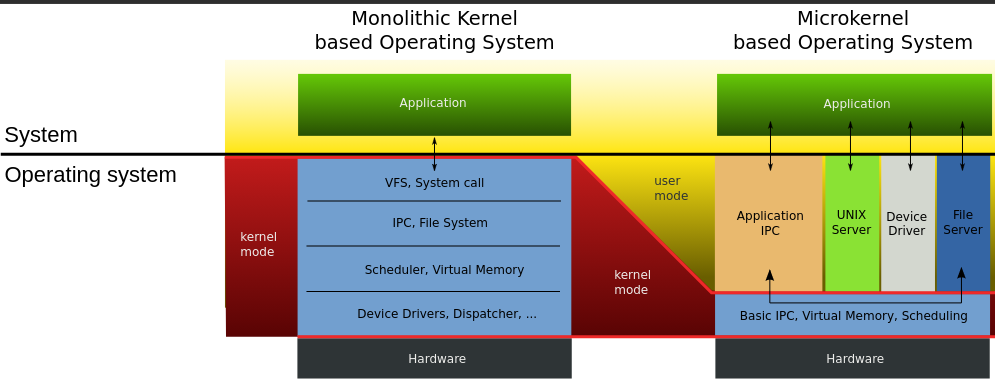
1) Monolithic structure: (figure)
	-In the monolithic approach, the entire OS runs as a single program in the kernel mode, written as a collectio of procedures, linked together into a single large executable binary program, each procedure in the system is free to call any other one, if the latter provides some useufl computation that the former needs
	-Being able to call any procedure you want is very efficient, but having thousands of procedures that can call each other without restriction may also lead to a system that is unwieldy and difficult to understand, also crash in any of these procedures will take down the entire OS
	-There is essentially no information hiding, every procedure is visible to every other procedure
	-Even in monolithic systems, it is possible to have some structure:
		1. A main program that invokes the requested system procedure
		2. A set of service procedures that carry out the system calls
		3. A set of utility procedures that help the service procedures

	-For each system call, there is one service procedure that takes care of it and executes it, utility procedures do things that are needed by several service procedures, such as fetching data from user programs
	-Many OS support loadable extensions, such IO drivers and file systems, which are loaded in demand, in UNIX called shared libraries, in Windows, they are called DLLs
	-Examples: CP/M, DOS

2) Layered systems: (figures)
	-A generalization to structure of monoliths is to organize the OS as a hierachy of layer, each one constructed upon the one below it
	-First system constructed in this was the THE system built by EW Dijkstra and his students, was a simple batch system for a Dutch computer
	-The sytem had six layers:
		5 : The operator
		4 : User programs
		3 : Input/output management
		2 : Operator-process communicatino
		1 : Memory and drum management
		0 : Process allocation and multiprogramming

		0: Processor allocation and multiprogramming:
			-Dealth with allocation of the processor, switching between processes when interrupts occured or timers expired, above 0, the system consisted of sequential processes, each of which could be programmed without having to worry about the fact that multiple processes were running on a single processor
		1: Allocated space for processes in main memory and on a 512K word drum used for holding parts of processes (pages) for which there was no room in main memory, above 1 processes did not have to worry about whether they were in memory or on the drump
		2: Handled communication between each process and the operator console, on top of which each process effectively had its own operator console
		3: Took care of managing the IO devices and buffering the information streams to and from them, above 3 each process could deal with abstract IO devices with nice properties
		4: Where the user programs were found, did not have to worry about process, memory, console or IO management
		5: Sytem operator was placed at layer 5
	-A further generalization of the layering concept was present in the MULTICS system, instead of layers, MULTICS was described as having a series of concentric rings, with the inner ones being more privilged than the outer ones

3) Microkernels: (figure)
	-Basic idea behind microkernel design is to achieve high reliability by splitting the OS up into small, well-defined modules, only one of which - the microkernel - runs in kernel mode and the rest run as relatively powerless ordinary user processes
	-For putting as little as possible in kernel mode because bugs in the kernel can bring down the system instantly
	-In particular, by running each device driver and file system as a separate user process, a bug in one of these can crash that component, but cannot crash the entire system, thus, a bg in the audio driver will cause the sound to be garbled or stop, but will not crash the computer
	-They are dominant in real-time, industrial, avionices, and military applications that are mission critical and have very high reliability requirements, Integrity, K42, L4, PikeOS, Symbian, MINIX 3
	-Outside the kernel, MINIX 3 is structured as three layers of processes all running in user mode,
	-Lowest layer contains the device drivers, to program an IO device, the driver builds a structure telling which values to write to which IO ports and makes a kernel call telling the kernel to do the write, means that kernel can check to see that the driver is writing (or reading) from IO it is authorized to use, consequently a buggy audio driver cannot accidentally write on the disk
	-Above the drivers is another user-mode layer containing the servers, which do most of the work of the operating system, one or more file servers manage the file system(s), the process manager creates, destroys, and manages processes and so on


1) Client-server model: (figure)
	-A slight variation of the microkernel idea is to distinguish two classes of processes, the servers, each of which provides some service, and the clients, which use these services
	-Communication between clients and servers is often by message passing, to obtain a service, a client process constructs a message saying what it wants and sends it to the appropriate service, the service then does the work and sends back the answer, if the client and server happen to run on the same machine, certain optimizations are possible
	-An obvious generalization of this idea is to have the clients and servers run on different computers, connected by a local or wide-area network
	-Increasingly many systems involve users at their home PCs as clients and large machines elsewhere running as servers, in fact, much of the Web operates this way, a PC sends a request for a webpage to the server and the webpage comes back

5) Virtual machines: (figure)
	-The principle of virtualization is based on an astute observation that a timesharing system provides 1) multiprogramming and 2) an extended machine with a more convenient interface than the bare hardware, essence is to completely separte these two functions
	-Heart of the system runs on the bare hardware and does the multiprogramming, providing not one, but several virtual machines to the next layer up, however, unlike all other oS, these virtual machines are not exteded machines, with files and other nice features, instead they are exact copies of the bare hardware including kernel/user mode, IO, interrupts and everything else the real machine has.
	-Because each virtual machine is identical to the true hardware, each one can run any operating system that will run directly on the bare hardware, different virtual machines can, and frequently do, run different operating systems
	-The special virtual machine monitor program is also known as type 1 hypervisor, next step in improving was to add a kernel module to do some of the heavy lifting, known as type 2 hypervisors
	-In practice, the real distinction between a type 1 hypervisor and a type 2 hypervisor is that a type 2 makes uses of a host OS and its file system to create proceses, store files and so on, a type 1 has no underlying support and must perform all these functions itself
	-Uses:
		>Many companies see virtualization as a way to run their mail severs, FTP servers and other servers on the same machine without having a crash of one server bring down the rest
		-Popular in web hosting world, a customer can rent virtual machine and rent whatever OS and software they want to, but at a fraction of the cost of a dedicated server
		-For end users who want to be able to run two or more OS at the same time, say Windows and Linux
		-Another area is somewhat different way, is running Java programs and equivalents
(okay all the talks about abstraction but how does it achieve it?) System calls: -System calls are the mechanism of interaction between user programs and the operating system whereby the user programs request a service from the OS, for example, creating, writing, reading, and deleting files -In a sense, making a system call is like making a special kind of procedure call, only system calls enter the kernel and procedure calls do not -Consdier the read system call, it has three parameters: the first one specifying the file, the second one pointing to the buffer, and the third one giving the number of bytes to read -Like nearly all system calls, it is invoked from C programs by calling a library procedure with the same name as the system call: read - count = read(fd, buffer, nbytes); -Returns the number of bytes actually read in count, is normally same as nbytes, but may be smaller, if, end-of-file is encountered while reading 1. C compilers push paramters onto the stack in reverse order then call the library procedure associated with read 2. The library procedure, possibly written in assembly, typically puts the sytem-call number in a place where the OS expects it, usch as a register 3. Then it executes a TRAP instruction to switch from user mode to kernel mode and start execution at fixed address within the kernel 4. Once it has completed its work, control may be returned to the user-space library procedure at the instruction following the TRAP instrucion 5. This procedure then returns to the user program in the usual way procedure calls return -POSIX is a family of standards specieid by the IEEE for maintaining compatiblity between operating systems specifies a family of precedural calls:
Shell Programming: -
Process: -A process is just an instane of an executing program, including the current values of the program counter, register, and variables -A program is something that may be stored on disk, not doing anything; while a process is an activity of some kind, that has a program, input, output and a state -Conceptually, each process has its own virtual CPU, in reality, the real CPU switches back and forth from process to process, such rapid switching of back and forth is called multiprogramming
>Creation:
	-When an OS is booted, typically numerous processes are created, some of these are foreground processes that interact with users and perform work for them, others run in the background and are not associated with particular users, but instead have some specific function
	-In addition, new processes can be created afterwards, often a running process will issue system calls -fork() in UNIX, to create one or more new processes to help it do its job
	-When a new process is created, is assigned a unique process ID and inherits the memory image and resources of its parent process, but executes in a separate address space
	-Usually, the child process then executes execve() to change its memory image and run a new program

>Termination:
	-Most processes terminate because they have done their work, second reason for termination is that process discovers a fatal error, third is an error caused by the process, often due to program bug, or the fourth reason is that a process executes a system call telling OS to kill some process
	-When a process terminates, it releases all the resources it was using, including memory, open files, and any other system resources. The operating system also releases the process's PID, making it available for use by other processes.

>Hierarchies:
	-In some systems, when a process creates another process, the parent process and child process continue to be associated in certain ways
	-In UNIX, just after the computer is booted, a special process, called init, is present in the boot image
	-When it starts running, it reads a file telling how many terminals there are, then it forks off a new process per terminal
	-These processes wait for someone to log in, if a login is successful, the login process executes a shell to accept commands
	-These commands may start up more processes, and so forth, thus, all the processes in the whole system belong to a single tree, with init at the root.
	-In contrast, Windows has no concept of a process hierarchy. All processes are equal, the only hint of a process hierarchy is that when a process is created, the parent is given a special token (called a handle) that it can use to control the child, however, it is free to pass this token to some other process, thus invalidating the hierarchy.

>States: (figure)
	-In a multitasking computer system, processes may occupy a variety of states
	1. Running: actually using the CPU at that instant
	2. Ready: temporarily stopped to let another process run
	3. Blocked: unable to run until some external event happens

	-Four transitions are possible among these three states

	1. Process blocks for input: occurs when OS discovers that a process cannot continue right now, in UNIX, when a process reads from a pipe or special file and there is not input available
	2. Scheduler picks it: when all other processes have had their fair share and it is time for the first process to get the CPU to run again
	3. Scheduler picks another process: when the scheduler decides that the running process has run long enough, and it is time to let another process have some CPU time
	4. Input becomes available: when the external event for which a process was waiting happens

>Implementation of process switching: (ekdum hardware level ma najaa C programming ko level ma jaa)
	-To implement the process model, the OS maintains a table, called the process table, with one entry per process, which contains important information about the process's state, including its program counter, stack pointer, memory allocation, status of its open files, its accounting and scheduling informatin, and other bookkeeping data structures
	-Associated with IO class is a location called the interrupt vector that contains the address of the interrupt service
		1. Suppose process 3 is running when a disk interrupt happens, user process 3's program counter, status word, and sometimes one or more registers are pushed onto the (current) stack by the interrupt hardware
		2. Computer then jumps to the address specified in the interrupt vector, that is all hardware does
		3. All interrupts start by saving the registers, often in the process table entry (PTE) for the current process, then the information pushed onto the stack by the interrupt is removed and the stack pointer is set to point to a temporary stack used by the process handler (Actions such as saving the registers and setting the stack pointer can not even be expressed in high-level languages as C, so they are performed by a small assembly-language routine)
		4. When this routine is finished, it calls a C procedure to do the rest of the work for this specific interrupt type
		5. When it has done its job, possibly making some process now ready, the scheduler is called to see who to run next
		6. After that, control is passed back to the assembly-language code to load up the registers and memory map for the now-current process and start it running.

>PCB structure khai?

>Modelling Multiprogramming:
	-To look at CPU usage from a probabilistic viewpoint, a process spends a fraction p of its time waiting for I/O to complete, with n processes in memory at once, the probability that n processes are waiting for I/O is p^n, then CPU utilization is then given by:
		CPU utilization = 1 - p^n
	-(Graph xa euta CPU use vs n(degree of multiprogramming); it shows IO use 205, 50%, 80%)
	-Suppose, for example, that a computer has 8 GB of memory, with the operating system and its tables taking up 2 GB and each user program also taking up 2 GB, these sizes allow three user programs to be in memory at once, with an 80% average I/O wait, we have a CPU utilization (ignoring operating system overhead) of 1 − 0.8^3 or about 49%
Threads: -A thread is a lightweight sub-process that can be scheduled and executed indepenelty by the operating system -Multiple threads of control in the same address space run in quasi-parallel, as though they were almost separate processes except for the shared address space -Trying to achiieve with thread concept is the ability for multiple threads of execution to share a set of resources so that they can work together to perform some task
>Processes vs threads:
	-One way of looking at a process is that it is a way to group related resources together, a process has an address space containing program text and data, as well as other resources, may include open files, child processes, pending alarms, signal handlers, accounting information, and more
	-Other concept a process has is a thread of execution, the thread has a program counter that keeps track of which instruction to execute next, has registers, which hold its working variables, has a stack, which contains the executino history, with one frame for each procedure called but not yet returned from
	-Although a thread must execute in some process, the thread and its process are different concepts and can be treated separately
	-There is no protection between threads because it is impossible and it should not be necessary, as a process is always owened by a single user, who has presumably created multiple threads so that they can cooperate, not fight

>Example:
	-An electronic spreadsheet is a program that allows a user to maintain a matrix, some of whose elements are data provided by the user, other elements are computed based on the input data using potentially complex formulas, when a user changes one element, many other elements may have to be recomputed by having a background thread do the recomputationi, the interactive thread can allow the user to make additional changes while the computation is going on

>Creation:
	-Threads can be created within a process using a thread creation function, such as pthread_create() in POSIX systems.
	-The thread creation function takes as arguments a pointer to a function that will be executed by the thread, as well as any arguments that need to be passed to the function.
	-Once created, the thread is assigned a unique thread ID and begins execution at the entry point specified by the function pointer.
	-The new thread shares the same memory and resources as the parent process, but has its own stack, program counter, and set of registers.

>Termination:
	-Threads can terminate for various reasons, such as completing their task or encountering an error.
	-When a thread has finished its work, it can exit by calling a library procedure, say thread_exit, in some thread systems, one thread can wait for a thread to exit by calling a procedure, for example, thread_join, which blocks the calling thread until the specific thread has exited
	-The resources associated with the thread are automatically freed when the thread exits, including its stack and thread ID.
	-Another common thread call is thread_yield, which allows a thread to voluntarily give up the CPU to let another thread run, such a call is important because there is no clock interrupt to actually enforce multiprogramming as there is with processes, so important for threads to be polite and voluntarily surrender the CPU from time to time for another thread to finish some work

>Hierarchies:
	-

>States:
	-Like traditional process, a thread can be in any one of several states: running, blocked, ready or terminated, for example, when a thread performs a system call to read from the keyboard, it is blocked until input is typed


>Implementing Threads:
	-Two main places to implement threads: user space and the kernel, choice is a bit controversial

	User Level Threads:
	-First method is to put the threads package entirely in user space, kernel knows nothing about them, it is managing ordinary, single-threade processes
 	-When threads are managed in user space, each process needs its own private thread table to keep track of the threads in that process, managed by the run-time system, when a thread is moved to ready state or blocked state, the information needed to restart it is stored in the thread table, exactly the same way as the kernel stores information about processes in the process table
	-Advantages:
		>The obvious advantage is that user-level threads package can be implemented on an OS that does not support threads
		>The procedures that saves the thread's state and the scheduler are just local procedures, so invoking them is much more efficient than making a kernel call, no trap is needed, no context switch is needed, the memory cache need not be flushed, and so on
		>Allow each process to have its own customized scheduling algorithm
	-Dis:
		>If a thread causes a page fault, the kernel, unaware of even the existence of threads, naturally blocks the entire process until the disk I/O is complete
		>If a thread starts running, no other thread in that process will ever run unless the first thread voluntarily gives up the CPU, as within a single process, there are no clock interrupts

	Kernel Level Threads
	-When the kernel know and manage the threads, it has a per-process thread table that keeps track of all the threads in the system
	-When a thread wants to create a new thread or destroy an existing thread, it makes a kernel call, which then does the creation or destruction by updating the kernel thread table
	-All calls that might block a thread are system calls, at considerably greater cost than a call to a run-time system procedure, when a thread blocks, the kernel, at its option, can run either another thread from the same process (if one is ready) or a thread from a different process
	-If one thread in a process causes a page fault, the kernel can easily check to see if the process has any other runnable threads, and if so, run one of them while waiting for the required page to be brought from the disk
	-Their main disadvantages is that the cost of a system call is substantial, so if thread operations (creation, termination, etc.) a common, much more overhead will be incurred


	Hybrid:
	-

>Need:
	1. In many applications, many activities are going on at once, some of these may block from time to time, by decomposing such an application into multiple sequential threads that run in quasi-parallel, the programming model becomes modular and simpler
	2. Threads are useful on systems with multiple CPUs where real parallelism is possible, threads allow programmers to take advantage of the parallelism by dividing a program into smaller units that can execute concurrently on different cores
	3. Since they are lighter weight than processes, they are easier and faster to create and destroy than processes


>Complications:
	-While threads are useful, they also introduce a number of complications into the programming model, if the parent process has multiple threads, should the child also have them?
	-Another class of problems is related to the fact that threads share many data structures, for example, what happens if one thread closes a file while another one is still reading from it?
Interprocess Communication Issues: -Need for communication between processes, preferably in a well-structure way not using interrupts, some of the related issues: -The first: how one process can pass information to another? The second has to do with making sure two or more processes do not get in each other’s way, The third concerns proper sequencing when dependencies are present -The latter two of these issues apply equally well to threads, the first one, passing information is easy for threads since they share a common address space
1. Race Conditions: (Spooling printer wala photo)
	-Race condition is a siutation in which the behavior of a program or system depend s on the order or timing of its execution
	-Situations where two or more processes are reading or writing some shared data and the final result depends on who runs precisely when, are called race conditions
	-Processes may share same common storage that each can read and write, may be in main memory (possibly in a kernel data structure) or may be a shared file
	-(Example ko lagi: duita processes xan, both want to print a file, so need to put name into spooler directory which keeps track of files to print using out = 4 meaing 4 slot ko print garnu parxa, and in variable for new empty slot for files to print; say process A fetches value of in into its local variable and then only interrput occurs, process B also fetches value of in and puts the name of the file to print into that slot and goes into blocking while waiting for print to happen, now process A continues and for it the local variable is still 7 so it puts its file into that same slot overwritting process B, for spooling directory, nothing is suspicious, so it does its job but since process B file is overwritten it does not get its output ever)
	-Debugging programs containing race conditions is no fun at all, results of most test runs are fine, but once in a blue moon something weird and unexplained happens.
	-With inreasing parallelism due to increasing number of cores, race conditoin are becoming more common

(yesma real problem k thiyo ta? yesma problem thiyo ki euta process le spooling directory ma write garisakesi pointer lai increase garnu bich ma gap thiyo, yo gap hunu bhayena, both things must happend at once, meaning that there should not be any interrupts possibility on that gap)

2. Critical Regions: (critical region ma euta pasera arko niskeko wala photo)
	-Part of the time, a process is busy doing internal computations and other things that do not lead to race conditions, sometimes a process has to access shared memory or files, or do other critical things that can lead to races, that part of the program where the shared memory is accessed is called the critical section, if we could arrange matters such that no two processes were ever in their critical regions at the same time, we could avoid races
	-What we need is mutual exclusion that is some way of making sure that if one process is using a shared variable or file, the other processes will be excluded from doing the same thing (mathi ko spooling lai refer garera bhana ki process B started using oen of the shared variables before process A was finished with it)

(critical region bhaneko chai tyo paxi tyo hunu parxa awatha yo statements haru interrupt hunu bhayena bhanni haru instructions haru parxan, ek line statement xa bhandai ma tyo at-once atomically hunxa bhanni xaina hai, look at its assembly)

3. Mutual Exclusion with Busy Waiting:

A, Disabling Interrupts:
	-Simplest solution is to have each process disable all interrupts just after entering its critical region and re-enable them just before leaving it, and with interrupts turned off the CPU will not be switched to another process
	-Generally unattractive because it is unwise to give user processes the power to turn off interrupts, what if one of them did it, and never turned them on again?
	-Also affects only the CPU that executed the disable instruction, other ones will continue running and can access the shared memory
	-On the other hand, frequently convenient for the kernel itself to diable interrupts for a few instructions while it is updating variables or especially lists

B, Lock Variables:
	-Consider having a single, shared (lock) variable, initially 0, when a process wants to enter its critical region, it first tests the lock, if the lock is 0, the process sets it to 1 and enters the critical region, if is already 1, the process just waits until it becomes 0; thus a 0 means that no procwss is in its critical regin, and a 1 means that some process is in its critical region
	-Contains the flow that if one process reads the lock and sees that it is 0, before it can set the lock to 1, another process is scheduled, runs, and sets the lock to 1, when the first process run again, it will also set the lock to 1, and two processes will be in their critical regions at the same time
(bhannako matlab chai aba read garnu ra teslai change garnu bich ko duration ma kasaile interrupt garnu bhayena)

C, The Test-and-Set-Lock instruction:
	-A proposal that requires a little help from the hardware, some computers, especially, those designed with multiple processors in mind, have an instruction like

	TSL RX, LOCK

	-Reads the contents of the memory LOCK into register RX and then stores a nonzero value at the memory address LOCK, is guranteed to be indivisible - no other processor (in multiprocessor system) can access the memory word until the instruction is finished, CPU executing the TSL instruction locks the memory bus to prohibit other CPUs from accessing memory until it is done
	-Locking the memory bus is very different from disabling interruptss, as interrupts does not prevent a second processor on the bus from accessing the word between read and the write
	-To use the TSL instruction, we will use a shared variable, lock, to coordinate access to shared memory. When lock is 0, any process may set it to 1 using the TSL instruction and then read or write the shared memory, when it is done, the process sets lock back to 0 using an ordinary move instruction
	-One solution to the critical-region problem:

	enter_region:
		TSL RX, LOCK
		CMP RX, #0
		JNE enter_region
		RET

	leave_region:
		MOVE LOCK, #0
		RET

	-An alternative solutioon to TSL is XCHG, which exchanges the contents of two locations automatically, for example, a register and a memory word, x86 CPUs use XCHG instruction for low-level synchronization

(Duita process matra xan bhane we dont really need hardware though)

D, Strict Alternation (Turn variable):
	-An integer variable turn, initially 0, keep track of whose turn it is to enter the critical region and examine or update the shared memory

		while (turn != 0);
		critical_region();
		turn = 1;

	-Initially process 0 inspects turn, say finds it to be 0, and enters its critical region, process 1 also finds it to be 0 and therefore sits in a tight loop continuously testing turn to see when it becomes 1, such busy waiting should be avoided, since it wastes CPU time
	-When process 0 leaves the critical region, it sets turn to 1, to allow process 1 to enter its critical region
	-Suppose that process 1 finished its critical region quickly, so that both processes are in their noncritical regions, with turn set to 0, suddenly, process 1 finishes its noncritical region and goes back to the top of its loop, unfortunately it is not permitted to enter its critical region now, because turn is 0 and process 0 is busy with its noncritical region
	-Put differently, taking turns is not a good idea when one of the proceses is much slower than the other, violates condition 4 set out above

E, Peterson's Solution:
	-Simpler software solution to the mutual exclusion problem that does not require strict alternation
	-Two variables 'turn' and 'interested', are shared between the two processes, 'turn' is used to indicate whose turn it is to enter the critical section, and the 'flag' variable is used to indicate whether a process is interested in entering the critical section or not

	#define FALSE 0
	#define TRUE 1
	int turn;
	int interested[2];

	void enter_region (int process)
	{
		int other = 1 - process;
		interested[process] = TRUE;
		//malai interest xa hai, critical region jana ma
		turn = other;
		//mero turn ho hai ma jadai xu
		while (turn == other && interested[other] = TRUE);
		critical_region();
		//tobenhaum ko book ma turn = process and check garni bela ni turn == process gariraxa
	}

	void leave_region (int process)
	{
		interested[process] = FALSE;
	}

	-Before entering the critical region, each process calls enter_region with its own process number, 0 or 1, as parameter, which will cause it to wait, if need be, until it is safe to enter, after it has finished with the shared variables, the process calls leave_region to indicate that it is done and to allow the other process to enter, if it so desires
	-Case 1: Initially neither process is in its critical region, now process 0 calls enter_region, indicates its interest by setting its array element and sets turn to 1, since process 1 is not interested, enter_region returns immediately, if process 1 now makes a call to enter_region, it will hang there until interested[0] goes to FALSE, an event that happens only when process 0 calls leave_region to exit the critical region
	-Case 2: Both processes call enter_region almost simultaneosuly, suppose process 1 stores last, so turn is 0, when both processes come to the while statement, process 0 executes it zero times and enter its critical region, process 1 loops and does not enter its critical region until process 0 exists its critical region

4, Sleep and Wakeup (Two disadvantages of busy waiting)
	-Peterson's solution and the solutions using atomic instructions are correct, but both have the defect of requiring busy waiting, in essence when a process wants to enter its critical region, it checks to see if the entry is allowed, if it is not, the process just sits in a tight loop waiting until it is
	-Also have unexpected effects, in a computer with two processes H, with high priority, and L, with low priority, where scheduling rules are such that H is run whenever it is in ready state, at a certain moment, with L in its critical region, H becomes ready to run, H now begins busy waiting, but since L is never scheduled while H is running, L never gets the chance to leave its critical region, so H loops forever (priority inversion problem)
	-Some interprocess communication primitives block instead of wasting CPu time when they are not allowed to enter their critical regions
	-Simplest pair of sleep and wakeup: sleep is a system call that causes the caller to block, that is, be suspended until another process wakes it up, wakeup call has one paramter, the process to be awakened
	(lock sanga sleep ra wakeup use garey bhaihalyo haina ta)
>>>>>> toilet is the critical region,
>>>>>> toilet jani bela lock lagauni, bahira kosailai jana mann lagyo bahne lock check gareko garai garni, jati jana bhaye ni sab le lock check garni
>>>>>> lock banda bhako payo bhane sutdini, ani bhitra bata niskiyo bhane jaslai mann lagyo teslai uthauxa

(yo sleep and wakeup lai peterson solution ma equip garda ni bhayo lock ma garda ni bhayo)
Classcal Problems: (spooling ma gareyjasari)
Producer-Consumer Problem: (single, single lai ho hai yo) -Known as the bounded-buffer problem where two processes share a common, fixed-size buffer, one of them, the producer, puts information into the buffer, and the other one, the consumer, takes it out -Producer’s code will first test to see if count is N, if it is, the producer will wait (or sleep); if it is not, the producer will add an item and increment count -Consumer’s code is similar: first test count to see if it is 0, if it is, waits (or sleeps); if it is nonzero, remove an item and decement the counter -Main challenge of the producer-consumer problem is to synchronize the access to the buffer, so that producers do not overwrite items that have not been consumed yet and consumers do not retrieve items that have not been produced yet
	#define N 10
	int buffer[N];
	int ptr = 0;

	void producer (void)
	{
		int item;
		while (True)
		{
			while (ptr == N+1);
			item = produce_item();
			buffer[ptr] = item
			ptr += 1
		}
	}

	void consumer (void)
	{
		int item;
		while (True)
		{
			while (ptr == 0);
			item = buffer[ptr];
			ptr -= 1
			consume_item(item);
		}
	}

-(suru ma ptr ko value 3 xa rey ani producer le euta item halxa, but before incrementing interrupt bhayo rey ani consumer ko paali aayo, consumer le sab chusera ptr ko value 0 banaidiyo, now euta item ta xa tara ptr 0 ma xa, aba producer ko paali aayo bhane tyo item lai overwite garera buffer lai full garindaxa)

-In another variation: (Tanbanbaum ko book ma yo matra dexa, yeha bhako wakeup ra sleep le code lai halka good ta banauxa tara tyo mathi wala wakeup() ra sleep() sanga kei related xaina)

	#define N 10
	int buffer[N];
	int count = 0;

	void producer (void)
	{
		int item;
		while (True)
		{
			if (count == N) sleep();
			item = produce_item();
			insert_item(item)
			count = count + 1
			if (count == 1) wakeup(consumer);
			//ptr 0 bhayera sutethyo consumer aba uthauni bela bhayo
		}
	}

	void consumer (void)
	{
		int item;
		while (True)
		{
			if (count == 0) sleep()
			item = remove_item();
			count -= 1
			consume_item(item);
			if (count == N-1) wakeup(producer)
			//ptr N bhayera sutehtyo prodcuer aba uthauni bela bhayo
		}
	}

-(yesma chai additional problem hunxa: consumer le sab chusera empty garaidiyo rey buffer lai, tara sleep hunu bhanda agadi interupted bhayo, aba producer le empty buffer ma producer garyo bhane ta consumer ma wakeup call dinxa, which is wasted, now producer le producer gareko garai garxa consumer lai uthauni koi xaina lmao, ani buffer full bhayesi producer ni sutxa)
Semaphores: -A variable or abstract data type proposed by EW Dijkstra which is used to control access to a common resource by multiple threads and avoid critical section problems in a concurrent systems -EW Dijsktra suggested using an integer variable used in real-used system is a record of how many units of particular resource are available, coupled with operations to adjust that record safely as units are acquired or become free, and, if necessary, wait until a unit of the resource becomes available. -Dijkstra proposed having two operations on semaphores, now usually called down and up (generalizations of sleep and wakeup, respectively) -The down operation on a semaphore checks to see if the value is greater than 0, if so, it decrements the value (i.e., uses up one unit) and just continues, if the value is 0, the process is put to sleep without completing the down for the moment -Checking the value, changing it, and possibly going to sleep, are all done as a single, indivisible atomic action. -The up operation increments the value of the semaphore addressed, if one or more processes were sleeping on that semaphore, unable to complete an earlier down operation, one of them is chosen by the system (e.g., at random) and is allowed to complete its down, thus, after an up on a semaphore with processes sleeping on it, the semaphore will still be 0, but there will be one fewer process sleeping on it -Semaphores which allow an arbitrary resource count are called counting semaphores, while semaphores which are restricted to the values 0 and 1 (or locked/unlocked) are called binary semaphores and are used to implement locks
#define N 100
typedef int semaphore;
semaphore mutex = 1;	//only one key
semaphore empty = N;	//N empties
semaphore full  = 0;	//0 fulls

void producer (void)
{
	int item;
	while (True)
	{
		item = produce_item()
		down(&empty);
		down(&mutex);
		insert_item(item);
		up(&mutex);
		up(&full);
	}
}

void consumer (void)
{
	int item;
	while (1)
	{
		down(&full);
		down(&mutex);
		item = remove_item();
		up(&mutex);
		up(&empty);
		consume_item(item);
	}
}

-This solution uses three semaphores: one called full for counting the number of slots that are full, one called empty for counting the number of slots that are empty, and one called mutex to make sure the producer and consumer do not access the buffer at the same time.

-(Solve garna ko lagi lock use garda bhaihalyo, but tyo chai alli signaning xaina, busy waiting ma xa bhanera lyang garxa sakxa, ani conditional lcoks use garey bhaihalthyo, jasle internally probably yei wakeup and sleep use garxa)
Mutexes: -A Mutex is a Mutually exclusive flag that acts as a gate keeper to a section of code allowing one thread in and blocking access to all others -A mutex is a shared variable that can be in one of two states: unlocked or locked, when a thread (or process) needs access to a critical region, it calls mutex lock, if the mutex is currently unlocked (meaning that the critical region is available), the call succeeds and the calling thread is free to enter the critical region. -On the other hand, if the mutex is already locked, the calling thread is blocked until the thread in the critical region is finished and calls mutex unlock, if multiple threads are blocked on the mutex, one of them is chosen at random and allowed to acquire the lock -Can be easily implemented in user space:
mutex_lock:
	TSL RX, MUTEX
	CMP RX, #0
	JZE ok
	CALL thread_yield
	JMP mutex_lock
ok:	RET

mutex_unlock:
	MOVE MUTEX, #0
	RET
Pthread mutexes: -Pthreads provides a number of functions that can be used to synchronize threads, the basic mechanism uses a mutex variable, which can be locked or unlocked, to guard each critical region -pthread_mutex_t, pthread_mutex_init, pthread_mutex_destroy, pthread_mutex_lock, pthread_mutex_unlock -In addition to mutexes, Pthreads offers a second synchronization mechanism: condition variables, mutexes are good for allowing or blocking access to a critical region. Condition variables allow threads to block due to some condition not being met Pthread cond init Create a condition variable Pthread cond destroy Destroy a condition variable Pthread cond wait Block waiting for a signal Pthread cond signal Signal another thread and wake it up Pthread cond broadcast Signal multiple threads and wake all of them
Monitors: -Suppose that the two downs in the producer’s code were reversed in order, so mutex was decremented before empty instead of after it. If the buffer were completely full, the producer would block, with mutex set to 0. Consequently, the next time the consumer tried to access the buffer, it would do a down on mutex, now 0, and block too. Both processes would stay blocked forever and no more work would ever be done. -A higher-level syncrhonization primitive called monitor, is a collection of procedures, variables, and data structures that are all grouped together in a special kind of module or package -Processes may call the procedures in a monitor whenever they want to, but they cannot directly access the monitor’s internal data structures from procedures declared outside the monitor -Monitors are a programming-language construct, so the compiler knows they are special and can handle calls to monitor procedures differently from other procedure calls -Monitors have an important property that makes them useful for achieving mutual exclusion: only one process can be active in a monitor at any instant, when a process calls a monitor procedure, the first few instructions of the procedure will check to see if any other process is currently active within the monitor, if so, the calling process is suspended until the other process has left the monitor, if no other process is using the monitor, the callin g process may enter …
Message passing: -Semaphores are too low level and monitors are not usable execpt in a few programming langauges -Message passing is a method of interprocess communication that uses two primitives, send and receive, which are system calls, as such they can easily be put into library proceudrse, such as,
	send (destination, &message);
	receive (destination, &message);

-The former call sends a message to a given destination and the latter one receives a
message from a given source (or from ANY, if the receiver does not care). If no message is available, the receiver can block until one arrives. Alternatively, it can return immediately with an error code …
Dining Philosophersp Problem: -Invted by Dijkstra is an IPC problem whose problem statemen is as follows. Five philosohpers are seated around a circular table, each has a plate of spaghetti, so slippery that a philosohper needs two forks to eat it, between each pair of plates is one fork, layout is : -The life of a philosopher consists of alternating periods of eating and thinking. -When a philosopher gets sufficiently hungry, she tries to acquire her left and right forks, one at a time, in either order -If successful in acquiring two forks, she eats for a while, then puts down the forks, and continues to think -Can you write a program for each philosopher that does what it is supposed to do and never gets stuck?
Obvious solution:

# define N 5

void philosopher (int i)
{
	while (1)
	{
		think();
		take_fork(left);
		take_fork(right);
		eat();
		put_fork(left);
		put_fork(right);
	}
}
-Suppose that all five philosophers take their left forks simultaneously. None will be able to take their right forks, and there will be a deadlock

Another: We could easily modify the program so that after taking the left fork, the program checks to see if the right fork is available, if it is not, the philosohper puts down the left one, waits for the soem time, and then repeats the whole process
-All the philosophers could start the algorithm simultaneously, picking up their left
forks, seeing that their right forks were not available, putting down their left forks, waiting, picking up their left forks again simultaneously, and so on, forever, a situation like this, in which all the programs continue to run indefinitely but fail to make any progress, is called starvation
Scheduling: -When a computer is multiprogrammed, it frequently has multiple processes or threads competing for CPU at the same time whenever two or more of them are simultaneously in the ready state, if only one CPU is avaiable, a choice has to be made which process to run next, is called scheduler -When the kernel manages threads, scheduling is usually done per thread, with little or no regard to which process the thread belong
Process behavior: (FIG)
	-Nearly all processes alternate burts of computing with disk or network IO requests, often, the CPU runs for a while without stopping, then a system call is made to read from a file or write to a file, when the system call completes, the CPU computes again until it needs more data or has to write more data, and so on.
	-I/O is when a process enters the blocked state waiting for an external device to complete its work
	-Some processes spend most of their time computing, while other processes spend most of their time waiting for I/O, former are called compute-bound or CPU-bound; the latter are called I/O bound.
	-The key factor is the length of the CPU burst, not the length of the I/O burst, CPU-bound processes typically have long CPU bursts and thus infrequent I/O waits, whereas I/O-bound processes have short CPU bursts and thus frequent I/O waits
	-As CPUs get faster, processes tend to get more IO bound, if an IO bound process wants to run, it should get a chance quickly so that it can issue its disk request and keep the disk busy

>Scheduling goals:
	All systems: Fairness, Balance, Policy enforcement
	Batch: Throughput, Turnaround time, CPU utilization
	Interactives: Response time, Proportionality
	Real-time: Meeting deadlines, Predictability

(kasari implement hunxa ta thaxaina paxi heramla)
>Batch scheduling:
	1. First-Come, First-Served
	2. Shortest Job First
	3. Shortest Remaining Time Next

>Interactive:
	1. Round-robin
	2. Priority
	3. Highest Response Ratio Next (non-preemtive)
	4. Rate Monotonic Algorithm (ghokdiye dost)

>Real-time
	1. Earliest Deadline First

>Thread scheduling:
	-When several processes can have multiple threads, two levels of parallelism is present: processes and threads, scheduling in such systems differs substanstially depending on whether user-level threads or kernel-level threadsd (or both) are supported

	User-threads:
		-Since the kernel is not aware of the existence of threads, it operates as it always does, picking a process, say, A, and giving A control for its quantum
		-The thread scheduler inside A decides which thread to run, say A1, since there are no clock interrupts to multiprogram threads, this thread may continue running as long as it wants to

	Kernel-threads:
		-The kernel picks a particular thread to run. It does not have to take into account which process the thread belongs to, but it can if it wants to.

	-Doing a thread switch with user-level threads takes a handful of machine instructions. With kernel-level threads it requires a full context switch,  changing the memory map and invalidating the cache, which is several orders of magnitude slower
Memory Management: -Computers have a few megabytes of very fast, expensive, volatile cache memory, a few terabytes of slow, cheap, nonvolatile magnetic or solid-state disk storage, not to mention removable storage, such as DVDs and USB stkcs, job of the OS is to abstract this hierarchy into a useful model and then manage the abstraction
-
No memory abstraction: -Simplest memory abstraction is to have no abstraction at all, as early program simply saw the physical memory, when an instruction MOV RX, 1000 The computer just moved the contents of physical memory locaiton 1000 to RX -Memory of model presented to the programmer was simply physical memory, a set of addresses from 0 to some maximum, each address corresponding to a cell containing some number of bits, commonly eight -Under these conditions, it was not possible to have two running programs in memory at the same time, if the first program wrote a new value to a location, this would erase whatever value the second program was storing there -Even with the model of memory being just physical memory, several options are possible, OS may be at the bottom of memory in RAM or it may be at the top of memory in a ROM -When the system is organized in this way, generally only one process at a time can be running, as soon as the user types a command, the OS copies the requested program from disk to memory and executes it -Has the disadavantage that a bug in the user program can wipe out the OS, possibliy with disastrous results -One way to get some parallelism in a system with no memory abstraction is to program with multiple threads, since all threads in a process are supposed to see the same memroy image, the fact that they are forced to is not a proble, while the idea works, is of limited use since people want is unrelated programs to be running at the same time -However, even with no memory abstraction, it is possible to run multiple programs at the same time, what the operating system has to do is save the entire contents of memory to a disk file, then bring in and run the next program, as long as there is only one program at a time in memory, there are no conflict -Lack of memory abstraction is still common in embedded and smard card systems, works because all the programs are known in advance and users are not free to run their own software on their toaster
-
A memory abstraction: Address space: -Two problems have to be solved to allow multiple applications to be in memory at the same time without interfering with each other: protection and relocation -A solution is address space, just like the process concept creates a kind of abstract CPU to run programs, the address space creates a kind of abstract memory for programs to live in -An address space is the set of addresses that a process can use to address memory. Each process has its own address space, independent of those belonging to other processes (except in some special circumstances where processes want to share their address spaces) -(Problem now is that how to given each program its own address psace, so address 28 in one program means a different physical location than address 28 in another program)
Base and Limit Registers: -Maps each process’s address space onto a different part of physical memory in a simple way by equpping each CPU with two special hardware registers, usually called the base and limit registers -When these registers are used, programs are loaded into consecutive memory locatins wherever there is room and without relocation during loading, when a process is run, the base register is loaded with the physical address where its program begins in memory and the limit reigster is loaded with the length of the program -Every time a process references memory, either to fetch an instruction or read or write a data word, the CPU hardware automatically adds the base value to the address generated by the process before sending the address out on the memory bus -Simultaneously, it checks whether the address offered is equal to or greater than the value in the limit register, in which case a fault is generated and the access is aborted -In many implementations, the base and limit registers are potected in such a way that only the OS can modify them -A disadvantage of relocation using base and limit registers is the need to perform an addition and a comparison on every memory reference
Swapping: -If the physical memory of the computer is large enough to hold the process, the scheme will do more or less but in practice, the total amount of RAM needed by all the process is often much more than can fit in memory, consequently, keeping all processses in memory all the time requires a huge amount of memory and cannot be done if there is insufficient memory -Two general appraoches to dealing with memory overload: the simplest startegy, called swapping, consists of brining in each process in its entirety, running it for a while, then putting it back on the disk, other strategy, called virtual memory, allows programs to run even when they are only partially in main memory -(swapping garda chai memory tala dekhi mathi samma OS xa ani process A xa, B aayo, C aayo aba memory ma atayena, D aauna khojyo, A lai faldiyo, tara if A bhanda D sano xa bhane D ra B ko bich ma hole huna janxa, bhanesi disk ma euta SWAP area pani chaiyo) -When swapping creates multiple holes in memory, it is possible to combine them all into one big one by moving all the processes downward as far as possible, this technique is known as memory compaction, usually not done because it requires a lot of CPU time (copy garera tala tira jhardai aauna paryo lastai time meaning 15 seconds lagxa) -A point that is worth making concerns how much memory should be allocated for a process when it is created or swapped in, if processes are created with a fixed size that never changes, then the allocation is simple: the operating system allocates exactly what is needed, no more and no less -(for dynamic ko lagi: aba process ekside tira matra grow hunxa bhane ta thik xa, halka space xodera processes allocate garni garamla, aba, stack ra heap jasari growth hunxa bhane ki ta dui side tira grow garauna paryo, ki ta bhitra hole banayera ek arka tarfa grow garauna paryo, teso garda aba feri arkai lafda xa, sab segment ko lagi base ra limit register garauna paryo)
Managing Free memory using bitmaps and linked lists: -(aba kaile process yeta halexa, kaile uta halexa garda ta memory dynamically allocate gariyo bhando raixa, yeslai manage garnai paryo) -When memory is assigned dynamically, the operating system must manage it, there are two ways to keep track of memory usage: bitmaps and free list (aba ajhai improvement ra advance ta bhaihalxa ni yiniharu ta principle matra hun) -With a bitmap, memory is divided into allocation units as small as few owrds and as large as several kilobytes, corresponding to each allocation unit is a bit in the bitmap, which is 0 if the unit is free and 1 if it is occupied (or vice versa) -Size of the allocation unit is an important design issue, smaller the allocatin unit, the larger the bitmap, however, even with an allocation unit as small as 4 bytes, 32 bits of memory will require 1 bit of the map, so the bitmap will take up only 1/32 of memory -If the bitmap will be smaller, appreciable memory may be wasted in the last unit of the process if the process size is not an exact multiple of the allocation unit -A bitmap provides a simple way to keep track of memory words in a fixed amount of memory because the size of the bitmap depends only on the size of memory and the size of the allocation unit. -The main problem is that when it has been decided to bring a k-unit process into memory, the memory manager must search the bitmap to find a run of k consecutive 0 bits in the map, searching a bit-map for a run of a given length is a slow operation because the run may straddle word boundaries in the map
 -Another way of keeping track of memory is to maintain a linked list of allocated and free memory segments, where a segment either contains a process or is an empty hole between two processes
 -(euta linked list banauni, type hunxa hole or process, starting address hunxa, end address hunxa, pointer to next hunxa)
 -Sorting by address has the advantage that when a process terminates or is swapped out, updating the list is straightforward (sort garesi algorithm haru use garna painxa rey)
 -(aba list update garesi agadi ra paxadi ko list pani hole xa bhane coalase garna sajilo hunxa so convenient to use doubly linked lists)
 -(aba say you want some space for you process, then first fit is there and best is there, as the name suggests)
 -(modifications like holes ra processes ko chuttai list maintain garni, commonly used sizes haru ko separate list banauni)
(aile samma ta sab process memory ma completely fit hunxa bhanni assumption ma chalirathim haina ta, multiple base registers use garey ni sabai lai ekai choti memory ma taninxa aba euta process pani atayena bhani ta lyang bhayo, programs want to be large so how to manage them as processes)
(aile samma ta process whole memory mai atauxa bhanni assume thiyo ni ta haina)
VIRTUAL MEMORY: -While base and limit registers can be used to create the abstraction of address spaces, there is another problem that has to be solved: managing bloatware, while memory sizes are increasing rapidly, software sizes are increasing much faster, as a consequence of these developments, there is a need to run programs that are too large to fit in memory, and there is certainly a need to have systems that can support multiple programs running simultaneously, each of which fits in memory but all of which collectively exceed memory -Swapping is not an attractive option, since a typical disk has a peak transfer rate of several hundres of MB/sec, which means it takes seconds to swap out a 1-GB program and the same to swap a 1-GB program -(Old solution was to split the programs into little pieces, called overlays, when a program started, all that was loaded into memory was the overlay manager, which imeediately loaded and ran overlay 0, when it was done, it would tell the overlay manager to load overlay 1, where the actual work of swapping overlays in and out was done by the operating system, the work of splitting the program into pieces had to be done manually by the programmer) -(definition: Memory management technique that provides an idealized abstraction of the storage resources that are actually available on a given machine creating the illusion of vary large main memory to users) -The basic idea behind virtual memory is that each program has its own address space, which is broken up into chunks called pages, each page is a contiguous range of addressses, these pages are mapped into physical memory, but not all pages have to be in physical memory at the same time to run the program -When the program references a part of its address space that is in physical memory, the hardware performs the necessary mapping on the fly, when not in physical memory, the operating system is alerted to go get the missing piece from the disk and re-execute the instruction that failed -In a sense, virtual memory is a generalization of the base-and-limit-register idea, 8088 had separate base registers (but no limit registers) for text and data, with virtual memory, instead of having separate relocaion for just the text and data segments, the entire address space can be mapped onto physical memory in fairly small units -VM works just fine in multiprogramming system, with bits and pieces of many programs in memory at once, while a program is waiting for pieces of itself to read in, the CPU can be given to another process
Paging: (background diraxa suruma chai paging explain garna) -When virtual memory is used, the virtual addresses do not go directly to the memory bus, instead they got to an MMU that maps the virtual addresses onto the physical memory addresses, can be generated using base registers, segment registers, and other ways -Example: We have a computer that generates 16-bit addresses, from 0 up to 64K-1, which are the virtual addresses, however, the computer, has only 32KB of physical memory, so although 64KB programs can be written, they cannot be loaded into memory in their entirety and run, a complete copy of a program’s core image, up to 64KB, must be present on the disk, however, so that pieces can be brought in as needed -(Euta photo xa hai yeha 4KB page size bhako wala) -The virtual space consists of fixed-size units called pages, corresponding units in the physical memory are called page frames, with 64KB of virtual address space and 32KB of physical memory, we get 16 virtual pages and 8 page frames -Transfers between RAM and disk are always in whole pages, many prcessors support multiple pages sizes that can be mixed and matched as the operating system sees fit, for instance, the x86-64 architecture 4KB, 2MB and 1GB pages, so we could use 4KB pages for user applications and a single 1GB page for the kernel (sometimes beter to use a single large page, rather than a large number of small ones) -When the program tries to access address 0, for example, using the instruction MOV reg, 0 virtual address 0 is sent to the MMU, the MMU sees that this virtual address falls in page 0 (HOW THOUGH? PAGE TABLES IS HOW), which according to its paging is page frame 2 (8192 o 112287), thus tranforms the address to 8192 and outputs address 8192 onto the bus -By itself, the ability to map the 16 virtual pages onto any of the eight page frames by setting the MMU’s map appropriately does not solve the problem that the virtual address space is larger than the physcial memory, in actual hardware, present/absent bit keeps tract of which pages are physically present in memory -If the program references an unmapped address, for example, by using the instruction MOV reg, 32789 which is byte 12 with virtual page 8, the MMU notices that the page is unmapped and causes the CPU to trap to the OS, this trap is called a page fault, the OS picks a little-used page frame and writes its contents back to the disk (if it is not already there), it then fetches (also from the disk) the page that was just referenced into the page frame just freed, changes the map, and restarts the trapped instruction -If OS decides to evict page frame 1 (page frame bhaneko main memory ma hunxa ni), it would load page 8 (yo chai virtual space ko, meaning disk bata yo page leuxa) at physical address 4096 (figure hernu parxa yo number bujhna), and makes two changes to the MMU map >First it would mark virual page 1’s entry as unmapped, to trap any future accesses >Then replaces cross in virtual page 8’s entry with a 1, so that when the trapped instruction is reexecuted, it iwll map correctly
 -(Why we choose page size to be power of 2? the incoming 16-bit virtual address is split into a 4-bit page number and a 12-bit offset, with 4 bits for the page number, we can have 16 pages and with 12 bits for the offset, we can address all 4097 bytes within a page)
 -The page number is used as an index into the page table, yielding the number of the page frame corresponding to that virtual page (page table bhaneko tei aba virtual address ko higher lai physical address ko higher ma map garxa)
Demand paging: -In the purest form of paging, processes are started up with none of their pages in memory, as soon as the CPU tries to fetch the first instruction, it gets a page fault, causing the operating system to bring in the page containing the first instruction, other page faults for global variables and stack usually follow quickly -After a while, the process has most of the pages it needs and settles down to run with relatively few page faults, this strategy is called demand paging because pages are loaded only on demand, not in advance -The set of pages that a process is currently using is its working set, if the entire working set is in memory, the process will run without causing many faults until it moves into another execution phase, if the available memory is too small to hold the entire working set, the process will cause many page faults and run slowly -Since executing an instruction takes a few nanoseconds and reading in a page from the disk typically takes 10msec, at the rate of one or two instructions per 10 msec, it will take ages to finish, a program causing page faults every few instructions is said to be thrashing -(suru garda po demand ma jhikni ho page haru, replace garera switch garda k garni?) -In multiprogramming, processes are often moved to disk to let others have a turn at the CPU, when a process is brought back in again, if nothing is done, it will just cause page faults until its working set has been loaded -The problem is that having numerous page faults every time a process is loaded is slow, and it also wasted considerable CPU, since it takes the OS a few milliseconds of CPu time to process a page fault, this approach is called working set model
Page Tables: -In a simple implementation, the mapping of virtual addresses onto physical addresses can be summarized as follows: the virtual address is split into a page number (high-order bits) and an offset (low-order bits) -For example, with a 16-bit address and a 4-KB page size, the upper 4 bits could specify one of the 16 virtual pages and the lower 12 bits would then specify the byte offset (0 to 4095) within the selected page -The virtual page number is used as an index into the page table to find the entry for that virtual page. From the page table entry, the page frame number (if any) is found. The page frame number is attached to the high-order end of the off-set, replacing the virtual page number, to form a physical address that can be sent to the memory -Mathematically, the page table is a function, with the virtual page number as argument and the physical frame number as result (page table hardware ho ki just memory ko info ho bhaneko xaina hai ajhai)
Structure of page table entry: -Exact layout of an entry in the page table is highly machine dependent, but the kind of information present is roughly the same from machine to machine -The size varies from computer to computer, but 32 bits is a common size -One table entry:
(aile samma chai sabai pages ko corresponding page table entry xa hai not only the present pages)
|xxxxx|Caching disabled?|Refernced?|Modified?|Protection?|Present/absent?|Page frame number| (virtual page number bata index bhaihalyo, teslai ta kina store garnu paryo ra)
 1. Protection bits: tells what kinds of access are permitted, in the simplest form, this field contains 1 bit, with 0 for read/write and 1 for read only, a more sophisticated arrangement is having 3 bits (read, write, execute yesta yetsa)
 2. Modified (dirty): When a page is written to, the hardware automatically sets the Modified bit, is of value when OS decides to reclaim a page frame, if the page in it has been modified (i.e. dirty), it must be written back to disk, if it has not been modified (i.e. clean), it can just be abandoned, since the disk copy is still valid
 3. Referenced bit: Is set wherever a page is reference, either for eading or for writing, its value is used to hlep the OS choose a page to evict when a page fault occurs, pages that are not being used are far better candidates than pages that are, and this bit plays an important role in several of the page replacement algorithms
 4. caching ko paxi padhamla: from future: aba kunai memory mapped inputs outputs lai caching garna ta bhayena ni

 -Note that the disk address used to hold the page when it is not in memory is not part of the page table, as the page table holds only that information the hardware needs to translate a virtual address to physical address, information the OS needs to handle page faults is kept in software tables inside the OS, the hardware does not need it
Speed up paging: -In any paging system, two major issues must be faced: 1. The mapping from virtual address to physical address must be fast 2. If the virtual address space is large, the page table will be large
 -The first point is a consequence of the fact that, it is necessary to make one, two, or, sometimes more page table references per instruction
 -The second point follows from the fact that all modern computers use virtual addresses of at least 32 bits, with 64 bits becoming the norm for desktops and laptops, with say, a 4KB page size, a 32 bit address sapce has 1 million pages, and a 64-bit address space has more than you want to contemplate, even so each process needs its own page table (because it has its own virtual address space)

 >Simplest design is to have a single page table consisting of an array of fast hardware reigsters, with one entry for each virtual page, indexed by virtual page number, during process execution, no more memory references are needed for the page table, disadvantage being that is is unberably expensive if the page table is large; it is just not practical most of the time, another one is that having to load the full page table at every context switch would completely kill performance (so paisa ni dherai layo, ani performance ni bela bela ghatyo)
 >At the other extreme, the page table can be entirely in main memory, all hardware needs then is a single register that points to the start of the page table, (aru ta index bata bhaihalxa), allows the virtual-to-physical map to be changed at a context switch by reloading one register, of course, the disadvantages of requring one or more memory refernces to read page table entries during the execution of each instruction, making it very low
Translation Lookaside buffers: -Widely implemented scheme for speeding up paging and for handling large virtual address spaces -If page table is in memory, since execution speed is generally limited by the rate at which the CPU can get instrucions and data out of the memory, having to make two memory references per memory reference reduces performance by half -Based on the observation that most programs tend to make a large number of references to small number of pages, only a small fraction of the page table entries are heavily read; the rest are barely used at all (tei cache kai idea ta bhayo ni, euta portion of memory matra read garxan programs le so page table entries ni thorai matra hunxan) -Solution is to equip computers with a small hardware device for mapping virtual addresses to physical addresses without going through the page table in memory, the device is called TLB or sometimes an associative memory, which is usually inside the MMU and consists of small number of entries, rarely more than 256 -Each entry contains information about one page, including the virtual page number (aba ta virtual page number hunai paryo), each entry contains information about one page, including the virtual page number, a bit that is set when the page is modified, the protection code, and the physical page frame in which the page is located, these fields have a one-to-one correspondence with the fields in the page table, except for the virtual page number, which is not needed in the page table -Works as: When a virtual address is presented to the MMU for translation, the hardware first checks to see if its virutal page number is present in the TLB by comparing it to all the entries simultaneously (fully associative ma yestai ta hunxa), if a valid match is found and the access does not violate protection bits, the page frame is take directly from the TLB, without going to the page table -When virtual page number is not present in the TLB, the MMU detects and does an ordinary page table look up, then evicts one of the entries from the TLB and replaces it with the page table entry just looped up, thus if that page is used again soon, the second time it will result in a TLB hit rather than a miss
Software TLB Management: -In the past, TLB managment and handling were done entirely by the MMU hardware, however many RISC machines, including the SPARC, MIPS do nearly all of this page management in software, the TLB entries are explicitly loaded by the OS, when a TLB miss occurs, instead of the MMU going to the page tables to find and fetch the needed page reference, it just generates a TLB fault and tosses the problem into the lap of the OS -When software TLB management is used, a soft miss occurs when the page reference is not in the TLB, but is in memory, a hard miss occurs when the page itself is not in memory and of course, also not in the TLB
Multilevel Page Tables: -How to deal with very large virtual address spaces? -Say the virtual memory is 2^32 bits then with page sizes of 2^12 there are 2^20 page table entries, if each of them is 8 bytes then size of 2^20 * 2^3 bytes = 2^23 bytes which is 8MB, for larger sizes you can imagine the scenarios, more importantly page tables are for each process for 8MB* no of processes is still large -Secret to multilevel page table method is to avoid keeping all the page tables in memory all the time, in particular those that are not needed should not be kept around -Suppose for example a process needs some MB then usually there is a hole for which no mapping exists, such page tables need not exist in memory -Say the page table number hunxa ni: | page table number | offset |, page table number is divided into two parts say PT1 and PT2 each of 10 and 10 bits -Essentially the memory is divided into 4M chunkks each one addressed by a separate page table with 1021 entries, the which chunk is then decided by PT1
Inverted Page Tables:
Page replacement algorithms: -When a page fault occurs, the operating system has to choose a page to evict to make room for the incoming page, if the page to be removed has been modified while in memory, it must be rewritten to the disk to bring the disk copy up to date, if however the page has not been changed, the disk copy is already up to date, so no rewrite is neede, the page to be read in just overwrites the page being evicted -In all the page replacement algorithms, a certain issue arises: when a page is to be evicted from memory, does it have to be one of the faulting process’ own pages, or can it be a page belonging to another process?
 1. The optimal page replacement
 	-At the moment that a page fault occurs, some set of pages is in memory, one of these pages will be referenced on the very next instruction, other pages may not be reference until many instructions later, each page can be labeled with the number of instructions that will be executed before that page is referenced
 	-The optimal page replacement algorithm says that the page with highest label should be removed
 	-Only problem with this algorithm is that it is unrealizable, at the time of page fault, the OS has no way of knowing when each of the pages will be referenced next

 2. NRU:
 	-In order to allow the OS to colelct page usage statistics most computers with virutal memory have two status bits, R and M, contained in each page table entry associated with each page
 	-R is set whenever the page is referenced (read or written), M is ste when the page is written to
 	-If the hardware does not have these bits, they can be simulated using the OS's page fault and clock interrupt mechanisms
 	-When a process is started up, all of its page table entries are marked as not in memory, as soon as any page is referenced, a page fault will occur, the OS then sets the R bit (in its internal tables), changes the page table entry to point to the correct page, with mode READ ONLY, and restarts the instruction, if the page is subsequently modified, another page fault will occur, allowing the OS to set the M bit and change the page's mode to READ/WRITE
 	-Periodically, the R bit is cleared, to distinguish that pages have not been referenced recently from those that have been
 	-When a page fault occurs, the OS inspects all the pages and divides them into four categories based ont he current values of their R and M bits:
 		Class 0: not referenced, not modified
 		Class 1: not referenced, modified
 		Class 2: referenced, not modified
 		Class 3: referenced, modified
 	-Clock interrupts do not clear the M bit because this information is needed to know whether the page has to be rewritten to disk or not
 	-NRU removes a page at random from the lowest-numbered nonempty class, implicit idea is that it is better to remove a modified page that has not been referenced in at least one clock tick than a clean page in heavy use

 3. FIFO:
 	-The OS maintains a list of all pages currently in memory, with the most recent arrival at the tail and the least recent arrival at the head, on a page fault, the page at the head is removed and the new page added to the tail of the list

 4. Second-chance:
 	-A simple modification of FIFO avoids the problem of throwing a heavily used page is to inspect the R bit of the oldest page, if it is 0, the page is both old and unused, so it is replaced immediately, if the R bit is 1, the bit is cleared, the page is put onto the end of the list of pages, and its load time is updated as though it had just arrived in memory

 5. LRU:
 	-A good approximation to the optimal based on the observation that pages that have been heavily used in the last few instructions will probably be heavily used again soon, suggests a realizable algorithm: when a page fault occurs, throw out the page that has been unused for the longest time
 	-Although is theoretically realizable, it is not cleap by a long shot, to fully implement LRU, it is necessary to maintain a linked list of all pages in memory, with the most recently used page at the front and the least recently used page at the rear
 	-The difficult is that the list must be updated on every memory reference, finding the page in the list, deleting it, and them moving it to the front is a very consuming operation, even in hardware

 [mathi linked list maintain garna dukha thiyo]
 [aba ta sab history nai save garera rakhni rey]
 6. (ajhai lai ajhai improve garera lest frequently used bhanni ni xa)

 (LOTS OF SHIT IS REMAINING)
(segmentation = base and limit registers without limits bhanera suruma assume garna sakinxa and was true) (but segments idea with virtual memory makes sense) (segments lai kosaile multiple base and limit registers ni bhanxan kosaile, kosaile chai virtual memroy implement garna ni use garxan so two types of segmentation we use the later one) (bathroom thought: segments are to address spaces, what threads are to processes) (so from paging to segmentation is a way of easiness) (Surprisel Linux does not use segmentaiton at all)
FIRST without virtual memory how would you implement it? Ans: paging chai without virtual memory hudaina k, process has multiple segments and you would tell which segments you are using and the address in in probably just like x86 we did, ES, SS, and all that shit, still confusing as fuck
Segmentation: -The virtual memory so far is one-dimensional because the virtual addresses go from 0 to some maximum address, one address after another, for many problems, having two or more separate virtual address spaces may be much better than having only one -For example, a compiler has many tables that are built up as compilation proceeds, possibly including: 1. The source text being saved for the printed listing 2. The symbol table containing names and attributes of variables 3. The table containing all the integer and floating-point constants used 4. The parse tree containing the syntactic analysis of the program 5. The stack used for procedure calls withn the compiler (aba compiler ta assembly ma lekheko bhanni bujha, hamlai po compiler le heap ra stack matra dinxa ta aafule ta multiples use garna paihalxa ni dost)
 -Each of the first four tables grows continuously as compilation proceeds, the last one grows and shrinks in unpredictable ways during compilation, in a one-dimentional memorhy, these five tables would have to be allocated contiguous chunks of virtual address space
 -(aba euta program ma variables matrai dherai xan bhane ta symbol table fill hunxa tara aru tables ta empty nai hunxa, memory management issue)
 -What is needed is a way of freeing the programmer from having to manage the expanding and contracting tables, in the same way that virtual memory eliminates the worry of organizing the program into overlays
 -Straightforward is to provide the machine with many completely indepdendent address spaces, which are called segments, each segment consists of a linear sequence of addresses, starting at 0 and going up to some maximum value, the length of each segment may be anything from 0 to the maximum address allowed, different segments may, and usually do, have different length, moreover, segment lengths may change during execution
 -Because each segment constitutes a separate address space, different segments can grow or shrink independently without affecting each other, if a stack in certain segment needs more address space to grow, it can have it, because there is nothing else in its address space to bump into, of course, a segment can fill up, but segments are usually very large, so this occurrence is rare
 (aba fill ta hamro address space lai fill huna sakxa ni paging ma)
 -To specify an address in this segmented or two-dimensional memory, the program must supply a two-part address, a segment number, and an address within the segment
 -Emphasize that a segment is a logical entity, which the programer is aware of and uses as a logical entity, which contain a procedure, or an array, or a stack, or a collection of scalar varaibles, but usually is does not contain a mixture of different types
 -Advantages
 	>Besides simplifying the handling of data structures that are growing or shrinking, each procedure occupies a separate segment, with address 0 as its starting address, the linking of procedures compiled separately is greatly simplified
 	>Facilitates sharing procedures or data between severeal procesess, common example is shared library, while it is also possible to have shared libraries in pure paging systems, it is more complicated and in effect, these systems do it by simulating segmentation
Segment implementation: -After the system has been running for a while, memory will be divided up into a number of chunks, some containing segments and some containing holes, called checkerboarding -If the segments are large, it may be inconvinient, or even impossible, to keep the in main memory in their entirety, which leads to the idea of paging them, so that only those pages of a segment that are actually needed have to be around -Euta GDT bhanni hunxa hai tyo ta ajhai baaki nai xa ni yar
File systems -While a process is running, it can store a limited amount of information within its own address space, but the storage capacity is restricted to the size of the virtual address space, moreover, when the process terminates, the information is lost -A disk is a linear sequence of fixed-size blocks that support two operations: read lblock k and write block k, which are very inconvenient operations, solve the problem with a new abstractions: the file -Processes and read existing files and create new ones if need be, information stored in files must be persistent, that is, not affected by process creation and termination -Files are managed by the OS, how they are structure, named, accessed, used, protected, implemented, and managed is part of the OS known as the file system
>File naming:
	-When a process creates a file, it gives the file a name, even after its termination, the file continues to exist and can be accessed by other processes using its name
	-The exact rules for file naming vary somewhat from system to system, but all
current operating systems allow strings of one to eight letters as legal file names -Windows 95 and Windows 98 both used the MS-DOS file system called FAT-16, and thus inherits many of its properties, Windows 98 introduced some extensions to FAT-16, leading to FAT-32, in addition 2000, XP, 7 and 8 all support FAT file systems, which are obsolete now, however these newer OS have a much more advanced native file sysem (NTFS) that has different properties -There is second file system for Windows 8, known as ReFS targeted at the server version of Windows 8 -Many operating systems support two-part file names, with the two parts separated by a period, as in prog.c, part following the period is called the file extension and usually indicates something about the file.
>File attributes:
	-Every file has a name and its data, in addition, all operating systems associate other information with each file, for example, the data and time the file was last modified and the file's size


>File types:
	-Many OS support several types of files, UNIX and Windows, for example, have regular files and directories, UNIX also has character and block special files
	1. Regular files are the ones that contain user information
	2. Directories are system files for maintaining the structure of the file system
	3. Character special files are related to input/output and used to model serial IO devices such as terminals, printers, and networks
	4. Block special files are used to model disks

>Hierarchy
	-To keep track of files, file systems normally have directories and folders, which are themselves files
	1. Single-level directory systems:
		-Simplest form of directory system is having one directory containing all the files

	2. Hierarchial directory systems:
		-For modern users with thousands of files, what is needed is a hierarhcy i.e. a tree of directories with which there can be many directories as are needed to group the files in natural ways
	-When the file system is organized as a directory tree, some way is needed for specifying file names, two methods are commonly used:
	-In the first method, each file is given an absolute path consisting of the path from the root directory of the file, eg: /usr/ast/mailbox
	-Other kind of name is relative path name, used in conjuction with the conecpt of working directory, a user can designate one directory as the current, in which case all path names not beginning at the root directory are taken relative to the working directory
	-Each process has its own working directory, so when it changes its working directory and later exits, no other processes are affected and no traces of the change are left behind in the file system
	-Most OS that support a hierarchical directory system have two special entries in every directory, '.' and '..', where dot refers to the current directory; dotdot refers to its parent, except in root where it refers to itself

>File access:
	-Early operating systems provided only one kind of file access: sequential access, in which process could real all the bytes or records in a file in order, starting at the beginning, but could not skip around and read them out of order
	-Could be rewound, however, so they could be read as often as needed, sequential files were convenient when the storage medium was magnetic tape rather than disk
	-When disks came into use for storing files, it became possible to read the bytes or records of a file out of order, or to access records by key rather than by position, files whose bytes or records can be read in any orther are called random-access files

>File structure:
	-File can be structured in any of several ways:
	1. Unstructured:
		-As an unstructured sequence of bytes, in effect, the OS does not know or care what is in the file, all it sees are bytes, a meaning must be imposed by the use rprograms
		-All versions of UNIX (including Linux and OS X) and Windows use this file model
	2. Structured:
		-In structured model, a file is a sequence of fixed-length records, each with some internal structure,
		-Central to the idea of a file being a sequence of records is the idea that the read operation returns one record and the write operation overwrites or appends one record

	3. Tree:
		-In this organization, a file consists of a tree of records, not necessarily all the same length, each containing a key field in a fixed position in the record, the tree is sorted on the key field, to allow rapid searching for a particular key

(no more user view time for deep shit)

>File-system layout (FIG):
	-File systems are stored on disks, most disks can be divided up into one or more partitions, with indepedent file systems on each partition
	-Sector 0 of the disk is called the MBR (Master Boot Record) and is used to boot the computer
	-End of MBR contains the partition table which gives the starting and ending addresses of each partition
	-One of the partitions in the table is marked as active, when the computer is booted, the BIOS reads in and exectues the MBR
	-The first thing the MBR program does is locate the active partition, read in its first block, which is called the book block, and execute it
	-The program in the boot block loads the OS contained in that partition, for uniformity, every partition starts with a boot block, even if it does not contain a bootable operating system, besides, it might contain one in the future
	-Other than starting with a boot block, the layout of a disk partition varies a lot from file system to file system, often the file system will contain some of the items as:
	1. Superblock, contains all the key parameters about the file system and is read into memory when the computer is booted or the file system is first touched, typical information in the superblock includes an identifier of the file-system type, the number of blocks in the file-system, and other key administrative information
	2. Next comes information about free block in the file system, for example, in the form of a bitmap or a list of pointers
	3. Followed by the i-nodes, an array of data structures, one per file, telling all about the file
	4. After that the root directory, which contains the top of the file-system tree
	5. Finally, the remainder of the disk contains all the other directories and files


>Implementing files:
	-The most important issue in implementing file storage is keeping track of which disk blocks go with which file

	1. Contiguous allocation (figure)
		-Simplest allocation scheme is to store each file as a contiguous run of disk blocks, thus on a disk with 1KB blocks, a 50KB file would be allocated 50 consecutive blocks
		-Each file begins at the start of a new block, so that if filie A was really 3 and half blocks, some space is wasted at the end of the last block
		-Has two advantages:
			>It is simple to implement because keeping track of where a file's blocks are is reduced to remembering two numbers: the disk address of the first block and number of blocks in the file, given the number of the first block, the number of any other block can be found by a simple addition
			>The read performance is exellent because the entire file can be read from the disk in a single operation, only one seek is needed (to the first block), after that no more seeks or rotational delays are needed
		-Drawbacks:
			>Over course of time, the disk becomes fragmented, when a file is moved, its block are naturally freed, leaving a run of free blocks on the disk, the disk is not compacted on the spot to squeeze out the hole, since that would involve copying all the blocks following the hole, which would take hours or even days with large blocks
			>If we maintain a list of holes, when a new file is to be created, it is necessary to know its final size in order to choose a hole of the correct size to place it in
		-Contiguous allocation is feasible in CD-ROMs as all the file sizes are known in advance and will never change during subsequent use of the CD-ROM file system

	(figure chai aba simple ho contiguous disk allocate bhako wala)

	2. Linked list allocation (figure)
		-Second method for storing files is to keep each one as a linked list of disk blocks, the first word of each block is used as a pointer to the next one, rest of the block is for data
		-Advantages:
			-Unlike contiguous allocation, every disk block can be used in this method, no space is lost to disk fragmentation, except for internal fragmentation in the last block
			-Sufficient for the directory entry to merely store the disk address of the first block, rest can be found starting here

		-Drawbacks:
			-On the other hand, although reading a file sequentially is straightforward, random access is extremey slow, to get a block n, the OS has to start at the beginning and read the n-1 blocks prior to it, one at a time
			-The amount of data storage in a block is no longer a power of two because the pointer takes up a few bytes, while not fatal, having a peculiar size is less efficient because many programs read and write blocks whose size is a power of two

	(Two files are there: A points to disk block 4 -> 7 -> 2 -> 10 -> 12)
	(B points to disk block 6 -> 3 -> 11 -> 14)

	3. Linked list with a table in memory (figure)
		-Both disadvantages of the linked-list allocation can be eliminated by taking the pointer word from each disk block and putting it in a table in memory
		(disk block ma numbering hunxa in such a way that f(current disk) = whcih disk it points to)
		-(mathi kai allocaiton ma memory ko table dekhauni, alli numbering ma confuse huna sakxa, chains are terminated by -1)
		-Such a table in memory is called a FAT, using this organization, the entire block is available for data, furthermore random access is easier
		-Although the chain must still be followed to find given offset within the file, the chain is entirey in memroy, so it can be followed without making any disk references
		-Disadvantages:
			>That the entire table must be in memory all the time to make it work, with a 1TB disk and a 1KB block size, the table needs 1 billion entries, one for each of the 1 billion disk blocks

	4. I-nodes:
	(last method le chai memory ma which blocks belong to which files bhanera track rakhthyo aba yo data structure lai disk mai rakhiyo bhane teslai i-node bhaninxa)
	-Big advantage of this scheme over linked files using an in-memory table is that the i-node need be in memory only when the corresponding file is open, if each i-node occupies n bytes and a maximum of k files may be open at once, the total memory occupied by the array holding i-nodes for the open files is only kn bytes
	-The table for holding the linked list of all disk blocks is proportional in size to the disk itself, if the disk has n blocks, the table needs n entries, as disks grow larger, this table grows linearly with them, in contrast, the i-node scheme requires an array in memory whose size is proportional to the maximum number of files that may be open at once
	-To address the problem that if each i-node has room for a fixed number of addresses, what happens whena file grows beyond the limit? is to reserve the last disk address not for a data block, but instead for the addrss of a block containing more disk-block addresses, even more advanced would be two or more such blocks containing disk addresses or even disk blocks pointing to other disk blocks full of addresses


>Implementing directories:
	-The main function of the directory system is to map the ASCII name of the file onto the information needed to locate the data
	-Depending on the system, this information may be the disk address of the entire file (with contiguous allocation), the number of first block (both linked-list scheme), or the number of the i-node (i-node scheme)
	(aile samma ta file ko attributes kata rakhni bhanni ni ta decide gariyexaina ni, so directory mai rakhda hola ni haina ta so a directory entry would contain informaiton about files, and their attributes contained along with pointer to the actual data block of the file)
	-For the systems that use i-nodes, one possibility for storing the attribute sis in the i-nodes, rather than in the directory entries, in that case, the directory entry can be shorter: just a file name and an i-node nubmer
	-(Long variable file names kasari impelement?)
	-In all of the designs so far, directories are searched linearly from beginning to end when a file name has to be looked up, for extremely long directories, lienar searching can be slow, one way to speed up the search is to use a hash table in each directory
	...

(LOTS OF MORE)

>File system management and optimization:
	(kasari optimize garna sakinxa ta bro)

	1. Block size:
		-Once it has been decided to store files in fixed-size blocks, question arises how big the blocks should be, given the way disks are organized, the sector, the track, and the cylinder are obvious candidates for the unit of allocation
		-Having a large block size means that every file, even 1-byte file, ties up an entire cylinder, means that small files waste a large amount of disk space
		-On the other hand, a small block size means that most files will span multiple blocks and thus need multiple seeks and rotational delays to read them, reducing performance
		-Thus, if the allocation unit is too large, we waste space; if it is too small, we waste space
		-Making a good choice requires having some information about the file-sze distribution
		-(Data from tobenhaum survey:)
		-60% of all files were 4KB or smaller and 90% of all files were 64KB or smaller
		-For one thing, with a block size of 1KB, only 30-50% of all files fit in a single block, whereas with a 4-KB block, the percenage of files that fit in one block goes up to the 60-70% percentage
		(So block bhitra ko space ta waste bhayo hola ni)
		-Say no more cause with a 4KB block, 93% of the disk blocks are used by the 10% largest files
		-(Curvy boi)
		-(Time to take k-sized block from disk)
		seek time + rotational delay + transfer time * no of bytes in one block
		-(Access time for a block is completely dominated by the seek time and rotational delay graph herr bro aru ta k bhannu, left wala solid graph ho)
		-(Disk ko lagi ni herr bro)


	2. Keeping track of free blocks:
		-


>File system performance:
	-Accesing to disk is much slower than access to memory, reading 32-bit memory word might take 10nsec, reading from a hard disk might proceed at 100 MB/sec, which is four times slower per 32-bit word, if only a single word is needed, the memory access is on the order of a million times as fast as the disk access
	-As a result of this difference in access time, many file systems have been designed with various optimizations to improve performance

	>Caching:
		-Most common technique used to reduce disk accesses is the block cache is a collection of blocks that logically belong on the disk but are being kept in memory for performance reasons
		-Check all the read requests to see if the needed block is in the cache, if it is, the read request can be satisfied without a disk access, if the block is not in the cache, it is first read into the cache and then copied to wherever it is needed
		-
		....

	>Block read ahead:
		-Try to get blocks into the cache before they are needed to increase the hit rate
		-...

	>Reducing disk-arm motion:
		-
INPUT/OUTPUT: -In addition to providing abstractions such as processes, address spaces, and files, an operating system also controls all the computer’s I/O (Input/Output) devices -Must issue command to the devices, catch interrupts, and handle errors, should provide an interface between the devices and the rest of the sytem possibly device independence
>Principles of I/O hardware:
	-Programers look at IO hardwware as the interface presented to the software - the commands the hardware accepts, the functions it carries out, and the rrors that can be reported back

	>IO Devices:
		-Can be roughly divided into two categories: block devices and character devices,
		-A block device is one that stores information in fixed-size blocks, each one with its own address, common block sizes range from 512 to 65,536 bytes, all transfers are in units of one or more entire consecutive blocks
		-Hard disks, Blu-ray disks and USB sticks are common block devices
		-The other type of I/O device is the character device delivers or accepts a stream of characters, without regard to any block structure, is not addressable and does not have any seek operation
		-Printers, network interfaces, mouse, and most other devices that are not disk-like can be seen as character devices
		-The classification is not perfect, some devices do not fit in, clocks, for example, are not block addressable, nor do they generate or accept character streams, not do touch screens, for that matter

	>Device controllers:
		-IO units often consist of a mechanical component and an electronic component, possible to separate the two portions to provide a more modular and genera designs
		-Electronic component is called the device controller, often takes the form of a chip on the PCB that can inserted into an expansion slot (PCIe)
		[aba controller hunxa teslai PCIe ma attach garna milxa bhanesi controller le device ko maal lai liyera PCI le accept garni form ma laijanxa]
		[Slot --- controller --- device hunxa]
		[slot ra controller bich ko tira PCIe haru yestai huxna bhannale PCIe lai controller device ho, controller lai chai user devices haru device ho]\
		[slot chai internally bus hierarchy huni bhayo haina ta]
		-Mechanical component is the device itself
		-If the interface between the controller and device is a standard interface, either an official ANSI, IEEE or ISO, the companies can make controllers or devices that fit that interface
		-The interface between the controller and the device is oftern a very low-level one, for example, a disk might be formatted with 2,000,000 sectors of 512 bytes per track, what actually comes off the drive, is a serial bit stream, starting with a preamble, then the 4096 bits in a sector, and finally a checksum, or ECC, the preamble is written when the disk is formatted and contains the cylinder and sector number, the sector size, and similar information, as well as synchronization information
		...

	>Memory-mapped I/O:
		-Each controller has a few registers that are used for communicating with the CPU, by writing into these registers, the OS can command the device to deliver data, accept data, switch itself on or off, or otherwise perform some action
		-In addition to the control registers, many devices have a data buffer that the OS can read and write, a common way for computers to display pixels on the screen is to have a video RAM, which is basically just a data buffer, available for programs or OS to write into
		-Two alternatives exist of how the CPU communicates with the control registers and also with the device data buffers:
		1. Each control register is assigned an IO port number, an 8 or 16 bit integer, set of all IO ports form the IO port space, which is protected so that ordinary user programs cannot access it
		-Only OS can access it using a speical IO instruction as:
			IN reg, PORT
		2. Map all the control registers into the memory space, each control register is assigned a unique memory address to which no memory is assigned, is called memory mapped IO, in most systems, the assigned addresses are at or near the top of the address space

		>Trade-offs:
			1. With memory mapped IO, no special protection mechanism is needed to keep user processes from performing IO
			2. If special IO instructions are needed to read and write the device control registers, access to them requires the use of assembly code since there is not way to execute an IN or OUT instruction in C or C++
			3. If memory-mapped IO is not present, the control register must first be read into the CPU, then tested, requiring two instructions instead of just one

		>Drawbacks:
			1. Most computer nowadays have some form of caching of memory words, caching a device control register would be disastrous, subsequent references would just take the value from the cache and not even ask the device
			2. Trend in modern personal computers is to have a dedicated high speed memory, trouble is that IO devices have no way of seeing memory addresses as they go by on the memory bus, so they ahve no way of respondin to them
			[aba duita bus xa rey memory tira ra io tira, address kata halni? extra filtering effort chaiyo]

	(okay dhacha ta ready bhaisakyo now how to do actual transfer, i.e. how to synchronize them)

	>DMA:
		-Sakinna yar yo padhera ta later hai bois

	>Interrupts:
		-When an IO device has finished the work given to it, it causes an interrupt (assuming that interrupts have been enabled by OS), it does this by asserting a signal on a bus line that it has been assigned, this signal is detected by the interrupt controller chip on the parentboard, which then decides what to do
		-If no other interrupts are pending, the interrupt controller handles the interrupt immediately, if another is in progress, or another device has made a simultaneous request on a higher-priority interrupt request line on the bus, the device is just ignored for the moment
		-To handle the interrupt, the controller puts a number on the address lines specifying which device wants attention and asserts a signal to interrupt the CPU, causes the CPU to stop what it is doing and start doing something else
		-The number on the address lines is used as an index into the table called the interrupt vector to fetch a new program counter, which points to the start of the corresponding ISR
		-Typically traps and interrupts use the same mechanism from this point on, often sharing the same interrupt vector.
		-Shortly after it starts running, the interrupt-service procedure acknowledges the interrupt by writing a certain value to one of the interrupt controller’s I/O ports.
		-The hardware always saves certain information before starting the service procedure. Which information is saved and where it is saved varies greatly from CPU
to CPU, as a bare minimum, the program counter must be saved, so the interrupted process can be restarted -Most CPUs save the inforamtion on the stack, but whose stack?, if the current stack is used, it may well be a user process stack, the stack pointer may not even be legal, which would cause a fatal error when the hardware tried to write some words at the address pointed to it -(Some big problems about interrupts, tyo superscalar architecture ma padheko haru ni yeta aauxan) …
>Principles of IO software:

	>Goals of the I/O software:
		1. Device independence:
			-Able to write programs that can access any IO device without having to specify the device in advance
			-Eg: a program that reads a file as input should be able to read a file on a hard disk, a DVD, or on a USB stick without having to modified for each different device

		2. Uniform mapping:
			-The name of a file or a device should simply be a string or an integer and not depend on the device in any way
			-Eg: a USB stick can be mounted on top of the directory /usr/ast/backup so that copying a file to /usr/ast/backup/monday copies the file to the USB disk, all the files and devices are addresses the same way: by a path name

		3. Error handling:
			-In general, errors should be handled as close to the hardare as possible, if the controller discovers a read error, it should try to correct the error itself if it can, if it cannot, then the device driver should handle it, perhaps by just trying to read the block again

		4. Syncrhonous:
			-Users program are much easier to write if the IO operations are blocking - after a read system call the program is automatically suspended until the dat are available in the bufer, it is up to the OS to make oeprations that are actually interrupt-driven look blocking to the user programs

		5. Buffering:
			-Often data that come off a device cannot be stored directly in their final destination, for example, when a packet comes in off the network, the OS does not know where to put it until it has stored the packet somewhere and examined it
			-For eg: some devices have severe real-time consraints, so the data must be put into an output buffer in advance to decouple the rate at which the buffer is filled from the rate at which it is emptied, in order to avoid bufer underruns

		6. Shareable and dedicated devices:
			-Some IO devices, such as disks, can be used by many users at the same time, other devices, such as printers, have to be dedicated to a single user until that user is finished
			-OS must be able to handle both shared and dedicated devices in a way that avoids problems

	(Finally lets perform IO in three different ways)

>Programmed IO:
	...
and aru duita haru

>IO software layers:
	-IO software is typically organized in four layers, each layer has a well-defined function to perform and a well-defined interface to the adjacent layers

1. Interrupt handlers:
	-I/O interrupts are unpleasant and should be hidden away, deep in the bowels of the OS, so that as little of the OS as possible knows about them
	-Best way to hide them is to have the driver starting an IO operation block until the IO has completed and the interrupt occurs, the driver can block itself, by doing a down on a semaphore or something similar
	-When the interrupt happens, the interrupt procedure does whatever it has to in order to handle the interrupt, then it can unblock the driver that was waiting for it, completes up on a semaphore
	-This model works best if drivers are structured as kernel processes, with their own states, stacks, and program counters
	-Series of steps to be performed after the hardware interrupt has completed:
		>Save any registers (including the PSW) that have not already been saved by the interrupt hardware
		>Set up a context for the interrupt service procedure, doing this may involve setting up the TLB, MMU and a page table
		>Set up a stack for the interrupt service-procedure
		>Acknowledge the interrupt controller, if there is no centralized interrupt controller, reenable interrupts
		>Copy the registers from where they were saved to the process table
		>Run the ISR, will extract information from the interrupting device controller's registers
		>Choose whose process to run next, if the interrupt has caused some high-priority process that was blocked to become ready, it may be chosen to run now
		>Load the new process's reigsers, including its PSW
		>Start running the new process

	-Takes a considerable number of CPU instructions, especially on machines in which virtual memory is present and page tables have to be set up or the state of the MMU stored
	-On some machines the TLB and CPU cache may also have to be managed when switching between user and kernel modes, which takes additional machine cycles

2. Device drivers:
	-Number of device registers and the nature of commands vary radically from device to device, consequently, each IO device attahed to a computer needs some device specific code for controlling it, called the device driver, is generally written by the device's manufacturer and delivered along with the device
	-Eahch device driver normally handles one device type, or at most, one class of closely related devices, for ex: a SCCI disk driver can usually handle multiple SCSI disk s of different sizes and different speeds
	-In order to access the device's hardware, actually, meaning the controller's registers, the device deriver normally has to be part of the OS kernel, actually possible to construct device drivers that run in user space, with system calls for reading and writing the device registers
	-Isolates the kernel from the drivers and the drivers from each other, eliminating a major source of system crashes
	....
	-Since designers of every OS know that pieces of code written by outsiders will be installed in it, it needs to have an architecture that allows such installation, means haing a well-defined model of what a driver does and how it interacts with the rest of the OS, are normally positioned below the rest of the OS
	-OS usually classify drivers into one of a small number of categories: namely the block devices, such as disks, which contain multiple data blocks that can be addressed independently, and the character devices, such as keyboards and printers, which generate or accept a stream of characters
	-Most operating systems define a standard interface that all block drivers must support and a second standard interface that all character drivers must support.
	-(HEY BHAGWAN)

3. Device-independent IO software:
	-The basic function of the device-independent software is to perform the IO functions that are common to all devices and to provide a uniform interface to the user-level software
	>Uniform interfacing for device drivers
		-...
		-(Need to have common intercaec that users can use do input output operations, when new device comes and user has to change the OS or has to read the manual is not a good thing though)
		-The way it works is for each class of devices, such as disks or printers, the OS defines a set of functions that the driver must supply,

	>Buffering: (long network bata data aayo bhane each character ko lagi interrupt garnu ramro haina), means provide a buffer for characters to come then only wake up the user
	>Error reporting: common framework for reporting errors to device drivers


4. User-space IO software:
	-(System calls to read and write are made by the library procedures, example printf takes a format string and possibly soem varibles, builds the ASCII string and then calls write to output the string
	-Other things it does is spooling rey, way of dealing with dedicated IO devices in multiprogramming system


ACTUAL HARDWARE AND THEIR DEVICE DRIVERS:

1. Disks:
	-

Stable storage:
	-Disks can sometimes make errors, good sectors can suddenly become bad sectors, whole drives can die unexpectedly
	-(RAIDs le ta protect garna sakdena)
	-For some applications that data never be lost or corrupted, aba tei dbms bhaihalyo
	-Ideally a disk should simply work all the time with no errors, not achievalble but what is achiaeavle is: when a write is issued to it, the disk either correctly writes the data or it does nothing, leaving the existing dat intact
	-Such is called stable storage and is implemented in software. The goal is to keep the disk consistent at all costs.
	-Underlying assumption or model:
	-When a disk writes a block, either the write is correct or is incorrect and can be dtected on a subsequent read by examining the vales of the ECC fields
	-Or a properly written sector could bad, but rare, however CPU can fail at the transering moment thus making data bad
	-Stable storage uses a pair of idenical disks with corresponding blocks working together to form one error-free block
	-k k garna garnu parxa ta yeslai?
DEADLOCKS: -Computer systems are full of resources that can be used only by one process at a time, common examples include printers, is a situation in which no member of some group of entities cna proceed because each waits for another member including to take action, such as sending a message or releasing a lock -A resource can be hardware device eg a Blu-ray device or a piece of information e.g a record in the database -Consider: semaphore resource_1; semaphore resource_2;
	void process_A(void)
	{
		down(&resource_1);
		down(&resource_2);
		use_both_resources();
		up(&resource_2);
		up(&resource_1);
	}

	void process_B(void)
	{
		down(&resource_2);
		down(&resource_1);
		use_both_resources();
		up(&resource_1);
		up(&resource_2);
	}

-Two processes A and B ask for the resources in a different order, it might happen that one of the process acuiqres both resources and effectively blocks out the other process until it is done, however it might also happen that process A acquires resource 1 and process B acquires resource 2, each one will now block when trying to acquire the other one, neither process will ever run again
-Conditions for resource deadlocks:
	1. Mutual exclusion: Each resource is either currently assigned to exactly one process or is available
	2. Hold-and-wait: Processes currently holding resources that were granted earlier can request new resources
	3. No-preemption: Resources preveiously granted cannot be forcibly taken away from a process, must be explicitly released by the process holding them
	4. Circular wait: There must be circular list of two or more processes, each of which is waiting for a resource held by the next member of the chain

>Deadlock modelling:
	-Four conditions can be modelled using directed graphs
	(square node for resources, circular for processes)
	(resource -> process: process holds the resource currently)
	(process -> resource: the process is waiting for the resource but is blocked)
	-A cycle in the graph means that there is a deadlock involving the processes and resources in the cycle
	....h

	Four strategies for dealing with deadlock:

	1. Jus ignore the problem
	2. Detection and recovery: Let them occur, detect them, and take action
	3. Dynamic avoidance by careful resource allocation
	3. Prevention, by structually negating one of the four conditions

...

1. Detection and recovery:
	-resource graph banauni, ani cycle detection algorithm lagauni, depth first search garni ani kunai nodes repeated xa ki nai check garni,
	-for multipe resources, matrix based algorithms
	-Current allocation matrix: process * allocated of each type of resource
	-Request matrix: process * requested of each type (additional)
	-Currently avaiable vector of each type of resource
	>Recovery through preemption: temporarily take a resource away from its current owner, printed paper lai side ma rakhni ani printer arko lai dini then continue, aba kaslai nikalni kun resoruce nikalni bhanni ni ta problem xa ni?
	>If deadlocks are periodic then processes checkpointed periodically, means that state is written to the file so that it can be restarted later
	>Recover through killing processe: kill the processes until the cycle is broken

2. Deadlock avoidance:
	-Resrouces are requested one at at time so decide whether avoid deadlock by making right choice all the time
	-Requires informaion about future requesuts
	-euta yesto state exist garxa of shceduling order in which every process can run to competion even if all of them suddently request their maximum number of resources immediately, bhannale available resuorces le paalaipalo satisfy garna milxa
	-one algo is bankers where if granting the request leads to a safe state, it is carried out,
	-The banker’s algorithm considers each request as it occurs, seeing whether
granting it leads to a safe state. If it does, the request is granted; otherwise, it is postponed until later. To see if a state is safe, the banker checks to see if he has enough resources to satisfy some customer
3. Deadlock prevention:
	>Attacking mutual exclusion:
		-Printer ma euta le matra lekhna milni garauni jastai daemon program use garni ali ali solve hunxa

	>Attacking the hold and wait:
		-One way is require all processes to request all their resources before starting execution

	>Attacking the no-premetpion:
		-Forcibly taking away the printer because a needed plotter is not avaible is tricky at best

	>Attacking the circular wait:
		-Make processes request resources in some numerical order, first printer then plotter not the other way around, with this no cycles
SECURITY: -Easier to achieve if there is a clear model of what is to be protected and who is allowed to do what
>Protection domains:
	-A computer system contains many resources or objects that is needed to prohibit processes from accessing that they are not authorized to access
	-Domoain conecnetp: is a set of (object, rights) pairs, each pair specifies an object and some subset of the operations that can be performed on it, a right in this context means permission to the operations
	-Often a domain corresponds to a single user, telling what the user can do and not do, but a domain can also be more general than just one user.
	-At every instant of time, each process runs in some protection domain. In
other words, there is some collection of objects it can access, and for each object it has some set of rights. -Look at UNIX, the domain of process is defined by its UID and GID, when a user logs in, his shell gets the UID and GID contained in his entry in the password file and these are inherited by all its children -Figure domain circles
>Access control lists
	-aba domains * resources ko euta sparse matrix use garna sakinxa
	-Consisting of associates with each object an ordered list containing all the domains that may access the object, and how
	-The list is called the ACL
	-eg: each file has an ACL associated with it, file F1 has two entries in its ACL, the first says that any process owned by user A may read and write the file
	-So far our ACL entries have been for individual user, many systems support the concept of group of users, groups have names and can be included in the ACLs
	-(GID ra UID ko pair hunxa)
	-so new form is (UID1, GID1): rights1, (UID2, GID2): rights2, ...
	-A possibility is that if a user belongs to any of the groups that have certain access rights, the access is permitted, advantage here is that a user belonging to multiple groups does not have to speicfy which group to use at login time
	-(virgil, *) : (none)
	-*, * : RW
	-Give apermisison to entire world except virgil because reaading is in order

>Capabilities list:
	-Slice horizontally now and with each process is a list objets that may be accessed along with an indidication of which operations are permitted on each

>Cryptography:
	-Used in filesystem encriptying disk, network packets or passowrds scrambling
	-Purpose of cryptography is to take a message or file, called the plaintext, and encrypt it into cipher text in such a way that only authorized people know how to convert it back to plaintext
	-The encryption and decrpytion algorithms should be public
	-So the secrecy depends on parameters to the algorithms called keys
	-If P is the plaintext file, KE is the encryption key, C is the ciphertext, and E is the encryption algorithm (i.e., function), then C = E(P, KE).
	-P = D(C, KD) where D is the decryption algorithm and KD is the decryption key

	>Secret-key:
		-Also called symmetric cryptography because the same key is used to both encrypt and decrypt the data
		-Sender and receiver must both be in possesin of the shared secret key, they may even have to get together physically for one to give it to the other
		-Most cyrptogrpahic systems have the property that given the encryption key it is easy to find the decrption key,
		-Example monoalphabetic substituion ciphers A lai X ma laijani yestai kei pattern
		-Computations required is managebale
		-Example ma caesar cipher bhandey ni bhayo hwere
		En(x) = (x+n) mod 26
		Dn(x) = (x-n) mod 26

	>Public-key:
		-Distinct keys are used for encryption and decryption and that given a well-defined encryption key, it is virtually impossible to discover the corresponding decryption key
		-Under these circumstances, the encryption key can be made public and only the private key deecryption key kept secret
		-Example: RSA explist that fac that mulitplying really big numbers is much easier for a computer to do than factoring realy big numbers, especially when all arithmetc is done using modulo arithmetic and all the numbers involved have hundresds of digits
		-Main problem is that thousands times slower than symmetric cyrpotp
		-The way public-works is that everyone picks a (public key, private key) pair and publishes the public key, the publilc key is the encrpytion key; the private key is the decrpytion key, usually the key generation is automated, possibly with a user-selected passowrd fed into the algorithm as a seed
		=To send a secret message to a user, a correspondent encrypts the message with the receiver's public key, since only the receiver has the private key, only the receier can decrypt the message
		-Used in digital signatures:
		-Original docuement ma private key lagauni (why though? public key lagauni hola ni) ani end ma attach garni yedi kosaile le chalako raixa bhane duita match gardnea


>Authentication:
	-Must authenticate at login to know which user is at
	-early mini computers did not have auth but with spread of unix on pdp, loggin in was again needed, more sohpistiaced OS do
	-Machines on coorporate lans almost always have a login procedure configured so that users cannot bypass it
	-finally people nowadays login remote to do banking, eshopping music, and other commerce
	-Having determined that authentication is often important, the next step is to find a good way to achieve it, most methods of authenticating users when they attempt to log in are based on generaly principles of dentifying what the users knows, user has or user is
	-The most widely used form of authentication is to require the user to type a
login name and a password. Password protection is easy to understand and easy to implement. The simplest implementation just keeps a central list of (login-name, password) pairs. The login name typed in is looked up in the list and the typed password is compared to the stored password. If they match, the login is allowed; if they do not match, the login is rejected -password rakhesi dots asteric garauna paryo -plus bios ma ni password rakhna paryo -over the network bata craxers le hack gardina sakxa -aru method bhaneko chai smart card or biometrics
>Types of attacks:
	-Every exploit invovles a specific but in a speific program, htere are seveeral general categories of bugs that occur over and over and are worth studyin to ssee how attacks workdk
	1. Buffer overflow attacks:
		-OS written by C and C++ which does not provide array bound checking, eg: gets reads a string into a fixed size buffer but without checking for overfllow, is notorous for being subject to this kind of attac
		-	char B[128];
			gets(B);
		-Function A represents a logging procedure, it invites the user to type in a log message and dthenr eads whatever the user types in B-
		-gets read characters from standard input until it encounters a newline character, it has no idea that buffer B can hold only 128 bytes
		-if user types 256 bytes then remaining 128 bytes are also stored in he stack as if the buffer was 256 bytes
		-Everything written there gets overwritten
		-In particular overwirtes the return address pushed there earlier
		-aba attacker le ta aafno code lekhxa tyo buffer ani return address chai tyo buffer ko rakhdinxa, now tyo bufefr ko code execute huni bhayo
		-Wihtin the context of tehe orignal program
		-Usually attacker is is calle dshell by means of execve command

		Protection:

		Stack canaries:
			-At places where the program makes a function call, the compiler inserts code to save a random canary value on the stack, just below the return address
			-Upon a return from the function, the compiler inserts code to check the value of the canary, if the value changed, something is wrong, in that case


	2. Code resuse attacks;
		-Rather than introducing new code, the attacker simply constructs the necessary functionality out of the existing functions and instructions in the binaries and liba=raries
		-return to libc attack
		-So instead of puttin return address of the code he worte, he puts return address of a function called system which takes a string as an argument and can execute any program he wants
		-Also mprotect function to make part of the data segment executable

		Problem:

		Address space layout randomization: (ASLR)
			-Tries to randomize the addresses of function and data between every run of the program, as a result it becomes musch harder for the attacker to exploit the system


	3. Noncontrol-flow diverting attacks:
		-Instead of contrlling the flow, data can also be interesting for the attackers
		-eg:
		char name[128];
		authorized = check_authorized(name)
		gets(name);
		if (authorized != 0)
			//do stuffs with secret data

		-Only user with right credentials are alowed to see th top secret data, check_credentials is not a function from the C library but we assume that is exists somewher ein the program and does not contain any errors,
		-attacker types 12 characters, the buffer will overflow and modifes the value of the authorized variable, giving it True

	4. Format string attacks:
		-Some programmers do not like to type instead of reference_coutn they use rc
			char *s = "Hello world";
			printf("%s", s)
		-but suppose programmer types this:
			printf(s);

		-which is a bad practice but works
		-After time other programmer is nistructed to modify the code to first ask the user for his name then greet by name, he changes to
			char s[100], g[100] = "Hello";
			gets(s);
			strcat(g, s);
			printf(g);

		-A knowledgable user who saw this code would realize that the input accepted from the keyboard isnot jsut a string; it is format string, and as such all format specification allowed by printf will work
		-In particular, ‘‘%n’’ does not print anything. Instead it calculates how many characters should have been output already at the place it appears in the string and stores it into the next argument to printf to be processed.
		-Since printing a format string can overwrite memory, we now have the tools needed to overwrite the return address of the printf function on the stack and jump
somewhere else, for example, into the newly entered format string. This approach is called a format string attack.
	5. Dangling pointers:
		-Heap use garda pointer return garxa, tyo space free garerea feri tei pointer use garni bhane teslai dangligin pointer error bhaninxa
		-int *A = (int*) malloc(128)
		int year_of_birth = read_user_input();
		if (input <fsfsfd_
		{
		 /..
		 free(A);
		}
		else
		{

		}
		A[0] = someting;

		-In line 12 it may assign a avalue to the element of array A which was freed already in line something
		-if the attacker is able to manipulate the program in such a way that it places a specific heap object in that memory where the first integer of that object contains, say, the user’s authorization level.

	6. Null pointer dereference attacks:
		-Before a program accesses a memory address, the MMU translates that virtual address to a physical address by means of the page tables. Pages that are not mapped cannot be accessed.
		-It seems logical to assume that the kernel address space and the address space of a user process are completely different, but this is not always the case.
		-In linux for example the kernel is simply mapped into every process' address space and whenever the kernel starts executing to handle a system call, it will run in the process' address space
		-Reason is efficiency swtiching between address space is exepensive
		-A buggy kernel may in rare and unfortunate circumstances accidentally dereference a NULL pointer
		-The crash happens because there is no code mapped at page 0. So the attacker can use special function, mmap, to remedy this. With mmap, a user process can
ask the kernel to map memory at a specific address. After mapping a page at address 0, the attacker can write shellcode in this page. Finally, he triggers the null pointer dereference, causing the shellcode to be executed with kernel privileges -In modern kerenels, not possible to map though
	7. Integer overflow attacks:
		-Graphics program multiply numbers height and width, if force an overflow it needs to store the image and call malloc to create much to osmall buffer for it

	8. Command injection attacks:
		-if there is system call for a lazy programmer:
			cp abc xyz
		-if xyz by user is xyx; rm -rf
		then the comman executes cp abc; xyz rm -rf


	10. Time of check to time of use attakcs:
		-The last attack in this section is of a very different nature. It has nothing to do with memory corruption or command injection. Instead, it exploits race conditions.
		-euta gwach document xa rey teslai access check ra actual access bich gap xa rey, bhanesi tyo gap ma chai attacker le kei garera aafno symbolic link ghusauna sakyo bhane arko lai payo
SYSTEM ADMINISTRATION: -The person who is responsible for setting up and maintaing the system is called as the system administrator -The root acoount has full unrestricted access so he/she can do anything with system, for example, root can remove critical system files -Problem solving is the most important skill to a system administrattor, when a workstation or server goes down, you should quickly and correctly diagnose the problem -DB administaror of newtowrk administarotor -Are not software engineerings or developers, not usually within their duties to design or write new paplicaton software, but must understand the behavior of software inorder to deploy it and to troubleshoot problems and generally know programming langauges for scriping
-Duties and responsibilites might include:

-Analysinzg system logs and identifying potential issues with computer systems
-Performing routine audits and updates of systems and software
-Performing backups for crucial data
-Performing system updates, patches and configuration changes
-Sytem performance tuning for the user base
-Ensuring that the network infrasturcutre is up and running
-Responsibility for security
-Troubleshotting
 newtork connections, services that dont start, faulty security
-Responsilibyt for documenting and configuration of system, new user's guide, policy and procedure documents, man pages for add-on software
xv6:
RISC-V ISA:

1. Bits
	-data bus, address bus, virtual memory
2. Registers
	-generals, specials
3. Addressing modes
	-base displacement
4. Instruction sets
	-transfer, arithmetic, atomics, floatings, multimedias, systems, priviliged
5. Traps
	-asyncrhonous: timer, interrupts
	-synchronous: syscalls, faults, illegals, misalignment
6. Calling convention:

Computer Organizations:

Comiler Technology:

Interfaces system calls:

	Process management:
	fork()
	kill(pid)
	getpid()
	sleep(n)
	exec(filename, *argv)
	exit(xtatus)
	wait(*xstatus)


	Memory management:
	sbrk(n)

	File management:
	open(filename, flags)
	read(fd, buf, n)
	write(fd, buf, n)
	close(fd)
	chdir(dirname)
	mkdir(dirname)
	fstat(fd)
	link(f1, f2)
	unlink(f1, f2)
	dup(fd)
	pipe(p)
	mknod(major, name, minor)

Unix shell:

Code structure:

	2. Initializers:
		-entry.S -> start.c
		-main.c

	2. Locking:
		-spinlock.h, spinlock.c, sleeplock.h, sleeplock.c

	3. Virtual memory:
		-vm.c
		-kalloc.c

	4. Trap handling:
		-kernelvec.S, trampoline.S, trap.c

	5. Drivers:
		-uart.c
		-virtio_disk.c, virtio.h

	6. Device indepedent OS sofwarre:
		-console.c
		-

Steps:

Basic headers:
		-riscv.h, memlayout.h, defs.h, types.h
		-riscv.h le chai mathi discuss gareko funcitnaliies lai easy form ma laidinxa
		-memlayout chai physical memory ko layout ho:

		// 00001000 -- boot ROM, provided by qemu
		// 02000000 -- CLINT
		// 0C000000 -- PLIC
		// 10000000 -- uart0
		// 10001000 -- virtio disk
		// 80000000 -- boot ROM jumps here in machine mode
		//             -kernel loads the kernel here
		// unused RAM after 80000000.

		[yeha clint, plic, uart0, virtiodisk bhanni sabai control registers hun hardwares kaa, not the device drivers, device drivers are actually in the text sgement]

		// the kernel uses physical memory thus:
		// 80000000 -- entry.S, then kernel text and data
		// end -- start of kernel page allocation area
		// PHYSTOP -- end RAM used by the kernel
		-defs.h chai sab datastructures ra functions ko declarations ho
		-types.h: usualy types such as int ko size fix gareko
		-param.h: kernel ko constants haru

1. When the RISC-V computer powers on, it initializes itself and runs a boot loader which is stored in read-only memory which loads the xv6 kernel into memory at physical address 0x80000000 (as 0x0: contains I/O devices) then in machine mode, the CPU exectures xv6 starting at _entry [entry.S]

[suruma entry garxa euta fixed location ma according to bootloader tei location ma kernel ko code rakhnu paryo, machine mode ma paging hudaina]

2. The instructions at _entry set up a stack so that xv6 can run C code, xv6 declares space for an initial stack, stack0 in the file start.c [start.c], stack pointer register sp gets the address stack0+4096*hartid, the top of the stack because the stack on RISC-V grows down

[kernel ko data segment ma stacks banayers rakheko hunxa euta 4096 bytes ko for each of 8 CPUs, hartid read garera sabai hart ko sp lai assign garxa; C code run garaunalai garne convention ho]

3. Now that we have a stack, _entry calls into C code at start which performs some configuration that is only allowed in machine mode, programs the clock chip to generate timer interrupts and then switches to supervisor mode causing program counter to change to main [main.c]

[aba stack banaisakesi, chaiyeko hardware configurations haru garxa ex: disabling paging for now, initializing the timer interrupt controller CLIN stored at 0x2...L physical and makes arrangement to return to supervisor mode)
	-disables paging
	-initilaizes the tp pointer as harid probably is only for machine mode
	-timerinit (memlayout bata clint ko address herera tesma gayera lekhdinxa, memlayout)
	-arrange returning to sueprvisor mode

4. main initializes several devices and subsystems
	-CPU state:
		>NCPU ota data structures kernel ko data segment ma hunxa as such:
			proc *proc
			context context
			int noff
			int intenna

		where,
			proc is the data structure currently running on this CPU or could be null;
				-NPROC's are stored in kernel data sgement

			context is saved registers for context switching of kernel:
				uint64 ra;
				uint64 sp;

				 // callee-saved
				uint64 s0;
				uint64 s1;
				uint64 s2;
				uint64 s3;
			 	uint64 s4;
				uint64 s5;
				uint64 s6;
				uint64 s7;
				uint64 s8;
				uint64 s9;
				uint64 s10;
				uint64 s11;

			noff: noff keeps count of how many times the interrupts for this CPU is requested to be turned off
			intenna: were interrupts enabled before the interrupt disabling?

			[yo duita data strucutres chai interrupts off ra on garni bela chai right interrupts on hos bhanna ko lagi ho]

		Also, provides following functions:
				>cpuid() returns your cpu id using assembly
				>mycpu() calling cpu ko cpu bhanni data structure ko pointer return garxa
				[need to disable interrupts before making a call; tyo suruma padheko locking mechanism jastai bhayo; the reason is to prevent race with process being moved to different CPU]

				>myproc() tyo proc bhanni pointer return garxa
				[yesle chai afai interrupt disable gariraxa]


		Furthermore, the proc strucure is this:

		  struct proc
		  {
		  	struct spinlock lock;

		  	// p->lock must be held when using these:
		 	enum procstate state;        // UNUSED, USED, RUNNING, RUNNABLE, SLEEPING ra ZOMBIE
		  	void *chan;                  // If non-zero, sleeping on chan
		  	int killed;                  // If non-zero, have been killed
		  	int xstate;                  // Exit status to be returned to parent's wait
		  	int pid;                     // Process ID

		  	// wait_lock must be held when using this:
		  	struct proc *parent;         // Parent process

		  	// these are private to the process, so p->lock need not be held.
		  	uint64 kstack;               // Virtual address of kernel stack
		  	uint64 sz;                   // Size of process memory (bytes)
		  	pagetable_t pagetable;       // User page table
		  	struct trapframe *trapframe; // data page for trampoline.S
		  	struct context context;      // swtch() here to run process
		  	struct file *ofile[NOFILE];  // Open files
		  	struct inode *cwd;           // Current directory
		  	char name[16];               // Process name (debugging)
		  };

		  Lets address each of them one by one:

		  1. indiviiual lock for accessing process attributes

	Spinlock.c ra spinlock.h:
		-struct as: locked (is the lock held, 0 if not, 1 if yes), (for debuggin) name and cpu struct of that cpu that holds the lock
		-auxilary functions:
			holding(pointer to lock): checks whether the current CPU is holding the lock (turn off the interrupts pls because we make call to mycpu())
			-needed for assertion because if a cpu holds a lock and asks for it then ohno similary for other things


			push_offs() and pop_offs(): are like interrupt off and on but with making changes to cpu struct data strcuture
			-push off call garni bhane interrupt off garxa ra tyo cpu data structure ma bhako duita attribues lai change garna, yedi


		-acquring:
			>lock acquire garnu bhanda agadi chai interrupt disable garnu parxa to avoid deadlocks (but how deadlocks happen?) so does pushoff
			>makes holding check
			>TSL instruction looping
			>sync_synchronizable (fence) to make a barrier for out of order execution
			>update the lock data strucutre on which cpu is holding now
			[note that the interrupts are not enabled here]

		-releaseing:
			>holding check
			>update the lock CPu data strucutre
			>sync syncrhonize
			>sync lock release
			>pop_off()


	Sleeplock.c ra sleeplock.h

			  struct sleeplock {
			  uint locked;
			  struct spinlock lk; //spinlock inside a sleeplock?

			  // For debugging:
			  char *name;        // Name of lock.
			  int pid;           // Process holding lock
			};

		-auxiliary functions:
		[also explain this after doing the mathi process struct explainign]


		2. States of types teha bhako haru (why though?)

		3. void *chan means that semaphore ko idea jastai ho, chan resoure ko certian condition ma sutiraxa

		4. killed: if nonzero means that it was killed ??

		5. xstate: return value for waiting parent

		Now below these, need to hold a lock to access:

		6. parent bhaihalyo
		7. kstack: virtual address of the kernel stack
		8. sz: size of the process memory
		9. pagetable: user pagetable
		10. trapframe bhanni xa euta
		11. context
		12. ponter to an array containing open files
		13. pointer to an inode


	Tyo bhanda paila page table ko barema heram:
	>Kernel ko aafno page table hunxa ra process ko ta proc struct mai aafno aafno page table hunxa, these are actually the pointers to the page table in data sgement of the kernel
	>Yo kura ta data segment ma huni bhayo but page table chai free memory sgement ma hunxa for which we need a memory management mechanism which is in kallo.c
	>Text segment -> data sgement -> free memroy (yo kura manage garxa tesle but how?)
	>Kallocator needs three functions
		1. Free list initailizer
		2. kalloc
		3. free the page

		First, structure:
			struct
			{
				struct run* freelist;
				a lock
			} kmem

			where, run is a data structure that has a pointer to itself

		Functoins:
			kinit(): initializes the lock and calls free range()

			freerange(physical address start, physical address end):
				-kernel ko data segment ko last page ko end dekhi kernel ko PHYSTOP samma bhoto bundinxa, for each of the pages it calls kfree() so easy huh?

			kfree(pointer to page which is beginning of the page):
				-paila tyo page ma jpt haldinxa using memset
				-gets a lock of kmem and adds to the freelist

			kalloc()
				-acquire the lock first
				-get one page from top of the pagelist
				-pagelist ma thau xa ki nai check garni ta bhaihalyo ani next pointer lau update gardini
				-ani memset garera fill with junk


			(string.c ma yestai a chunk of memory lai manipulate garni power hunxa)

	PAGETABLE:
	-Three level hierarchy hunxa
	-First level contains 512 entries so each entry is for 2^30 bytes of the VM
	-Now aba each 2^30 bytes ko lagi chuttai page table hunxa
	-Meaning that if from te dviison of 2^30 even if one byte is allocated then there gotta be a page table
	-Base table ta huni nai bhayo haina
	-Again for 2^30 wala chunk ko lagi 9 entries meaning chat 2^21 ko lagi euta page table, similary ani last ko lagi ani 2^12 ta page size nai bhaihalyo

	-Need the following functions:
	(remember that one page table (whichever part of tree it is) is 1 page in size
	-Each PTE [63-0] contains:
		>63-54: Reserved
		>53-10: Physical Page Number
		>9-8: Reserved for supervisor software
		>7: D:Dirty
		>6: A:Accessed
		>5: G:Global
		>4: U:User
		>3: X:Executable
		>2: W:Writable
		>1: R:Readable
		>0: V:Valid

	>walk(pagetable pointer, va, alloc)
		-return the address of the PTE in page table that corresponds to virtual address va
		-pagetable pointer lai base table dekhi level move gardai jaani ho, yedi pte entry valid xaina bhane return 0 depending on alloc if alloc is not 0 then cretae a page table table and assign it valid, hierarchy nai banaunxa bich ko table haru bhorini bhaye but last ko chai bhorrina say again: tara tyo page table ko last ma chai entry chai huni bhayena, page table banauna possible bhayena bhane ni 0

	>walkaddr(base pagetable pointer, va)
		-looks up the physical address and returns 0 if not mapped ie invalid
		-user wala ko lagi matra bhayo

	(PTE entry banaunu ra page table nai banaunu chuttai kura ho)

	>mappages(pagetable pointer, virtual address, size, physical address, permission)
		-create PTEs for vritual address starting at va that refer to avirtual address pa, need not be page aligned
		-tyo given virtual address ko range ko just below and above page ko address linu
		-from the lowest level of page table see whether or not the page table for this page is created by doing a pte = walk with alloc = 1
		-returns 0 on success and -1 on failures

	[as said kernel ko page table pointer chai data segment mai hunxa, process ko chai afno afno process struct ma hunxa]

	>kvinit() just calls kvmmake()

	>kvmmap() same thing as mappages with only two lines of cover

	>kvmmake(): makes a direct mapped page table for the kernel
		-creates a base page table as walk wont be doing that
		-memsets the base
		-kvmmap calls for each of the following:
			uart0 with read and write
			virtio with read and write
			(need not do clint)
			plic with read and write
			text as read and executable
			data and reamining as read and write
			trampoline as highest one

			[most of the direct mappeds physical and virtual addresses are same and are provided in memlayout]

			[for text and data and free segment are given by etext wchich is appranetly in kernel.ld]

			[for trampoline the virtual address is in the top but the actual physical address is in the text segment defined in trampoline.S]


		-Call to proc_mapstacks for mapping the kernel stacks for each process
		-For somme reason, the proc_mapstaks(pointer to base page table) is in proc.c which for each process, the proc data structure is in data segment already, creates a
		-The stacks are each one page large with guard pages, and are stored in data sgements free memroy part by kalloc


	-kvminithart()
		-which does sfence to wait for previous writes to page of memory to finish
		-and write the address of the page table to (means essentially turns on paging)
		-flush stable entries from TLB by sfence because TLB is a buffer and need to complete the writes to the actual memory though


	[NOW PROCESS KO BAREMA KURA GARAM, PAGING TURN ON GARESI HUNXA YO KURA HARU)

	-cpu table ko barema kura garisakiyo cpu[NCPU] bhanni struct xa ni cpu data type ko tyo nai cpu table ho, tesai garera proc[NPROC] bhanni array xa proc structure ko tei nai ho process table bhanni aba tesma bhako proc strucutre ko elements haru lai initialize garni ra aru k k fucntions xan heram hai ta

		>procinit():
			-initializes two locks: pid_lock and wait_lock which are the globals
			-then for each process in process table initailzies the lock and make their state to be UNUSED and point their stack to appropriate places in the virtual memory


	---------------
	we were studying this to go to consoleinit() right?

	Let's understand how 16550 UART works?

	Ans:
	1.Baud rate generator: divdes clock signal by a divisor to generate actual speed
	2.Transmitter: first load the data into the buffer, then UART sends one bit at at ime, adds a start bit and also a stop bit, 32 byte size
	3.Receiver: smae
	4.Interrupts: includes capabilities to be notified when data is avaialble to receive or when the transmit buffer is emtpy and ready to accept new data

	Need:
	>Make a buffer of size 32 bytes in the data segment of the kernel
	>And maintain two pointers:
		uint64 uart_tx_w; // write next to uart_tx_buf[uart_tx_w % UART_TX_BUF_SIZE]
		uint64 uart_tx_r; // read next from uart_tx_buf[uart_tx_r % UART_TX_BUF_SIZE]

	>Functions:
		-uartinit() to write into control registers good things and intiailize a lock
		-uartputc(): to write a character into the buffer and tell it start sending:
			>get the lock bro
			>if memory buffer is full then sleep
			>else write to the mmory buffer and do uartstart() which does follwoing:
				-32 byte ko buffer bata euta matra data write garxa uart ko reigsters ma
				-get data from the memroy buffer and write into uart reigsters
				-Also wakeup (mathi suteko bhaneko lai wakeup hannu)
				-release the lock

		-uartputc_sync() pani xa jun chai printf le use garxa; direct uart lai dinxa; in contrast to buffer ma lekhera uartstart() lai call garni; also does not need locks but does push_off and pop_off only

		-uartgetc() return one character form uart actual registers, if none is availalbe send -1

		-uartintr() checks if there is a data in the receiver if there is then calls the consoleintr() and also gets lock and start writing that using uartstart()


	HOW VIRTIO WORKS (DISK FOR QEMU):

	>First about virtio, each block device contain zero or more virtqueues which are the mechanisms for bulk transfer (network device ko duita hunxa rey)

	Driver to device:
	1. Driver makes requests available to device by adding an available buffer to the queue, i.e., adding a buffer describing the request to a virtqueue, and optionally triggering a driver event, i.e., sending an available buffer notification to the device.
	2. Device executes the requests and - when complete - adds a used buffer to the queue, i.e., lets the driver know by marking the buffer as used. Device can then trigger a device event, i.e., send a used buffer notification to the driver.

	Device to driver:
	3. Device reports the number of bytes it has written to memory for each buffer it uses. This is referred to as "used length”.
	4. Device is not generally required to use buffers in the same order in which they have been made available
by the driver
	(could directly come here:)
	So, consists of three parts:

	1. Descriptor table: a set of DMA descriptor with which the driver tells the device where to read and write individual disk operatoion, there are NUM (8) descirptors available, hamle disk bhanni struct banamla ani tesbhitra yo descriportor bhanni data structure ko pointer hahalma, jun chai data segment ma basxa:
			virtq_desc
			{
				address: the physical address of the buffer
				length: its length probably
				flags: and some flags
				next: pointer to next virq-disc (it is uint16 bits though)
			}

	2, Available ring: a ring in which the driver writes descriptor numbers that the driver would like the device to process, it only includes the head descriptor of each chain, the ring has NUM elements
			virtq_avail
			{
				flags: always 0
				idx: driver will write ring[idx] next
				ring[NUM]: descriptor numbers of each heads
				unused
			}


	3, Used ring: A ring in which the device writes descirptor numbers that the device has finished processing (just the head of each chain), there are NUM used ring entries

			virtq_used
			{
				flags: always 0
				idx: deice increments when it adds a ring[] entry
				struct virtq_used_elemnt ring[NUM]: which includes descriptor number of each chains with the number of bytes written
			}

			virtq_used_elem
			{
				id: start of completed descriptor chain
				len
			}

	Our booking structures in disk data structure:

	4. free[NUM]: is a descriptor free?
	5. used_idx: we have looked this far in used[2...NUM]

	6. struct {
			struct buf b;
			char status;

		} info[NUM]

		which tracks info in=flight operation for use when completeion interrupt arrives, indexed by first descriptor index of chain

	(specific to disk)
	7, struct virtio_blk_req ops[NUM] disk command headers one for one with descriptor for convenience
		{
			types
			reserved
			sector
		}


	8, struct spinlock vdisk_lock;


	PROVIDED FUNCTIONS:

	1.virtio_disk_init():
		-status registers haru lekhnu paryo paila ta
		-ani desc, avail ra used = kalloc() garera sablai euta page allcoate garnu paryo
		-sabai page lai memset garni ta bhaihalyo
		-recently created desc, avail ra used ko information device samma purauna paryo through control reigstesr
		-Our time:
			disk.free for all descriptor = 1 garauna paryo
		-finally device lai info purauna paryo ready xau bhanera by wirting reigsters again

	2. virtio_disk_rw (struct buf *b, int write): buffer structur ra whether to write deicision liyera does disk access:
		-buf.h ma buffer ko strucutre xa
		{
			int valid
				-valid bit
			int disk;
				-yo block lai disk le use gariraxa ki nai bhanni kura ho? disk le read or write garna ko lagi block use garxa ra complete bhayesi interrupt gardinxa tei interrupt garna agadi ko time ho
			uint dev
				-from which device is this buffer?
			uint blockno
				-which block of the disk is this buffer (disk ma blocks hunxan jun memory ma aayesi buffer bhaninxan)
			struct sleeplock lock
				-lock bhaihalyo
			uint refcnt
				-how many times this thing is referred for LRUing
			struct buf *prev
			struct buf *next
			uchar data[BFSIZE]; BFSIZE is 1024
		}
		-the buffer is described in bio.c
		-The buffer cache is a linked list of buf structures holding cached copies of disk block contents, caching disk blocks in memory reduces the number of disk reads and also provides a synchronization point for disk blocks used by multiple processes
		-Interface:
			>To get a buffer for a particular disk block, call bread; means that disk ma write garna ko lagi buffer ma lekhnu paryo paila ta so need a buffer because cant just pick one
			>After changing buffer datda, call bwrite to write it to disk
			>When done with the buffer, call brelse, do not use the buffer after calling brelse
			>Only one process at a time can use a buffer, so do not keep them longer than necessary


		-Data strucutres:
			struct
			{
				struct spinlock lock;
				buf buf[NBUF];	where NBUF = 10*3
				struct buf head; | the head is just for the purpose only sayad
			} bcache;

			which is a linked list of buffers, sorted by how recently the buffer was used; head.next is the most recest, head.prev is least

		-So the buffer cache is already made in the datasegment of the memory
		-Functions:
			>binit():
				-init the bcache lock
				-create linked list of buffers by making head point to itself bcahce.head.prev = &bcache.head and same for next
				-from b = bcache.buf to bcache.buf+NBUF
					b->next = bcache.head.next;
					b->pre = &bcache.head
					initialzes the sleeplock of individual buffer
					bcache.head.next->prev = b;
					bcache.head.next = b
					(doubly link list logic jaha last ko block le point garxa head lai nai circular logic; head lai k bhanthyo le knuth le)


			[note that only pointers and not other attributes of the blocks are changed]

			>bget(dev, blockno): returns the block that you can use need to do bget before reading or writing a block, looks through buffer cache for block on device dev, if not found, allcoate a buffer, in either case, return locked buffer
				-somebody wants to get the blockno from dev, is it already in memory or need to take it from disk
				-take the block of the buffer cache not the individual buffer lock
				-Check if block is already cached? for each block in buffer cachce check the dev and block no; if same then increase the refernce count of the block, relase the lock and now acquire the inidivual lock of the individual buffer
				-return the pointer to the buffer

				-If not cached then
				-from the list get one of the block whose refernce is 0 (what if there are none) then probably does panicing
				-initializes its dev and blockno and valid and referencet count
				-realse the bcache lock and get the individual lock
				(why get the lock though? becuase this function is clalled from bread or write so the lock is locked to perform other functions in those read and writes)

			>bread(dev. blockno): return the buffer
				-do b = bget(dev, blockno)
				-if is not valid then do virtio_disk_rw(b,0) and set b->valid = 1
				and return b


			>bwrite(struct buf *b): writes locked buffer contents onto the disk
				-check on sleep lock
				-do virtio_disk_rw(b, 1)

			>brelse(strcut buf *b) releases a locked buffer and moves to the head of the most recentrly used list
				-lock thing
				-releasessleep lock
				-acquire bcache lock
				-update the bcache

			>bpin(buf*b) and bunpin(buf*b) increases and decreases the counter with locks around


		-finds the sector no to access by sector = b->blockno * (BSIZE/512)
		-acquires the disk vdisk_lock
		-allocate three virtq_descritpors for which following functions are required:
			>alloc_desc(): which finds a free descirptor, mark it nonfree and returns its index, if none reutrn -1; means just return a descriptor but does not put anything inside
			>free_desc(i): mark a descritor as free by simply manipulating the ith desc strucutre and wakes up on &disk.free[0] because some could be sleeping here
			>finally alloc3_desc(idx):
				-three ota descirtpro allocate gar athawa kunai pani nagar ani -1 return gar
			>free_chain(i) a chain lai free garauni starting from i index okay (requires later)

		-time to format three descriptors which are used by the qemu
		-does some formating to the disk.desc using input buffer that was in the paramters
		-b->disk = 1 says that disk owns it????
		-and some more ...
		-sleep if b->disk = 1 (hehe)
		-after waking up free the chain and release the lock


	3. virtio_disk_intr():
		-aba interrupt handler bata interrupt yeta aayo bhane garxa kaam kuro
		-acquires the lock (but was not the lock gained by the sleeping process?)
		-does something
		-b->disk = 0 ..
		-and wakes the fuck up the waiting process
		-then release the lock


	FILE SYSTEM THOUGH:
	-There should be one superblock per disk device but we run with only one device

	Superblock:
		-gotta be in kernel data segment which is initialized by the mkfs file (pretty nice idea)

		Functions:

		1. readsb(dev, struct superblock *sb): read superblock corresponding to the dev
			-bp = bread(dev, 1) le bp bhanni buffer ma data liyera haldinxa
			-memmove(sb, bp->data, sizeof(*sb)); teslai copy garera tyakka hamro datasegment ma bhako structure ma halnu paryo
			-brelse(bp); good thing to do

			structure of superblock:
			{
				magic: file system type
				size: size file system image (blocks): 20000
				nblocks: number of data blocks; gets from subtracting size - meta blocks

				ninodes: no of inodes: 200's
				nlog: no of log blocks: looks like 30
				logstart: block number of first log block:
				inodestart: block number of first inode block
				bmapstart: block number of first free map block
			}

		2. fsinit(int dev): probbly initialzies FS for dev
			-readsb(dev, &sb); as sb is global
			-check sb.magic
			-initlog(dev, &sb) which makes the data struture intialization and log recovery

		so filesystem initialization requires log initailization:

	LOGS:
		-Allow concurrent FS system calls
		-A log transaction contains the updates of multiple FS system calls, the logging system only commits when there are no FS calls active, thus there is never any reasoning required about whether a commit might write an uncomitted system calls updates to disk
		-A system call should call begin_op()/end_op() to mark its start and end, usually beginop just increments the count of inprogress FS system calls and returns but if it thinks the log is close to running out, it sleeps untilt he last outstanding end_op commits

		-The log isa physical re-do log containing disk blocks, the on-disk log format:
		>header lbock, containig block #s for block A, B, C ...
		block A
		block B
		block C

		[means that committed blocks haru log ma lekhinxa but their home location is actually different so for ex here block A and B and C are written in log section of the disk but their home location i.e. where they are supposed to be is differnt, this information is kept in the header block]
		-Log appends are synchronous

		Data strucutre;
		log header; which is stored in the disk as well
		{
			int n;
			block[LOGSIZE]; is 30
		}
		block[i] says which is the home locaiton of the ith block in the log

		log; its the current bookkeeping data structure for kernel living in datasegment
		{
			spinlock
			start; from which block does the log start
			size
			outstanding; no of log entries that have been written but not comitted yet
			committing; whether or not its currently comitting?
			dev; which device is this log for
			logheader lh; current state of logheader
		}


		Functions:

		>initlog(dev, superblock pointer); hamro memory ma bhako bookeeping datastructure lai initialize garnu paryo ni ta sathi haru
			-init the log.lock
			-log.start = sb->logstart
			-log.size = sb->nlog
			-log.dev = dev
			-recover-from_log(); where recovery is as follows:

		>recover_from_log() [essentially sees the contents of the log header and write them into actual memroy]
			-read_head(): read the log header from disk to in-memory
				-buf pointer = bread(log.dev, log.start)
				-extract the data
				-log.lh.n = lh->n;
				-now for each i = 0 to log.lh.n do log.lh.block[i] = lh->block[i]
				[read_head le read garera hamro bookkeeping structure lai upate garxa]
			-install_trans(1); 1 is for whether or not recovering?
				-copies the comitted blocks from log to their home location
				-for the tail = 0 to log.lh.n
					-lbuf = block no. log.start+tail+1
					-dbuf = block no. log.lh.block[tail]
					-memmove the contents
					-bwrite the destination buffer
					-if recovering = 0then bunpin(lbuf)
				[notice that we cannot just write any block into any blcok we want in disk?]
			-log.lh.n = 0
			-write_head()
				-buf = bread(log.dev, log.start) need to read the header block again to write it
				-update the buffer and do bwirte and brelse


		-Now how to actually write to the log though?

		>begin_op(): called at the start of each FS system call
			-acquire log.lock
			-if log is committing now sleep on lock
			-if the log.outstanding exceeds something then this op might log space so wait for commit by sleeping on the lock again
			-increase the outstanding by 1, and relase the lock

		>end_op(): called at the end of each FS sysstem call
			-acquire the lock
			-decrease outstanding by 1
			-if log.outstanding is 0 then assign do_commit to true for now
			-if not zero then wakeup sleeping begin_op()
			-relase the lock now

			-did we decide to commit?
			-then call commit()
			-acquire lock and assign comitting to zero then relase it

		>commit():
			-write_log() write the modified blocks from cache to log
			-write_head() write header to disk -- the real commit
			-install_trans(0) now install writes to home location without indicating the recovery phase
			-log.lh.n = 0
			-write_head() erase the transaction from the log

		>write_log(): copying modfiied blocks from cache to log
			-for each tail = 0 to log.ln.n
				-buf = bread the log.start+tail+1
				-buf = bread the log.lh.block[tail]
				-memmove the data
				-bwrite(to buffer)
				-brelse(from and to)


		Scenario could be like:

		>There is some disk block in the memory which is used by all the CPUs available, they outstand and write or read from it
		>When one of the CPU wants to write to it it does begin_op() makes the write calls which modifies the buffer, then finally does end_op() which puts the cache into the log and if nobody is waiting it commits, which moves stuffs from log to actual location
		>When starting the computer it is time to do commit again because others could not have been comitted
		[The disadvantage is that whole log is commited or not at all type of things probably]

		Another simpler use is to replace the bwrite()

		>log_write(struct buf *b)
			-acquires log lock
			-find which disk block does b refer to? and in the log header find the destination that refers to that block, say that log block is i, so i is either last of the blocks or is found exactly
			-if it is last of the block then bpin the buffer and increment the log.lh.n++
			-release the log lock

		Use as follows:
			bp = bread()
			modify the data
			log_write(bp)
			brelse(bp)


	[we had done readsb and fsinit which actually reads sb and does log initliazation]

	[aile samma ta kun block use garni ho fix thiyo ni ta tyo bhanda paila block haru arrange pani ta garnu paryo]
	3.  Probably need three cute functions as:

		>bzero(int dev, int bno) which puts zero into that block
			-bp = bread(dev, bno)
			-memset()
			-log_write()
			-brelse()

		>balloc(uint dev) allocates a zerored disk reutrns 0 if out of disk
			-...
			-does sstuffs and return the number of zeroed allocated blocks

		>bfree(int dev, uint b):
			-ofcourse frees the block by doing stuffs again


	4. INODES STUFFS:
		-there is a itable data structure in kernel data
		-The kernel keeps a table of in-use indoes in memory to provide a place for syncrhozinig access to inodes used by multiple processes]
		-THe in mmoery inodes include book keeping informaiotn that is not stored on disk
		-An inode and its memory representation go through a sequence of states before they can be used by the rest of the file system

		struct
		{
			struct spinlock lock;
			struct inode inode[NINODE];
		}itable;

		which is a list of inodes, the inode data strucutre is:

		inode
		{
			dev; device number
			inum; inode number
			ref; reference count
			sleeplock lock; protects everything below here:
			int valid; inode has been read from disk?

			>copy of disk inode
			short type;
			short major
			short minor
			short nlink
			size
			addrs[NDIRECT+1]; NDIRECT blocks ko number plus euta indirect block ko number
		}
		which is a memory inode, the disk inode is as follows:

		dinode
		{
			type: whether a device file or data file or whatever
			major: type of device driver responsible for the device file
			minor: used by device driver to acecss the specific device
			nlink: no of hard links that exist to the file
			size:
			addrs[NDIRECT+1]
		}


		Functions:

			>iinit():
				-initializes the locks only

			>FIRST TALK ABOUT HOW TO GET INFORMATION FROM THE INODE
			>THEN TALK ABOUT HOW TO CREATE THEM SOMETHING THEM

			>bmap(inode *ip, uint bn): file read garna paryo ra tyo file ko bnth block chaiyo bhane this is your man
				-returns the disk block address of the nth block in inode ip, if there is no such block, bmap allcoates one, returns 0 if out of disk space
				-first checks the NDIRECT blocks then checks the INDREICT ones and send them

			>itrunc(struct inode *ip): removes the inode and free the blocks

			>readi(inode *ip, int user_dst, uint off, uint n): reads data from inode, caller must hold ip->lock, if userdst = 1 then dst is a virtual address otherwise dst is a kernel address
				-n is the number of bytes requested by the user and shit

			>writei(inode *ip, int user_src, src, off, n): same but for write now

			>stati(inode *ip, struct stat*st) for upper abstraction layer we have the stat structure


			>ialloc(dev, type):
				-allocates an inode on device dev, mart it as allocated by giving it type types, returns an unlocked but allcoated and referenced inode, or null if no free inode
				-for inum = 1 to sb.number of inodes:
					-bp bread yo 'inum' inode bhako block read gar
					-get it in the form of diinode as dip
					-if type is 0 meaning free inode then
					-memset it
					-dip->type = type
					-log_write(bp)
					-brelse(bp)
					-return iget(dev, inum);
				-if loop finishes then return 0

			>iupdate(inode *ip) copies a modified inode into the disk
				-usual stuffs


			[total inode that could be in file system is 200 while 50 can be in memory at one]

			>iget(uint dev, uint num): find the inode with number inum on device dev and return the in-memory copy; just finds it
				-acquire itable lock
				-if inode is already in table return it
				-if not recycle and return it, see no need to read it from the disk

			[what if it could be pointing to some shit]

			>idup(inode *ip)
				-incrments the refernce count for ip

			>ilock(inode *ip)
				-

			>iunlock(struct ionde *ip)
				-


			DIRECTORIES TIME:
			-A directory is a file containing a sequence of dirent structures:

			direcnt
			{
				ushort inum
				char name[DIRSIZ]; 14 is length of name
			}

			>dirlookup(struct node *dp, char *name, uint *poff)
				-looks for a direcotry with given name,

			>dirlink(inode *dp, char *name, uint inum)
				-writes a new directory entry (name, inum) into the directory dp returns 0 on success, -1 on failure i.e out of disk blocks
				[so it probaly means that directory inode pani same structure ma hunxa NDIRECT ra euta INDIRECT sanga aba chai yini block haru le (name, inum) ko pairs store garxan, which is the dirent data strcuture]

			PATHS:

			>namex(char *path, int nameiparent, char *name):
				-looks up and return the inode for a pathname, if parent != 0 return the inode for the parent and copy the final path element into name, which must have room for DIRSIZ bytes, must be called inside a transaction since it calls iput()

			>some dreived functiosn


	ACTUAL FILE STUFFS THOUGH:
		-Need to support functions for system calls that invovlve file descriptors
		-A data strucutre for file tables
		{
			struct spinlock lock
			struct file file[NFILE]
		} ftable

		where,

		file
		{
			enum {FD_NONE, FD_PIPE, FD_INODE, FD_DEVICE} type;
			int ref; refernce count
			char readable
			char writable
			struct pipe *pipe; FD_PIPE
			struct inode *ip; FD_INODE and FD_DEVICE
			uint off; FD_INODE
			short major; FD_DEVICE
		}


		Functions:

		1. fileinit()
			-initailizes the lock


		2. filealloc(): allocates a file strucure
			-get the file table lock
			-check for each file reference and if zero then return that else return 0
			-release the lock also

		3. filedup(file *f) increments the ref count of corse
			-acquires the ftable lock
			-increments the refernce count
			-release the lock


		4. filestat(file *f, addr) where addr is a virtual address pointint to a struct stat: give metadata about the file f
			stat
			{
				int dev; file systems disk device
				int ino; inode number
				type; type of file
				nlink; number of links to file
				size; size of file in bytes
			}
			-file my current process
			-if ftype is inode or device then


		[maintains a array of  which is a struct of pointers to functions

		devsw
		{
			int (*read)(int, uint, int);
			int (*write)(int, uint64, int)
		}

		5. fileead(file *f, addr, n):
			-if type is FD_PIPE, then call piperead
			-if type if FD_device, then do call devsw.read
			-if file type if fd_inode do call readi() which is essentially in fs.c which then calls bread() which then calls virtio_disk_rw()


		6. file write also about same


		[I have seen console registering its devsw but it is not registering itself to inode why though? is it done by mkfs.c]

		[Also I have not seen making of the file system just reading it, something is happening with mkfs.c; what i see is mkfs is making a file system with the user files but when I do ls I see console as well]


	Now the console part:

	-Higher level abstraciton for console

	Need:

	Data structures:
		-A struct named cons to represent the console
			{
				a lock
			  	char buf[INPUT_BUF_SIZE]; of size 128
			  	uint r;  // Read index
			  	uint w;  // Write index
			  	uint e;  // Edit index
			} cons;


	Functions:
		-consoleinit():
			-register the lock
			-do the uart init
			-and reigster your read and write functions to switch table

		-consoleread(user_dst, dst, n):
			-user_dst indicates whether st is a user or kernel address
			-copy n bytes
			-while the read index and write index are same sleep on it


		-consolewrite()	with consoleputc()
		-consoleintr()


	PLIC TIME FINALLY:
		-Two initialization functions:
		-plicinit() and plicinithart()
		-plic_claim(): ask PLIC what interrupt we should serve
		-plic_complete(): tell PLIC we have serted the IRQ

		[this involves writing to the register of PLIC hardwrae)

		-The trap in kernel goes to kernelvec.S and on user goes to trampoline.S

		-In trap.c there is initialization functions and user trap and kernel trap functions for taking care of kernels that come from it
		-Both give up the CPU if its a timer interrupt
		-usertrap calls syscall()
		-If was a system call makes system call which goes to its own functin
		-If was a device interrupt goes to devintr() fucntion in trap() which calls the plic and decides the interrupt, if it was a uart then goes to uart part of the interrupt and if virtio then does same
		-


	OKAY ABOUT ALL THE MANAGEMENT STUFFS, NOW PROVIDING TIME, RIGHT?
		-Somehow when user does a system call function call, then sthe call goes to systcall() in syscall.c through the trampoline.S which calls user vec and from which goes to syscall()
		-I got it now....!!! There is a perl script that generates a user.S file for ampping system calls to their assembly calls
		-The question is how does the function call get compiled into system call
		-The syscall function() has a function pointer list now according to given syscall number, the function goes to somewhere in sysproc.c sysfile.c from which it is serviced okay?


IDONT KNOW IF HERE TO WRITE BUT THIS IS HOW YOU CREATE A FILE SYSETM: DONT KNOW WHEN IT IS CALLED OR BY WHOM?

-mkfs initializes the superblock and creates the root directory on the disk. It also creates an initial set of files and directories that are used by the xv6 operating system, such as the /init program, which is the first program executed by the kernel during the boot process.


	LETS SEE HOW THE FIRST PROCESS IS CREATED:
		-main calls userinit()
		-which sets up for the first ever program by calling alocproc()s
		-calls uvmfirst(pagetable, initcode, sizeof initcode);
		-here initcode is an array which caontains some numbers (probably compiled code) for calling exec("/init") assebmled from somewhere
		-what does uvmfirst does?
			-I think it allocates a page for the first code and does its stuff, so basically the process goes into the free segment of the kernel

		-The init.c does is opens some consoles does some stuffs
		-and does exec('sh', argv) which reads the elf files and loads them into the memory


MAKEFILE TUTORIAL DIM NATA:
	-targets: prerequisities
		commands

	-target naam ko file banauna prerequeitis files haru chainxa jasma commands run hunxa
	-runs only if prerequisties mentioned by changed, does so by looking at the timestamps
	-but first sees if they are defined by targets in the same file so makefile could be changing them
	-Implicit rules for comipling a C program:
	-blah.o: blah.c:
		$(CC) - c $(CFLAGS) $(CPPFLAGS) $^ -o $@
		$(CXX) - c $(CXXFLAGS) $(CPPFLAGS) $^ -o $@
	-Here $^ is an automatic variable for prequeities and $@ is for target
	-So if you just define these variables then targets can be made like
		blah.o: blah.c
	-and everything is done implicityly
	-CC and CFLAGS are variables of course defined like:
		CC := gcc
		or
		CC := clang

	-


Virtual memory:
	-xv6 runs on Sv32 RISC-V which has 39-bit virtual addresses in which a table table is logically an array of 2^27 PTEs, each contains a 44-bit physical page number (PPN) and flags
	-The paging hardware translates a virtual address by using top 27 bit of the 39 bits to index into the page table to find a PTE, and making a 56-bit physical address whose 44 bits come from the PPN in the PTE and bottom 12 bits are copied from the original virtual address
	-Thus a page table gives the OS control ove virtual-to-physical address translation at the granularity of aligned chunks of 4096 bytes
	-A page table is stored in physical memory as a three level tree, root of which is a 4096 byte page table page that contails 512 PTEs, which contain the physical address for page-table pages in the next level of the tree, each of those pages contains 512 PTEs for the final level of the tree
	-The paging hardware uses the top 9 bits of the 27 bits to select a PTE in the root ptable-table page, the middle 9 bits to select a PTE in page-table page in the next level of the tree and the bottom 9 bits to select the final PTE
	-If any of the three PTEs required to translate an address is not present, the paging hardware raises a fault
	-This three-level structure allows a page table to omit entire page table pages in the common case in which large ranges of virtual addresses have no mappings
	-

	Kernel layout:
	[FIG]
	-The kernel has its own page tables, when a process enters the kernel, xv6 switches to the kernel page table, and when the kernel returns to user space, it switches to the page table of the user process [memlayout.h]
	-The kernel uses an identify mapping for most virutal addresses; that is, most of the kernel's address space is direct-mapped which simplifies the kernel code that needs to both read or write a page with its virtual address and also manipulate a PTE that refers to the same page with its physical address
	-The kernel itself is lcoated at KERNBASE (0x80000000) in both virtual address space and in physical memory
	-There are a couple of virtual addresses that aren't direct-mapped:
	1. Trampoline page
	2. Kernel stack pages

	...
	-The kernel maps the pages for the trampoline and the kernel text with the permission PTE_R and PTE_X and other pages with the permissions PTE_R and PTE_W, mappings for the guard pages are invalid

5. kinit() le chai end of kernel dekhi PHYSTOP samma ko pages ko free list banauxa

6. The central data structure is pagetable_t, which is really a pointer to a RISC-V root page table page; a pagetable_t may be either the kernel page table or one of the per-process page tables,
-The central functions are walk, which finds the PTE for a virtual address and mappages, which installs PTEs for new mappings (hardware le directly find garni haina bro)
-Other functions are copyout and copyin copy data to and from user virtual addresses provided as system call arguments; they are in vm.c as they need to explicitly translate those addresses in order to find the corresponding physical memory
(kernel ko page table kernel ko data segment ma xaina hai it needs to be kallocated)
-Early in the boot sequence, main calls kvminit to create the kernel's page table, this call occurs before xv6 has enabled paging on the RISC-V so addresses refer directly to the physical memory, Kviminit first allocates a page of phsyical memory to hold the root page-table page then it calls kvmmap to install the translations that the kernel needs

-The translations include the kernel's instructions and data, physical memory up to PHYSTOP and memory ranges which are actually devices
-kvmmap calls mappages which installs mappings into a page table for a range of virtual addresses to a corresponding range of physical addresses, it does this seaparately for each virtual address in the range, at page intervals
-For each virtual address to be mapped, mappages calls walk to find the address of the PTE for that address, then initializes the PTE to hold the relevant physical page number
-jalsjdf;sjdlfja;sdjfalsjdflajsd;lfkjasdlkjf;asdjfklasdjf
-main calls kvminithart to install the kernel page table, writes the physical address of the root page-table page into the register satp
-After this the CPU will translate addresses using the kernel page table, since the kernel uses an identity mapping, the now virtual address of the next instruction will map to the right physical memory address
-procinit which is called from main allocates a kernel stack for each process, maps each stack at the vritual address generated by KSTACK which leaves room for the invalid stack guard pages, kvmap adds the mapping PTEs to the kernel page table, and the call to kvminithart reloads the kernel page table into satp so that the hardware knows about the new PTEs


(The only thing that I have found so far in free memory is the page table)

-

7. The allocater resides in kalloc.c whose data structure is a free list of physical memory pages that are available for allocation, each free page's list element is a struct run whose element is the pointer to run itself, ...

Process address space:
-Each process has a separate page table, and when xv6 switches processes, it also changes page tables,


.....
Traps:
..
>Trand handling proceeds in four stages: hardware actions taken by the RISC-V CPU, an assembly vector that prepares the way for kernel C code, a C trap handler that devicdes what to do with the trap, and the system call or device driver service routine
-Commonality among the tree trap types suggests that a kernel could handle all traps with a single code path, it turns out to be convenient to have separate assembly evctors and C trap handlers for three distrint cases:
	traps from kernel space
	traps from user space
	timer interrupts

RISC-V trap machinery:
	-Outline of most important registers:

	1. stvec: The kernel writes the address of its trap handler here; the RISC-V jumps here to handle a trap
	2. sepc: When a trap occurs, RISC-V saves the program counter here (since the PC is then replaced with stvec), the sret (return from trap) instruction copies sepc to pc, the knerl can write to sepc to control where sret goes
	3. scause: The RISC-V puts a number here that decsivres the reason for the trap
	4. sscratch: The kernel places a value here that comes in handy at the very start of a trap handler
	5. sstatus: The SIE bit controls whether device interrupts are enabled, if the kernel clears SIE, the RISC-V will defer intetrrupts ultil the kernel sets SIE, the SPP bit indicates whether a trap came from user mode or supervisor mode and controls to what mode sret returns

	When it needs to force a trap, the RISC-V hardware does the following for all trap types (other than timer interrupts):
	1. If the trap is a device interrupt, and the sstatus SIE bit is clear, dont to any of the follwoing
	2. Disable interrupts by clearing SIE
	3. copy pc to sepc
	4. Ssave the current mode (user or superivisor) in the SPP bit in status
	5. Set scause to reflect the inetrrupts cause
	6. Set the mode to supervisor
	7. Copy stvec to pc
	8. Start executing at the new pc

	-CPU peroforms all these setps as a single operation
	-Note that the CPU does not switch to the kernel page table, does not switch to a stack in the kernel, and does not save any reigsters other than the PC, the kernel must perform these tasks if necessary


Traps from kernel space:
	-When the xv6 kernel is executing on CPU, two types of traps can occur: exceptions and device interrupts
	-When the kernel is executing, it points stvec to the assembly code at kernelvec (kernelvec.S), since xv6 is already in the kernel, kernelvec can rely on satp being set to the kernel page table, and on the stack pointer referring to a valid kernel stack, kernelvec saves all registers so that we can eventually resume the interrupted code without disturbing it
	-kernel vec saves the registers on the stack of the interrupted kernel thread, which makes sense because the reigseter values belong to that thread, which is particularly important if the trap causes a switch to a different thread - in that case the trap will actually return on the stack of the new thread, leaving the interrupted thread's saved registers safely on its tack
	-kernelvec jums to kerneltrap after saving registers, kerneltrap calls devintr to check for and handle device interrupts, if the trap is not a device interrupt, it is an execption, and that is always a fatal error if it occurs in the kernel
	-If kerneltrap was called due to a timer interrupt, and a process's kernel thread is running rather than a scheduler thread, kerneltrap calls yield to give other threads a chance to run
	-When kerneltrap's work is done, it needs to return to whatever code was interrupted by the trap because a yield may have disturbed the saved sepc and the saved previous mod ein sstauts, kerneltrap saves them when it starts, it now stores those ocontrol registers and returns to kernelvec, kernelvec pops the saved reigsters from the stack and executes sret which copies sepc to pc and resumes the interrupted kernel code

	-xv6 sets CPU's stvec to kernelvec when that CPU enters the kernel from user space; you can see this in usertrap, there's a window of time when the kernel is executing but stvec has the wrong value, and its crucial that device interrupts be disabled during that window, luckily RISC-v always disables interrupts when it starts to take a trap, and xv6 doesnot enable them again until after it sets stvec

Traps from user space:
	-A trap may occur while executing in user space if the user program makes a system call (ecall instruction), does something illegal or if a device interrupts
	-The high-level path of a trap from user space is uservec [trampoline.S], then usertrap [trap.c] and when returning, usertrapret [trap.c] and then userret [trapmpoline.S]
	-Traps from user code are more challenging than from the kernel,
		since satp points to user page table that does not map the kernel,
		and the stack pointer may contain an invalid or even malicious value
	-Because the RISC-V hardware does not switch page tables during a trap, we need the user page table to include a mapping for the trap vector instructions which must be mapped at the same address in the kernel page table as in the user page table
	[trap addresses haru ta kernel ko code segment ma xa? aba user le teslai kasari access garni ta yar]
	-Xv6 satisfies these constraints with a trampoline page that contains the trap vector code, xv6 maps the trampoline page at the same virtual address in the kernel page table and in every user page table, this virtual address is TRAMPOLINE whose contents are set in trampoline.S and when executing user code stvec is ste to uservec
	-When uservec starts, every register contains a value owened by the interrupt code, but uservec needs to be able to modify some registers in order to set satp and generate addresses at which to save the registers RISC-V provides a helping hand in the form of the sscratch reigsters
	-The csrrw instruciotn at the start of uservec swaps the conents of a0 and sscratch, now the user code's a0 is saved; uservec has one register (a0) to play with; and a0 contains whether value the kernel previous placed in sscratch
	-uservec's next task is to save the user registers before entering the user space, the kenrl ssets sscrattch to point to a per-process trapfram that among other things has space to save all the user registers, because satp still refers to user page table, uservec needs the trapframe to be mapped in the user address space, when creating each process, xv5 allcoates a page for the process's trapframe and arranges for ti always to be mapped at user virtual address TRAPFRAME, which is just below TRAMPOLINE
	-The process's p->tf points to the trapframe though at its physical address where it can be accessed through


Timer interrupts:
	-xv6 uses timer interrupts to maintain its clock and to enable it to wtich among compute-bound processes; the yield calls in usertrap and kerneltrap cause this wtiching
	-RISC-V requires that timer interrupts be taken in machine mode, not supervisor mode, RISC-V machine mode exectues without paging, and with a separate set of control registers, so its not practical to run ordinary xv6 kernel code in machine mode, as a result, xv6 handles timer interrupts compelltey separately from the trap mechanism laid out
	-Code executed in machine mode in start.c before main sets up to received time rinterrupts, part of the job is to prgram the CLINT hardware (core-local interruptor) to genreate an interrupt after a certian delay, another part is to set up a scratch area, analogous to the trapfarame for the timer interrupt handler to save reigster in and find the addres of the CLINK registesr, finally start sets mtvec to timervec and enables timer interrupts
	-A timer interrupt can occur at any point during critical operations, thus the timer interrupt handler must do its job in a way guarantteed not to distrub interrupt kernel code, the basic startegy is for the timer interrupt to ask the RISC-v to raise a software interrupt and immediately return
	-THe RISC-V deliters software interrupts to the kernel with the ordinary trap mechanism and allwos the kernel to disable them

	-THe machien mode timer interrupt vector is timervec saves a few registers in the scratch area prepared by start, tells the CLINT when to generate the next timer interrupt, asks the RISC-V to raise a software interrupt, restores reigsters and returns, no C code invovled in a timer interrupt
	-CLINT and PLINT are two interrupt handlers


Calling system calls
	-initcode.S invokes exec system call
	-The user code places the arguments for exec in registers a0 and a1, and puts the ystem call number in a7, sytem call numbers match entries in the syscalls array, a table of function pointers, the ecall instruction traps into the kernel and exectues uservec, usertrap and then syscall [syscall.c]
	-Sycall loads the system call number from the trapfram, which contains the saved a7, and indexes into the system call table, for the first system call, a7 contains the value SYS_exec and syscall will call the SYS_exec;th entry of the sysem call table which corresponds to calling sys_exec
	-Syscall records the return value of the systemc call function p->tf->a0, when the system call returns to user space, userret will load teh values from p->tf into the machine registesr nad return to user space using sret
	-Thus, when exec returns in user space, it will return in a0 the value that the system call handler returned (kernel/syscall.c), System calls conventionally return negative numbers to indicate erorrs and zero or psobitio numbers fro success, if invalid call number prints an erro and returns -1

System call arguments:
	-The C calling convention on RISC- specifies that arguemnts are passed in registers, during a system call, these reigsters (the saved user reigsters) are avaialble in the trapframe, p->tf, the functions argint, argaddr and argfd retrieve the nth system call arguments, as either an integer, pointer or a file descriptor, they all call argraw to retreieve one of the saved user registers
	-Some system calls pass pointers as arguments, and the kernel must use those pointers to read or write user memory, the exec system call, for example passes the kernel an array of pointers referring to string arguments in user spac
	-These points pose two challenges, first he user program may be bubby or maclicours, and may pass the kernel an invalid pointer or a pointer intended to trick the kernel into accessing kernel memroy instead of user memory
	-....


Device drivers:
	-A driver is the code in an OS that manages a particular device: it tells the device hardware to perform operations, configures the device to generate interrupts when done, handles the resulting interrupts and interacts with cprcesses that may be waiting for IO from the device
	-Driver code can be trickly because a driver exectues conceurrnelty with the device that it manages, in addition, the driver must understand the device's hardware interface which can be compelx and poorly documented
	-Devices that need attention from OS can usually be configured to gnereate interrupts, which are one typ eof trap, the kernel trap handlnig code must be able to recognize when the device has raised an interrupt an dcall the drivers interupt handler; in xv6 this dispatch happens in devintr
	-Two parts of DD: code that runs as part of a process, and code that runs at interrupt time, the process-level code is driven by system calls such as read and write that want the deice to perofrm IO, this code may ask the hadrweaw to start an operation, eg ask the disk to read a block; then the code waits for the operation to complete
	-Eventually the device completes the oeraption and raises an iterrupt, the drivers interrupt handlers figures out what operation has completed, wakes up a waiting process if approriate and perhaps tells th ehardwar to start work on any waiting nexzt operations


Console dirver:
	-The console driver is a simple illustration of driver structure, the console driver accepts characters typed by a human via the URAT port similated by QUEM
	-User processes such as the shel can use the read system call to fetch lines of input from the console, when you type input to xv6 in QEMU, you keystrokes are delivered to xv6 by way of QUEMU simulate dharware
	-The UART hardware appears to software as a set of memory mapped control registers, that is there are some physical addresses that RISC-V hardware conencts to the UART device, so that loads and stores interact with the device hardwar rather than RAM, the memroy mapped address for th UART is 0x10000000 or UART0, there are handful of UARD control reigseters, each the width of a btye, their offsets from UART0 are defined in uart.c
	-..
	-main calls consoleinit to intialize the UART hardware and to configure the UART hardware to generate input interrupts
	-xv6 shell reads from the console by way of a file describptor opened by init.c, calls to read system call make their way through the kernel to consoleread (console.c, consoleread waits for input to arrrive via interrupts and be buffered in cons.buf, copies the input to user space, and after a whole line has arrived returns to user process, if the user hasnt typed a full ine yet, any reading procsses will wait in the sleep call

	-When the user types a character, the UAT hardware asks the RISC-V to raise an interrupt, the RISC-V and xv6 process the interrupt as desribed above and xv6's trap handling code calls devintr, devintr looks at the RISC-V scause register to discover that the interrupt is from an external device then it asks a hardwware unit called the PLIC to tell which device interrupte [trap.c] if it was the UART, devintr calls uartintr


LOCKING:
	-Multiple CPUs share physical RAM and xv6 exploits the sharing to maintain data strucures that all CPUs read and write, this sharing raises the possiblity of one CPU reading a data strugure while another is midway through updating it or even multipl CPUs updating the same data; wihout careful design such parallel access is likely to yield incorrect results or a broken data strucuttre
	-Even on uniprocessor, the kernel may switch the CPU among a number of threads...


	-Kernels are full of conrurrenlcy accessed data, two CPUs could simultaneous call kalloc
	-A race condition is a sitatiuon in which a memory location is accessed concurrently, and at least one access is a write
	-The outcome of a race depends on the exact timing of the two CPUs involved and how their memory operations are ordered by the memor system, which can make race induced errors difficult to produce and debug
	-The sequence of instructions between acquire and release is often called a critical seciton
	-When we say that a lockk protects data, we mean that the lock protects some collection of invariants that appply to the data
	-Invariants are properties of data structure that are maintained across operations
	-Typically, an operations correct behavior depends on the invariants being true when the operation begins, may temporarily vioalte the invriants but must reestablish them before finishing
	-In a list, the invariant is that list points at the first element in the list and that each elements next file dpoints at the next element
	-The implementation of push violates this invariant temporarily,
	-Can think of a lock as serializing concurrent critical sections so that they run one at a time, and thus preseve invariants (assuming the critical sections are correct in isolation)

LOCKS:
	-xv6 has two types of locks; spinlocks and sleep-locks,
	-something like:
		void
		acquire (struct spinlock *lk)
		{
			while(1)
			{
				if (lk->locked == 0)
				{
					lk->locked = 1;
					break;
				}
			}
		}

	-At the point, two different CPUs hold the lcok, which violates the mutual exclusion propert, what we need is a way to make lines if and below it to be atomic
	-On RISC-V this instruction is amoswap r,a , which reads the value at memroy address a, writes the contens of register r to that adress, and puts the value it read into r
	-That is, it swaps the contents of the reigster and the memory address, it perofrms this sequence atomically, using speical hardware to pevent any other CPU from using the memory adress between the read and the write

USING LOCKS:
	-


SCHEDULING:
	-A common approach is to provide each process with the illusion that it has its own virutal CPU by mmultiplexing the processes onto the hardware CPUs
	-Switches in two situations:
	1. xv6s sleep and wakeup mechanism switches when a process waits for device or pipe IO to complete, or waits for a child to exit, or waits in the sleep system call
	2. xv6 periodically feorces a siwtch to cope with procesess that compute for long periods without sleeping

	-Poccesses challenges such as:
	1. How to switch from one process to another?, although the idea of context swithcing is simple, the implementaion is some of the most opaque code in xv6
	2. How to force siwthces in a way that is transparent to user process? xv6 uses standard context switches with timer interrupts
	3. Third many CPUs may be switching among processes concurrently, and a lcoking plan is necessary to avoid races
	4. A process's memory and other resources must be freed when the process exits, but it cannot do all of this itself because it cant free its own kenrel stack while stil using it
	5. Each core of a multicore machine must reembmer which process it is executing so that system calls affect the correct process kernel state

	6. FInally, sleep and wakeup allow a process to give up the CPU and sleep waiting for an event, and allows another process to wake the first process up, care is needed to avoid races that result in the loss of wakekup notifications


Context siwthcing:
	-Sayad steps ho:
		1. a user-kernel transitiion to the old process's kernel thread
		2. a context switch to the current CPU's scheduler thread
		3. a context switch to a new process's kernel thread
		4. a trap return to the user-level process

	-The xv6 scheduler has a dedicated thread (saved registers and stack) per CPU because it is not safe for the scheduler exectue on the old process's kernel stack: some other core might wake the process up and run it, and it would be a dissaster to use the same stack on two different cores
	-Swtiching from one thread to another involves saving the old thread's CPU registers, and restroing the previously saved registers of the new thread; the fact that the stack pointer and program counter are saved and restroed means that the CPU will switch stacks and witch what code it is executing
	-The function swtch performs the saves and restores for a kernel trhead siwtch swtich doesnot direclty know about hreads; it just saves and restores reigstesr stes called contexts
	-When it is time for a process to give up the CPU, the process's kernel thread calls swtch to saves its own context and return to the shceudler context
	-Each context is conatined in strcute context [proc.h], itself contianed in a process's struct proc or CPU's struct cpu
	-Swtch takes two arguments struct context old and stsruct ocntext new, saves the current regiseters in old, laods regsisters from new and returns
	-Yield calls swtch to save the current context in p->context and switch to the scheduler context preioulsy saved in cpu->scheduler [proc.h]
	-Swtch only saves callee-saved reigsters; caller-saved reigsters are saved on the stack if needed by the calling C code, swtch knows the offset of each reigster's field in struct context, it does not save the PC instaed swtch saves the ra reigse which holds the return address from which swtch was called
	-Now swtch restroes registers from the new context, which holds reigsers values saved by a privous swtich
	-When swtch returns, it returns to the isntructions pointed to by the restored ra register that is, the instruciton from which the new thread preveiously called swtch

Schedulng:
	-The scheduler exists in the form of a special thread per CPU, each running the shceudler function, this function is in charge of chossing which process to run next, a process that wants to give up the CPU must acquire its own process lock p->lock, relase any other locks it is holidng, update its own state p->state and then call sched
	-Yield follows this convetion as do sleep and exit
	-


File system:
	-Is to organize and store data, typically support sharing of data among users and applications, as well as persistence so that data is still avaialble after a reboot
	-Several challenges:
	1. The file system needs on=disk data structures to represent the tree of named directories and files, to record the identities of the blocks that hold each file's content, and to record which ares of the disk are free
	2. The file system must suppoort crash recovery, that is, if a crash eg. power failure occurs, the file system must still work correctly after a restart, the risk is that a crash might interrupt a squence of updates and leave incosisnte on -disk data strucutres eg. a block that is both used in a file and marked free
	3. Different process may operate on the file system at the same time, so the file system code must coordinate to maintain invariants
	4. Accessing a disk is orders of magnitude slower than accessing memory, so the file system must maintain an inmemory cache of popular blocks

	>The xv6 file system implementation is organized in seven layers:
	-The disk layers reads and writes blocks on an virtio hard drive,
	-The buffer cache layer caches disk blocks and syncrhonizes access to them, making sure that only one kernel process at a time can modify the data stored in any particular block
	-The loggin layer allows higher layers to wrap updates to several blcoks in transaction, and ensures that the blocks are updated automatically in the face of crashes (i.e all of them are updated or none)
	-The inode layer provides inidivual files, each represented as an inode with a unique i-number and some blocks holding the file;s data
	-The directory layer implemnets each directory as a special kind of inode whose content is a sequence of directory entries, each of which contains a file's name and i-number
	-The pathname layer provide herarchiesal path names like /usr/rtm/xv6/fs.c and resolves them with recursive looup
	-The file descriptor layer abstrat many unix resources eg pipes, devices, files using the file system interface, simplying th elives of application programemrs


	-The fs must have a plan for where it stores inodes and content blocks on the disk, to do so xv6 diides the disk into several sections, the file system does not use block 0 (it holds the boot sector), block1 is caled the superblock; it caontsin the number of inodes, and the number of blocks in the log
	-Blocks starting at 2 hold the log, after the log are the inodes, with multiple inodes per block
	-After those come bitmap blocks tracking which data blocks are in use, remaining blocks are data blocks; each is either marked free in the bitmap block or holds content for a file or directory
	-The superblock is filled in by a seaprate program, called mkfs which builds an initial file system


	Buffer cache layer:
		-The buffer cache has two jobs:
			1. synchronize access to disk blocks to ensure that only one copy of a block is in memory and that only one kernel thread at at time uses that copy
			2. cache popular blocks so that they dont need o be re-read from the slow disk [bio.c]
		-The main interface exoprted by the buffer cache consists of bread and bwrite; the former obtains a buf containing a copy of a block which can be read or modified in memory, and the latter writes a modified buffer to the appropriate block on the disk
		-A kernel thread must rleaste a buffer by calling brelse when it is done with it
		-The buffer cache uses a per-buffer sleep-lock to ensure that only one thread at a time uses each buffer (and thus each disk block); bread returns a locked buffer, and brelse releases the lock

		-