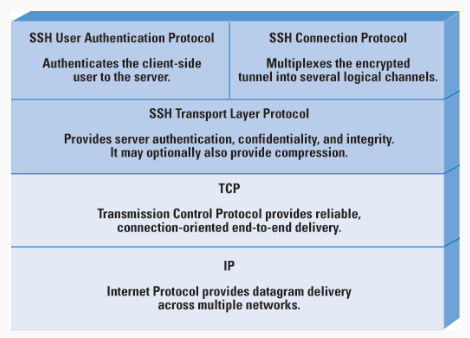
SSH is a protocol for secure network login and other secure network services over an insecure network. The SSH protocol consists of three major components:
SSH Transport Layer Protocol - server authentication, confidentiality, and integrity with perfect forward secrecy SSH User Authentication Protocol - authenticates the client to the server SSH Connection Protocol - multiplexes the encrypted tunnel into several logical channels
I did: ssh ubuntu@hostname. It ensures that you are connecting to the server you intend to, and not a malicious one impersonating your target. The fingerprint provided in the message is a hash of the server’s public SSH key. This key fingerprint is used to uniquely identify the server’s key. Before connecting to a server, especially in a sensitive environment, you should verify the fingerprint with the server administrator or through some other trusted channel. This verification ensures that you are connecting to the intended server and not a fraudulent one. Then, prompted to authenticate yourself. This could be through a password, an SSH key, or another method depending on the server’s configuration.
SSH Connection Protocol
Provides
- interactive login sessions
- remote execution of commands
- forwarded TCP/IP connections (port forwarding)
Port forwarding or SSH tunneling is one of the most useful features of SSH. Using port forwarding one can convert any insecure TC connection into a secure SSH connection.
Port Forwarding
Local forwarding is used to forward a port from the client machine to the server machine. Basically, the SSH client listens for connections on a configured port, and when it receives a connection, it tunnels the connection to an SSH server. The server connects to a configurated destination port, possibly on a different machine than the SSH server.
Typical uses for local port forwarding include:
- Tunneling sessions and file transfers through jump servers
- Connecting to a service on an internal network from the outside
- Connecting to a remote file share over the Internet
(i understand no shit bro)
What did I do
I made a connection to the SSH. Cloned a repo. Change the user owner from root to my current user. Now this grants git priviliges.
Install vscode remote extension then just click connect to host in bottom left. This makes good shit and also installations of extensions are cooler with your own configs and all that.
Now installed the requirements.
Since the git cloned repo didnt have everything. I SCP’ed my local files into the server and it ran smoothly.