| Aspect | Data | Information |
|---|---|---|
| Definition | Raw, unorganized facts and figures. | Processed data with context and meaning. |
| Form | Numbers, text, multimedia. | Analyzed and organized content. |
| Characteristics | Lacks context and meaning. | Has context, relevance, and meaning. |
| Result of | Measurements or observations. | Interpretation, analysis, and synthesis of data. |
| Value | Basic elements of information. | Aids in decision-making, problem-solving, understanding. |
| Examples | Temperature readings over a week; a list of attendees. | Average temperature for the week; analysis of event attendance trends. |
| Utility | Foundation for analysis. | Facilitates informed decisions and strategies. |
| Transformation | Requires processing to be useful. | Ready to be used for a specific purpose. |
| Communication | Often requires expertise to interpret. | Can be understood by a wider audience. |
Information system:
is a formal, sociotechnical, organizational system designed to collect, process, store and distribute information. From a sociotechnical perspective, information systems are composed by four components:
- task
- people
- structure
- technology Information systems can be defined as an integration of components for collection, storage and processing of data of which the data is used to provide information, contribute to knowledge as well as digital products that facilitate decision making.
Six components that must come together in order to produce an information system are:
- Hardware: refers to machinery and equipment. In a modern information system, this category includes the computer itself and all of its support equipment. The support equipment includes input and output devices, storage devices and communications devices. In pre-computer information systems, the hardware might include ledger books and ink.
- Software: refers to computer programs and the manuals (if any) that support them. Computer programs are machine-readable instructions that direct the circuitry within the hardware parts of the system to function in ways that produce useful information from data. The “software” for pre-computer information systems included how the hardware was prepared for use (e.g., column headings in the ledger book) and instructions for using them (the guidebook for a card catalog).
- Data are facts that are used by systems to produce useful information. In modern information systems, data are generally stored in machine-readable form on disk or tape until the computer needs them. In pre-computer information systems, the data are generally stored in human-readable form.
- Procedures: Procedures are the policies that govern the operation of an information system. “Procedures are to people what software is to hardware” is a common analogy that is used to illustrate the role of procedures in a system.
- People: Every system needs people if it is to be useful. Often the most overlooked element of the system is the people, probably the component that most influence the success or failure of information systems. This includes “not only the users, but those who operate and service the computers, those who maintain the data, and those who support the network of computers”
Operations support system:
assist in efficient business operations, processing, industrial process control, enterprise communication, and database updates
- Transaction processing system: organize people, procedures, software, databases, and device to records business transactions
- Process control systems: utilize computers and sensors for automatic decision-making in physical production processes. e.g. petroleum refining
- Office automation systems: facilitate communication via tools like work processing, email, and videoconferencing.
Management support systems:
produce managerial-level information for planning and decision-making using data analysis tools
- Management information systems
- Decision support systems
- Executive information systems
Information System Architecture:
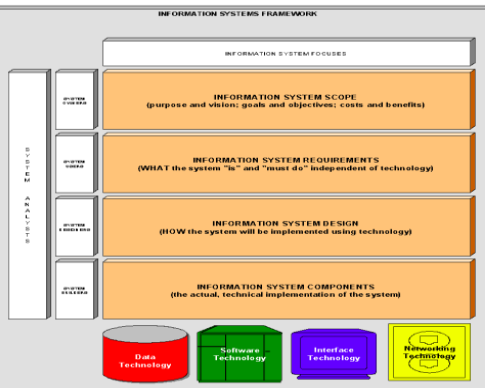
Information system architecture: overall structure and design of an organization’s information systems, detailing the arrangement and interaction of its components to meet the organization’s needs, goals and objectives.
- Data technology: encompasses the raw facts and information collected, stored, and processed by the system
- Software technology: includes application, OS, and other software components necessary for processing and managing data
- Interface technology: includes tools, methods, and technologies used to facilitate interaction between users and computer systems or between different software applications.
- Network technology: communication infrastructure that connects hardware components and facilitates data exchange
Roles within the IS framework:
-
System Owners: Those who finance the system, set its priorities, determine policies, and may also be users.
-
System Users: Individuals who utilize the system to perform or support their work, often collaborating with system designers.
-
System Designers: Technical specialists who design the system to meet user requirements and may also be involved in system construction.
-
System Builders: Technical experts who construct, test, and implement the system into operation.
Qualities of information systems:
Balanced Scorecard
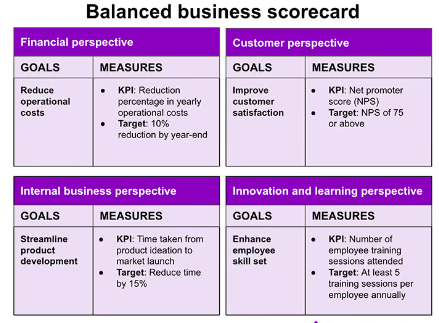
The Balanced Scorecard (BSC) is a strategic management performance metric that helps organizations identify and improve their operations to help their outcomes. It was developed by Robert Kaplan and David Norton in the early 1990s as a way to address the limitations of traditional financial measures of performance.
The BSC is a four-perspective framework that helps organizations measure their performance across four key areas:
- Financial: This perspective measures the organization’s financial performance, such as profitability and revenue growth.
- Customer: This perspective measures the organization’s performance from the customer’s perspective, such as customer satisfaction and loyalty.
- Internal process: This perspective measures the organization’s internal processes, such as efficiency and quality.
- Learning and growth: This perspective measures the organization’s investment in its people and processes, such as employee training and development.
A software development company could use the BSC to measure the success of a new software product development project. The company could measure financial metrics such as profitability and return on investment, customer metrics such as customer satisfaction and market share, internal process metrics such as time to market and quality, and learning and growth metrics such as employee satisfaction and skills development.
Control, audit, and security of IS
IS control: IS audit: IS security: IS planning: IS implementation: IS in enterprise level:
Audit and control of IS are two essential aspects of information system management, aiming at ensuring data integrity, confidentiality, and availability.
| Aspect | Audit of Information System | Control of Information System |
|---|---|---|
| Objective | Evaluate effectiveness, efficiency, and compliance of information systems with organizational goals and regulatory standards. | Safeguard assets, maintain data accuracy, and ensure operational efficiency through policies, procedures, and technical measures. |
| Activities | Reviewing infrastructure, applications, data management, and IT policies; assessing risks and compliance with standards. | Establishing security policies, access controls, encryption, backup procedures, and incident response plans. |
| Outcome | Audit reports highlighting strengths, weaknesses, and recommendations. | Ensured operational efficiency, data integrity, reduced risk of breaches, and compliance with laws and regulations. |
| Focus | Evaluation and assessment of the information system’s controls, processes, and compliance. | Implementation and management of security measures and control processes. |
| Responsibility | Conducted by external or internal auditors, independent of the system’s daily operations, providing an unbiased evaluation. | Managed by the organization’s IT staff and management, responsible for the design, implementation, and maintenance of controls. |
| Frequency | Periodic (e.g., annually, bi-annually), based on the audit schedule. | Continuous, with ongoing monitoring and adjustments to address new threats and changes in the environment. |
General controls:
- Software controls
- Hardware controls
- Computer operations controls
- Data security controls
- Implementation controls
- Administrative controls
Application controls:
- input controls
- processing controls
- output controls
Audits:
The information system audit evaluates and improves the value of information systems while also controlling computer abuse.
- Measuring vulnerability
- Identification of threat sources
- Identification of high risk points
- Check for computer abuse
(planning, fieldwork)
Layered security:
Layered security, also known as defense in depth, involves using multiple security components to protect operations on various levels or layers. It aims to slow down, block, or hinder threats until they can be neutralized completely. By employing multiple strategies, layered security enhances protection against a wide range of attacks, including hacking, phishing, malware, and denial of service attacks.
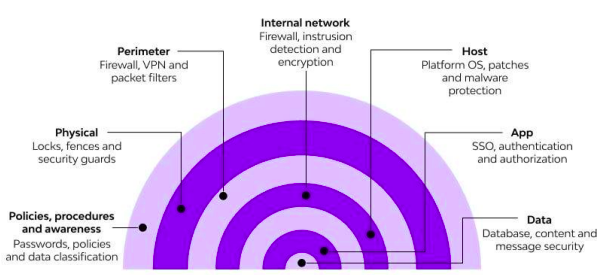
Consumer Layered Security Strategies
- Backup: Utilize free backup utilities to safeguard critical data.
- Firewall: Employ applications or hardware appliances to block unauthorized access while permitting authorized communications.
- Antimalware: Install frontline antimalware applications to prevent system infection.
- Antivirus: Implement antivirus applications to detect and stop malicious programs.
- Web Browser Security: Enhance browser security with add-ons like Web of Trust (WOT) to identify unsafe websites.
Others:
- Single sign on
- MFA
- Secure web and email
- Open fraud
Enterprise Layered Security Strategies
- Workstation Application Whitelisting: Restrict applications to approved whitelist entries.
- Workstation System Restore Solution: Implement solutions for system restoration in case of breaches.
- Workstation and Network Authentication: Authenticate workstations and network access.
- File, Disk, and Removable Media Encryption: Encrypt files, disks, and removable media for data protection.
- Remote Access Authentication: Implement authentication mechanisms for remote access.
- Network Folder Encryption: Encrypt network folders to safeguard data.
- Secure Boundary and End-to-End Messaging: Ensure secure messaging within and outside the organization.
- Content Control and Policy-Based Encryption: Enforce content control policies and encryption for data security.
| Organization Validation (OV) | Extended Validation (EV) |
|---|---|
| Validates organization identity | Validates organization identity and legal existence |
| Requires verification of business existence and legitimacy | Requires extensive verification of legal, physical, and operational aspects |
| Displays organization name in SSL certificate | Displays organization name prominently in browser address bar |
| Provides moderate assurance and trust | Provides highest level of assurance and trust |
| Generally takes a moderate amount of time for validation process | Typically involves a longer validation process |
| Typically used by businesses and corporations | Preferred by e-commerce sites, banks, and financial institutions |
E-commerce Security E-commerce security involves protecting online businesses from unauthorized access, misuse of data, and various cyber threats. Key dimensions of e-commerce security include integrity, nonrepudiation, authenticity, confidentiality, privacy, and availability.
Common E-commerce Security Threats & Issues
- Financial Frauds
- Spam
- Phishing
- Bots
- DDoS Attacks
- Brute Force Attacks
- SQL Injections
- Trojan Horses
E-commerce Security Solutions
- Switch to HTTPS
- Secure Servers and Admin Panels
- Payment Gateway Security
- Antivirus and Anti-Malware Software
- Use Firewalls
- Secure Website with SSL Certificates
- Employ Multi-Layer Security
- Backup Your Data
- Train Your Staff Better
- Monitor for Malicious Activity
SSL Certificate
An SSL certificate is a digital certificate that authenticates a website’s identity and enables an encrypted connection. SSL stands for Secure Sockets Layer, a security protocol that creates an encrypted link between a web server and a web browser.
Companies and organizations need to add SSL certificates to their websites to secure online transactions and keep customer information private and secure. If a website is asking users to sign in, enter personal details such as their credit card numbers, or view confidential information such as health benefits or financial information, then it is essential to keep the data confidential. SSL certificates help keep online interactions private and assure users that the website is authentic and safe to share private information with.
SSL certificates can be obtained directly from a Certificate Authority (CA). Certificate Authorities – sometimes also referred to as Certification Authorities – issue millions of SSL certificates each year. They play a critical role in how the internet operates and how transparent, trusted interactions can occur online.
The cost of an SSL certificate can range from free to hundreds of dollars, depending on the level of security you require. Once you decide on the type of certificate you require, you can then look for Certificate Issuers, which offer SSLs at the level you require.
SSL certificates do expire; they don’t last forever. The CA which serves as the de facto regulatory body for the SSL industry, states that SSL certificates should have a lifespan of no more than 27 months. This essentially means two years plus you can carry over up to three months if you renew with time remaining on your previous SSL certificate. SSL certificates expire because, as with any form of authentication, information needs to be periodically re-validated to check it is still accurate. Things change on the internet, as companies and also websites are bought and sold.
Types:
Extended Validation certificates (EV SSL)
This is the highest-ranking and most expensive type of SSL certificate. It tends to be used for high profile websites which collect data and involve online payments. When installed, this SSL certificate displays
- the padlock,
- HTTS,
- name of the business,
- and the country on the browser address bar. Displaying the website owner’s information in the address bar helps distinguish the site from malicious sites. To set up an EV SSL certificate, the website owner must go through a standardized identity verification process to confirm they are authorized legally to the exclusive rights to the domain.
Organization Validated certificates (OV SSL)
This version of SSL certificate has a similar assurance similar level to the EV SSL certificate since to obtain one; the website owner needs to complete a substantial validation process. This type of certificate also displays the website owner’s information in the address bar to distinguish from malicious sites. OV SSL certificates tend to be the second most expensive (after EV SSLs), and their primary purpose is to encrypt the user’s sensitive information during transactions. Commercial or public-facing websites must install an OV SSL certificate to ensure that any customer information shared remains confidential.
Domain Validated certificates (DV SSL)
The validation process to obtain this SSL certificate type is minimal, and as a result, Domain Validation SSL certificates provide lower assurance and minimal encryption. They tend to be used for blogs or informational websites – i.e., which do not involve data collection or online payments. This SSL certificate type is one of the least expensive and quickest to obtain. The validation process only requires website owners to prove domain ownership by responding to an email or phone call. The browser address bar only displays HTTPS and a padlock with no business name displayed.
Wildcard SSL certificates Multi-Domain SSL certificates
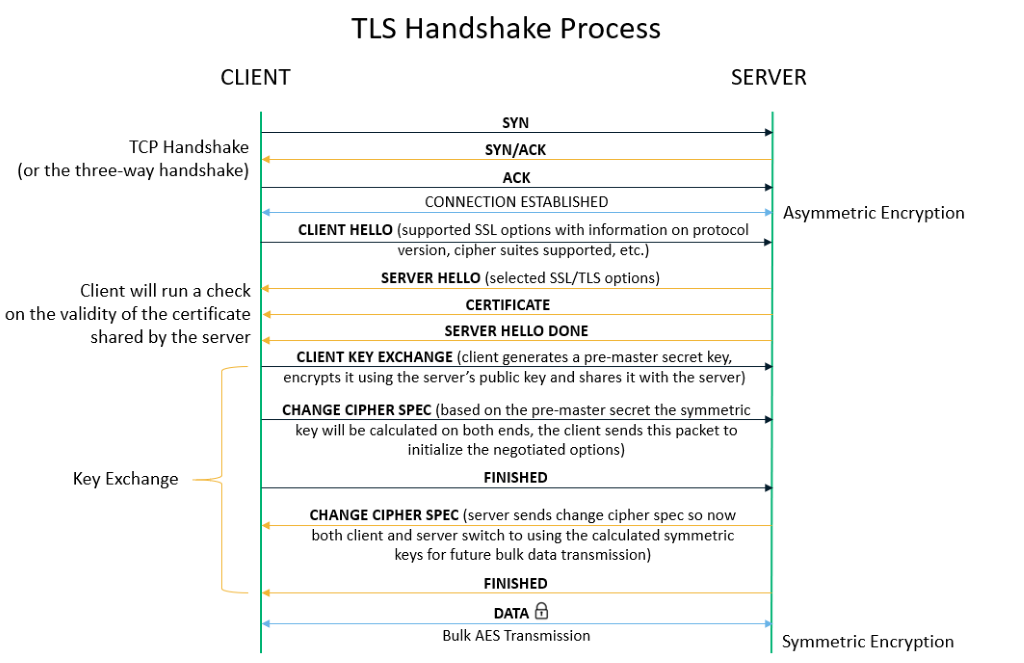
- Exchanging Hello: The browser initiates a connection with the server via a client hello message, which specifies the cryptographic algorithms it supports and the highest version of TLS it can use. The server responds with a “server hello” if it can support the browser’s requirements, or an error occurs if not.
- Verifying SSL/TLS certificate: The server presents its SSL certificate to the browser, which checks the certificate’s validity, ensures it hasn’t been revoked, and confirms it matches the requested hostname. The SSL certificate would be just a simple text file containing the domain’s public key, hostname, issuance and expiry dates, etc.
- Validating the CA signature: The browser verifies the certificate’s authenticity by checking the signature against a list of trusted certificate authorities (CAs). If the certificate is not signed by a trusted CA, an error is displayed.
- Generating a Shared Session Key: The browser creates a session key for encrypted communication, which it sends to the server encrypted with the server’s public key. The server decrypts this using its private key.
- Transferring Data Via HTTPS: Encrypted data is exchanged between the browser and server using the established session key, ensuring secure communication over the internet.
RBA
Remote Based Authentication (RBA) involves the verification of a user’s identity from a remote location, typically over a network connection. It is essential for preventing unauthorized access to sensitive data and securing information exchanges between servers and users. RBA is particularly important in defending against channel attacks, direct hacker intrusions, and various software-based attacks
Authentication Methods:
- Biometrics: Utilizes biological measurements such as fingerprint mapping, facial recognition, and retina scans for identity verification.
- Passwords: Requires users to input a predetermined password to access protected information or systems.
- Cognitive Passwords: Involves answering personalized questions to verify identity, addressing the memorability vs. strength issue of traditional passwords.
- Card Based: Utilizes smart cards with embedded integrated circuits for personal identification and authentication.
- One-Time or Dynamic Passwords (Token Based): Generates a unique numeric or alphanumeric code, which changes regularly, to authenticate access. This can be implemented through hardware tokens, software apps, or on-demand services.
IS Planning
Planning is the process of thinking about and organizing the activities required to achieve a desired goal. It encompasses the creation and maintenance of a strategic plan, incorporating both the analytical and psychological aspects that necessitate conceptual skills.
Information System (IS) planning is a critical process within organizations that focuses on the development and management of information systems to align with and support the organization’s objectives. This planning process is structured and methodical, aimed at ensuring that the information systems contribute effectively to the overall goals of the organization.
Charactersitics:
- primary managerial function lays groundwork for other activities
- essence is to define organizational goals
- continuous process for varying duration - monthly, quarterly, annually
- intellectual process
- decision making
Importance:
- Improves future performance
- Minimizes risks and uncertainty
- Facilitates coordination
- Provides direction
- Identifies opportunities and threats
- Basis for control
Components for IS Planning:
-
Activities for Achieving Goals: This includes identifying and outlining specific tasks or projects that the planner believes will help the organization reach its goals through the effective use of information systems.
-
Monitoring Program: A systematic approach for tracking real-world progress against the plan. This involves setting up benchmarks, performance metrics, and regular review schedules to ensure that the information systems development is on track and delivering expected benefits.
-
Means for Implementing Changes: Recognizing that plans may need adjustment, this component involves establishing processes for updating the plan based on new insights, changes in technology, shifts in business strategy, or feedback from monitoring activities. It ensures the plan remains relevant and aligned with organizational goals.
Process:
-
Establish a mission statement: defines role of IS within the organization, core responsibilities in supporting objectives Example: A mission statement for the IS department may emphasize the delivery of timely, accurate, and relevant information to support decision-making across all business functions.
-
Access the environment: Conduct an analysis of internal and external factors affecting the organization’s information needs and capabilities, consider factors such as trends, information requirements, user preferences Example:An environmental scan may reveal changes in customer preferences, emerging technologies, or regulatory requirements that impact the organization’s information systems strategy.
-
Set goals and objectives: establish specific goals and objectives for the organization’s information systems to align with its strategic direction Example: Goals may include improving data quality, enhancing decision support capabilities, and increasing the efficiency of information delivery. Objectives may include reducing data entry errors by 20% or implementing a business intelligence system within one year.
-
Derive strategies and policies: develop strategies and policies to guide the development, deployment and management of information system. Strategies may include approaches to system development, data management, user training, and security. Example: A strategy may involve adopting agile development methodologies to accelerate system deployment, while a policy may outline data retention requirements to comply with regulatory mandates.
-
Develop long medium and short range plans:
- Create plans that outline initiatives and projects to address the organization’s information needs over different time horizons.
- Long-range plans focus on strategic investments in information systems infrastructure, capabilities, and innovation.
- Medium-range plans include projects to implement new systems, enhance existing systems, and address specific business requirements.
- Short-range plans cover operational activities, maintenance tasks, and incremental improvements to information systems.
- Example: Long-range plans may include upgrading the organization’s enterprise resource planning (ERP) system, while medium-range plans may involve implementing a customer relationship management (CRM) system. Short-range plans may include data migration projects or system maintenance activities.
-
Implement plans and monitor results: Execute the planned initiatives, projects, and activities outlined in the IS plans. Monitor progress, track performance metrics, and assess outcomes to ensure alignment with goals and objectives.
| Feature | Top-Down Planning | Bottom-Up Planning |
|---|---|---|
| Focus | Starts with organizational goals, then addresses the needs of business units. | Begins with the needs of individual business units, then aligns with organizational goals. |
| Objective Setting | Global objectives are defined first at the highest level. | Narrow, specific goals are set at lower levels of the organization. |
| Approach | Divergent – plans are developed and specified as they move down the hierarchy. | Convergent – goals from lower levels are integrated into the global strategy as they move up. |
| Process Flow | Decisions flow from the top to the bottom of the organizational hierarchy. | Decisions and plans start at the bottom and are consolidated as they move up. |
| Example | Management sets growth targets based on market development, which are broken down into detailed subplans at lower levels. | Focuses on specific products or services based on sales forecasts, integrating these into broader company goals. |
| Strategy Formation | Strategy is formed by senior management and disseminated downwards. | Strategy forms through the aggregation of departmental or unit plans, moving upwards. |
| Engagement | Often limited input from lower levels during initial planning stages. | High level of input from lower levels from the beginning, influencing the overall plan. |
| Flexibility | Less flexible, as changes at lower levels require approval from top management. | More flexible, as changes can be initiated at the operational level where they are most relevant. |
Strategic, tactical and operational:
| Aspect | Strategic Planning | Tactical Planning | Operational Planning |
|---|---|---|---|
| Objective | Defines the long-term vision and direction of the organization. Focuses on where the organization wants to be in the future. | Describes how strategic goals will be achieved. Focuses on medium-term goals and the allocation of resources to meet these goals. | Details short-term activities that support tactical and strategic plans. Focuses on daily to monthly operations. |
| Scope | Broad, covering the entire organization. | Specific to departments or units within the organization, bridging strategic and operational planning. | Very detailed, focusing on specific tasks and operations within departments. |
| Time Horizon | Long-term (3, 5, or 10 years). | Medium-term (1 to 2 years). | Short-term (daily, weekly, up to 6 months). |
| Planning Level | High-level, involving top management and strategic decision-makers. | Middle-level, involving department heads and middle managers. | Lower-level, involving supervisors and front-line managers. |
| Focus | On the organization’s mission, major advantages, and strategic opportunities. | On achieving strategic objectives through resource allocation and project management. | On day-to-day operations, schedules, and budgets. |
| Implementation | Provides a framework for lower-level planning. | Links strategic planning with operational activities by detailing specific actions. | Executes the plans by managing daily tasks and resources efficiently. |
| Key Considerations | Competitive advantage, business strategy alignment, innovation, and market positioning. | Flexibility, compatibility, connectivity, scalability, and total cost of ownership of IS resources. | Supporting strategic and tactical goals through efficient operations and resource management. |
| Examples of Planning | Developing a new business strategy to enter a market. | Planning the acquisition of new technology to support the new business strategy. | Creating weekly schedules for IT staff to implement new software. |
| Job Titles Involved | CEOs, General Managers, Corporate Boards. | Advertising managers, Personnel managers, Manager of information systems. | Supervisors of smaller work units, front-line managers. |
IS Implementation
Change Management is a systematic approach to dealing with change, both from the perspective of an organization and on the individual level. It encompasses methodologies to manage the effect of new business processes, changes in organizational structure or cultural changes within an enterprise.
- A framework for implementing, controlling, and applying guidelines to introduce change within organizations. It involves managing the transition of business processes, organizational structures, and operating procedures.
- Recognizes change as a learning curve that can be smoother with proper management to minimize resistance and maximize acceptance.
Importance:
- Organization transformation, moving towards e-business
- Employee resistance, reduce resistance from employees who may be wary of changes to their familiar work
- Cultural considerations, must adapt to respect cultural differences
- Ensures quality services
- Earns the institution public goodwill and support
- Projects the organization as progressive, forward looking and proactive
Stages of change:
-
Stagnation: realization that current methods are no longer effective, creating a desire or need for change. It’s a period of awareness where the status quo is questioned, leading to the acknowledged that change is necessary for progress or improvement.
-
Anticipation: once need for change is identified, involves high levels of enthusiasm and expectation. Planning for the change occurs here, with strategies and actions being developed.
-
Implementation: where the planned changes are put into action. It is a critical period that demands commitment from all levels of the organization. Implementation often encounters the most resistance, as the reality of change sets in and affects routines, roles, and expectations.
-
Determination:organization moves into a phase of adjusting to the new changes. This involves setting realistic expectations and integrating the new processes or behaviors into daily routines.
-
Fruition: The final stage is reached when the changes are fully integrated and start to show benefits. Acceptance of the new ways of working increases as the organization begins to realize the positive outcomes of the change.
Lewin’s model: unfreeze → change → refreeze
Change Management Tools:
- Flowcharting: Simplifies complex processes into clear, easy-to-understand diagrams, helping teams identify inefficiencies and make effective improvements.
- ADKAR Analysis: A model that ensures employee support for change through Awareness, Desire, Knowledge, Ability, and Reinforcement. It focuses on communication, training, feedback, and incentives to support change.
- Culture Mapping: Visualizes company culture to identify positive enablers and risks during change. Involves identifying subcultures, interviewing representative groups, and organizing the information for analysis.
- Stakeholder Analysis: Identifies and prioritizes stakeholders based on various factors, using a stakeholder map to categorize them according to their impact and interest in the project.
- Gantt Charts: Visual project management tools that outline the timeline of a project, breaking down tasks along a horizontal axis and showing their duration, sequence, and timing.
CSFs
CSFs are vital elements that must be achieved for an organization to succeed, varying by industry and individual business within sectors.
Some common CRFs include:
- Achieving financial performance
- Meeting customer needs
- Producing quality products/services
- Encouraging innovation and creativity
- Fostering employee commitment
- Creating a distinctive competitive advantage
The company needs to be aware that it is essential to pull together the team that will be working with the CSFs, its necessary to have employees submit their ideas or give feedback. Never forget to have multiple frameworks to examine the key elements of your long-term goals. Before implementing your company-wide strategic plan with your critical success factors in mind, determine which factors are key in achieving your long-term organizational plan.
Critical success factors should not be confused with success criteria. The latter are outcomes of a project or achievements of an organization necessary to consider the project a success or the organization successful. Successful criteria are defined with the objectives and may be quantified by KPIs.
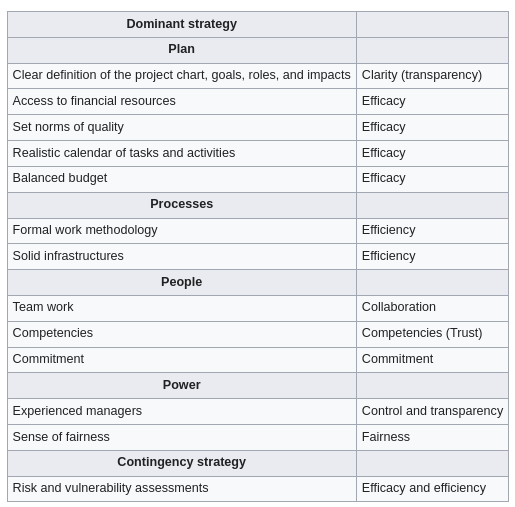
As stated in several studies in the literature, nearly 80% of IS projects fail. An unsuccessful project exceeds its schedule and budget yet might not still reach to end. Companies try to avoid such project failures due to high investments in terms of money, time and man power.
Enterprise Management System
EMS is a broad term that encompasses a wide range of systems designed to manage and integrate all the key operations of an enterprise. An EMS provides a comprehensive suite of tools and applications designed to manage the entire breadth of organizational needs, from front-office functions like sales and customer service to back-office operations like production and inventory management. This can include ERP systems as a core component, but it also extends to other systems like Customer Relationship Management (CRM), Supply Chain Management (SCM), Human Resources Management System (HRMS), and more. While EMS can be tailored to fit the needs of organizations of various sizes, its comprehensive nature makes it particularly well-suited for large, complex organizations that require a wide array of functionalities to manage their operations.
Enterprise Resource Planning:
EMS is a more encompassing term that includes ERP among other systems. An EMS aims to cover every aspect of managing an enterprise, while ERP focuses on integrating core business processes. While both systems aim to integrate various functions, ERP is more about the seamless integration of core business processes into a single system, whereas EMS may involve a collection of specialized systems that cover more areas beyond those typical of ERP.
ERP systems are comprehensive software solutions designed to manage and integrate all the core operations of an organization. They serve as the central hub for processing and organizing information across different functions, facilitating seamless communication and workflow between them.
Key points about ERP:
-
Integration: ERP software integrates diverse facets of an organization’s operations, including product planning, development, manufacturing processes, sales, and marketing.
-
Functionality: ERP systems come equipped with a wide range of functionalities to support various business activities. Some of the core functions include;
- Bookkeeping and accounting: Managing financial records and transactions.
- Human resource management (HRM): Overseeing employee information, payroll, recruitment, and performance management.
- Planning production: Scheduling and tracking production processes to optimize manufacturing efficiency.
- Supply chain management (SCM): Managing flow of goods and materials from procurement through delivery, including inventory management.
- Customer Relationship Management (CRM)
The primary goal of an ERP system is to optimize the management of an organization’s resources within certain constraints, aiming to maximize return on investment (ROI). It achieves this by providing real-time visibility into operations, enhancing decision-making, and improving efficiency and productivity across the organization.
Supply Chain:
SCM deals with a system of procurement (purchasing raw materials/components), operations management, logistics and marketing channels, through which raw materials can be developed into finished products and delivered to their end customers. Effective supply chain management systems minimize cost, waste and time in the production cycle. The industry standard has become a just-in-time supply chain where retail sales automatically signal replenishment orders to manufacturers. Retailers can then restock shelves almost quickly as they sell products. One way to further improve on this process is to analyze the data from supply chain partners to see where to improve further.
-
Identifying potential problems
- When a customer orders more products than the manufacturer can deliver, the buyer can complain of poor service. Through data analysis, manufactures might be able to anticipate the shortage before the buyer is disappointed.
-
Optimizing price dynamically
- Seasonal products have a limited shelf life. At the end of the season, retailers typically scrap these products or sell them at deep discounts. Airlines, hotels and others with perishable “products” typically adjust prices dynamically to meet demand. By using analytic software, similar forecasting techniques can improve margins, even for hard goods.
-
Improving the allocation of available to promise inventory
- Analytical software tools help to dynamically allocate resources and schedule work based on the sales forecast, actual orders and promised delivery of raw materials. Manufacturers can confirm a product delivery date when buyers place orders—significantly reducing incorrectly-filled orders.
(supplier relationship management demand planning and forecasting logistics and transporation sustainability and corporate responsiblity technology integraiton)
Benefits of using SCM:
- Higher efficiency rate
- Reduce cost effects
- Raise output
- Raised your business profit level
- Lowers delay in processes
- Enhanced supply chain network
Softwares:
- Netsuite
- Netstock
- Magaya Corporation
- Shippabo
- E2open
Customer Relationship Management (CRM)
CRM is a comprehensive strategy that businesses employ to manage, understand, and enhance their interactions with current and future customers. It’s built on the premise of developing a deep and enduring bond between a company and its customers, aiming to understand their needs, preferences, and behaviors to serve them better.
Goals (scope)
- Consolidate customer information: Creating a unified database that contains all customer information and documents, enabling a cohesive and comprehensive view of each customer.
- Better lead management: Utilizing the consolidated data for more effective lead management, ensuring that potential customers are nurtured appropriately through the sales funnel.
- Automate task: Streamlining and automating repetitive tasks related to marketing, sales, and customer service to increase efficiency and allow staff to focus on more strategic activities.
- Workforce Management: Enhancing the management and productivity of sales and marketing teams by providing them with the tools and information they need to succeed.
CRM strategies:
- Marketing
- Sales
- Support
- Orders
Customer relation marketing techniques:
Customization: Tailoring the product or service to match individual customer preferences, beyond just personalizing marketing communications. This approach acknowledges the unique needs and desires of each customer.
Customer Co-production: Engaging customers in the creation or customization of the product, which enhances their connection to the brand and increases satisfaction.
Customer Service Tools: Utilizing tools like FAQs, real-time chat systems, and automated response systems to provide efficient and effective customer support.
Software:
- Flowlu
- freshsales
- Really Simple Systems
- Suite CRM
Benefits:
- Centralized Customer Interactions: Offering a single view of all customer interactions across different channels, ensuring consistency and improving service quality.
- Improved Customer Support and Satisfaction: Through the efficient use of CRM tools, businesses can offer prompt, personalized, and effective support, enhancing overall customer satisfaction.
- High Rate of Customer Retention: By understanding and meeting customers’ needs, businesses can increase loyalty and reduce churn.
- Increased Revenue and Referrals: Satisfied customers are more likely to make repeat purchases and refer new customers, boosting revenue.
- Improved Products/Services: Feedback and data gathered through CRM can inform product development and improvement.
- Performance Measurement and Optimization: CRM systems provide analytics and reporting tools that allow businesses to measure their performance and identify areas for optimization.
- Boost in New Business: Effective CRM strategies can attract new customers by showcasing the company’s commitment to customer satisfaction and personalized service.
Role of IS in Enterprise Management:
- Automation of manual tasks
- Hardware and software integration
- Support of multi processing environment
Role of IT In Enterprise Management:
- Communication
- Inventory management
- Data management
- Customer relations management
Enterprise integration:
Enterprise integration involves connecting data, applications, and devices across an organization to support its business mission. This includes integrating markets, development and manufacturing sites, suppliers and manufacturers, as well as hardware and software components.
Types:
- Loose vs. Full Integration: Loose integration means enterprises can exchange information but might not interpret it uniformly. Full integration occurs when enterprises not only exchange information uniformly but also collaborate on common tasks.
- Horizontal vs. Vertical Integration: Horizontal integration is acquiring a similar company in the same industry at the same supply chain level. Vertical integration involves acquiring a company that operates before or after the business in the supply chain.
- Intra-Enterprise vs. Inter-Enterprise Integration: Intra-enterprise integration refers to integrating internal business processes within a single enterprise, while inter-enterprise integration involves connecting business processes across multiple enterprises.
Alignment process:
- Objective: To develop a common understanding among stakeholders to achieve project goals and avoid conflicts. This involves aligning business process objectives with organizational goals and strategies.
- Implementation: Achieving alignment typically starts with a kickoff meeting and may vary in complexity based on the project’s scope. It’s crucial during the initiation phase to ensure everyone is on the same page regarding the project’s purpose, goals, and methods.
Electronic Organism
- Definition: A self-replicating, mutating, and evolving computer program. These organisms are complex, capable of immediate response to challenges, and can live and evolve in digital ecosystems.
- History: The concept traces back to games like Darwin (1961) and Core War, where computer programs competed, replicated, and modified themselves to win.
Enterprise engineering
- Definition: An interdisciplinary field combining systems engineering and strategic management to design, implement, and manage all aspects of an enterprise. It focuses on continuous improvement and adaptation of products, processes, and business operations.
- Goal: To identify and integrate effective change methods, encompassing traditional areas like R&D, product design, operations, and strategi c management.
(i think technical stuffs begin from now on)
Decision making
Decision making: is the act of choosing among alternatives after considering several possibilities. It’s a methodological process rather than a single event, encompassing the collection and analysis of information to resolve questions or problems.
Typically involves four stages:
- Intelligence, identifying and understanding problems
- Design, formulating possible solutions
- Choice, selecting among solutions
- Implementation, executing the chosen solution
Types of decisions:
- Structured (Programmed) Decisions: These have clear procedures and objectives, with specific inputs and outputs, often automated or guided by predefined rules.
- Unstructured (Non-programmed) Decisions: These lack a structured decision-making process, relying heavily on human judgment and intuition.
- Semi-Structured Decisions: A mix where some aspects of the decision-making process are defined, but human judgment and external factors still play significant roles.
Decision support systems:
A DSS is a computer-based information system that helps in addressing semi-structured problems with significant user involvement. It integrates data and models to assist in problem-solving and decision-making processes.
- A DSS enables direct interaction between decision-makers and computers to create information useful for making semi-structured and unstructured decisions. It supports the decision-making process by facilitating the identification and resolution of problems.
Group decision support systems
Group DSS provides a group electronic environment in which managers and teams can collectively make decisions and design solutions for unstructured and semi-structured problems. A GDSS is composed of a set of highly configurable “tools” (e.g. brainstorming, voting and ranking, multi-criteria analysis etc.) that requires a high level of expertise for an effective use for complex decisions
The idea of Group Decision Support System (GDSS) is to support the decision makers at all the hierarchic levels in an organization to take the decisions efficiently and just in time. The main advantage of using a GDSS proved to be, over the years, a better understanding of the decision process through the involvement of all the decision makers in all the phases of the decisional issue from statement to solving and interpretation. Group Decision Support Systems (GDSS) can be presented as a set of software, hardware, language components and procedures that support a group of people engaged in a decision related meeting.
Participants use a common computer or network to enable collaboration. A decision support system is an application that analyzes business data and presents it in a fashion that allows users to make business decisions more easily. A decision support system creates an environment where ideas and collaboration flourish in an efficient time-saving manner. With a decision support system can alleviate the constraints of group dynamics by facilitating more open group discussion with parallel anonymous input. Decisions are made with a higher degree of consensus and agreement resulting in a dramatically higher likelihood of implementation. With a decision support system you can bring people together like never before. GDSS contains most of the elements of decision support system plus software to provide effective support in group decision-making settings
The architecture of GDSS includes:
- The hardware element, which is the conference facility which includes the decision room, computers, internet access, and other means of communications
- Software tools, which are web-based applications, e-questionnaires, e-brainstorming, idea organizers, group dictionaries, questionnaire tools, policy formation tools and
- People, who include the decision-makers themselves and, in many cases, a trained facilitator and, possibly, the support staff
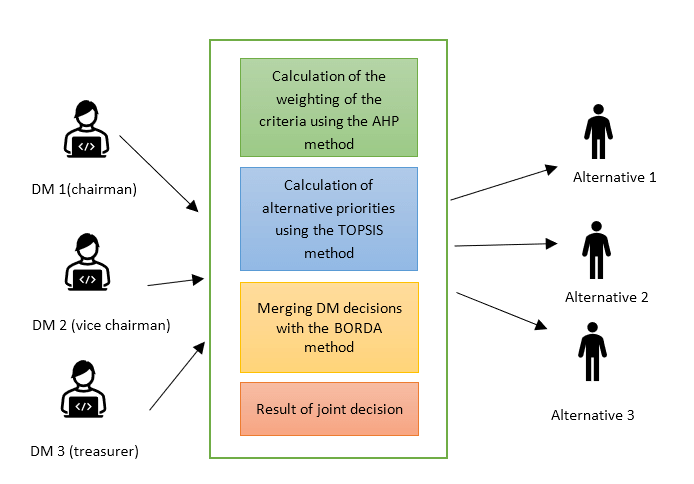
Benefits:
- More participation: anonymity, parallel
- Group synergy:
- Automated record keeping: no need to take notes and communicate later
- More structure
Executive support systems …
Knowledge Management
KM involves systematic approaches to managing and leveraging knowledge within an organization. This encompasses the processes of creating, sharing, using, and managing organizational knowledge and information.
To improve efficiency, enable better decision making and foster innovation by ensuring that the right knowledge is available to the right people at the right time.
KMS:
- Create: Generate new knowledge internally or source it externally.
- Store: Retain knowledge in a structured and accessible manner.
- Find: Enable users to locate the knowledge they need, when they need it.
- Acquire: Facilitate the process of obtaining the required knowledge.
- Use: Apply the acquired knowledge to achieve practical objectives.
- Learn: Analyze the outcomes of using the knowledge, facilitating continuous improvement.
Expert system:
A specialized computer program that uses artificial intelligence to solve complex problems within a specific domain, which typically requires human expertise.
Can perform tasks such as classification, diagnosis, monitoring, design, scheduling, and planning.
Considered an advanced form of Decision Support Systems (DSS), with the added ability to mimic the decision-making capabilities of a human expert in specific fields.
Used in various areas including medical diagnosis and telephone network maintenance. For example, MYCIN is an expert system developed for diagnosing bacterial infections and recommending treatments.
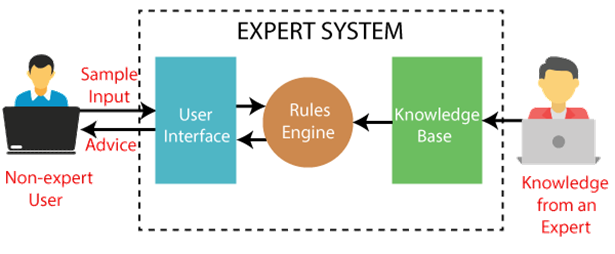
Components:
-
User interface
-
Inference engine: forward and backward chaining
-
Knowledge base
-
Symptoms:
- Let
Prepresent “Patient has high blood sugar.” - Let
Qrepresent “Patient experiences frequent urination.” - Let
Rrepresent “Patient experiences increased thirst.”
- Let
-
Diagnosis:
- Let
Drepresent “Patient is diagnosed with Type 2 Diabetes.”
- Let
-
Treatment:
- Let
Trepresent “Recommend Metformin to the patient.” - Let
Lrepresent “Advise lifestyle changes to the patient.”
- Let
DifP ∧ Q ∧ R(If a patient has high blood sugar, experiences frequent urination, and increased thirst, then the patient is diagnosed with Type 2 Diabetes.)TifD(If a patient is diagnosed with Type 2 Diabetes, recommend Metformin.)LifD(If a patient is diagnosed with Type 2 Diabetes, advise lifestyle changes.)
Data Mining
Data mining is the process of extracting and discovering useful information and patterns in large data repositories. We live in a world where vast amounts of data are collected daily. Analyzing such data is an important need.
Not all information discovery tasks are considered to be data mining. For example, looking up individual records using a database management system or finding particular Web pages via a query to an Internet search engine are tasks related to the area of information retrieval.
Data rich information poor situation.
*Challenges?
- Scalability
- High dimensionality
- Heterogeneous and complex data:
- Data ownership and distribution
- Non-traditional analysis:
Steps?
- Data cleaning: to remove noise and inconsistent data
- Data integration: where multiple data sources may be combined
- Data selection: where data relevant to the analysis task are retrieved from the database
- Data transformation: where data are transformed and consolidated into forms appropriate for mining by performing summary of aggregation operations
- Data mining: an essential process where intelligent methods are applied to extract data patterns
- Pattern evaluation: to identify truly interesting patters representing knowledge based on interestingness measures
- Knowledge representation: where visualization and knowledge representation techniques are used to present mined knowledge to user
Steps 1 through 4 are different forms of data preprocessing, where data are prepared for mining. The data mining step may interact with the user or a knowledge base. The interesting patterns are presented to the user and may be stored as new knowledge in the knowledge base.
| Feature | OLTP | OLAP |
|---|---|---|
| Primary Purpose | Supports day-to-day transactional processes | Supports complex analysis and queries of large datasets |
| Data Updates | Frequent inserts, updates, and deletes | Infrequent updates, batch updates common |
| Database Design | Normalized schemas to avoid data redundancy | Denormalized schemas to optimize for query speed |
| Query Type | Simple queries (CRUD: Create, Read, Update, Delete) | Complex queries, involving aggregations and calculations |
| Data Volume | Deals with data at the transaction level | Works with large volumes of data for analysis |
| Usage | Operational use (e.g., order processing, banking) | Analytical use (e.g., business intelligence, reporting) |
| User Types | End-users performing daily tasks | Analysts and decision-makers |
| Performance Focus | Optimized for fast query processing of small transactions | Optimized for analyzing large datasets |
| Transaction Volume | High transaction volume | Low transaction volume but queries may be very large and complex |
| Data Consistency | Immediate consistency required for transactions | Consistency important but can tolerate some latency |
| Example Systems | Customer Relationship Management (CRM), Retail Sales | Data Warehousing, Business Intelligence tools |
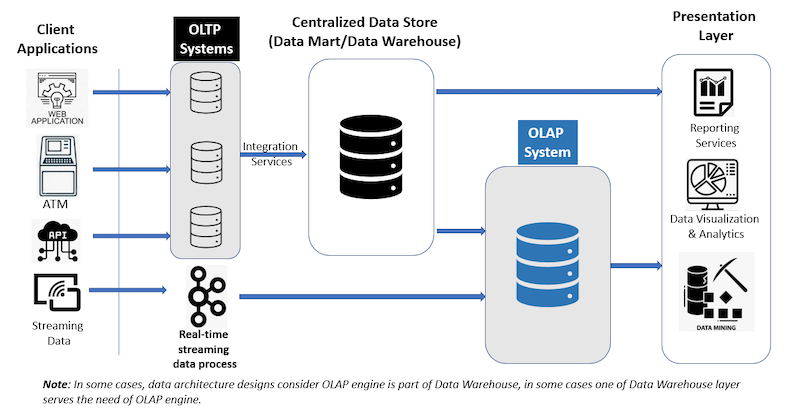 |
Data warehouse:
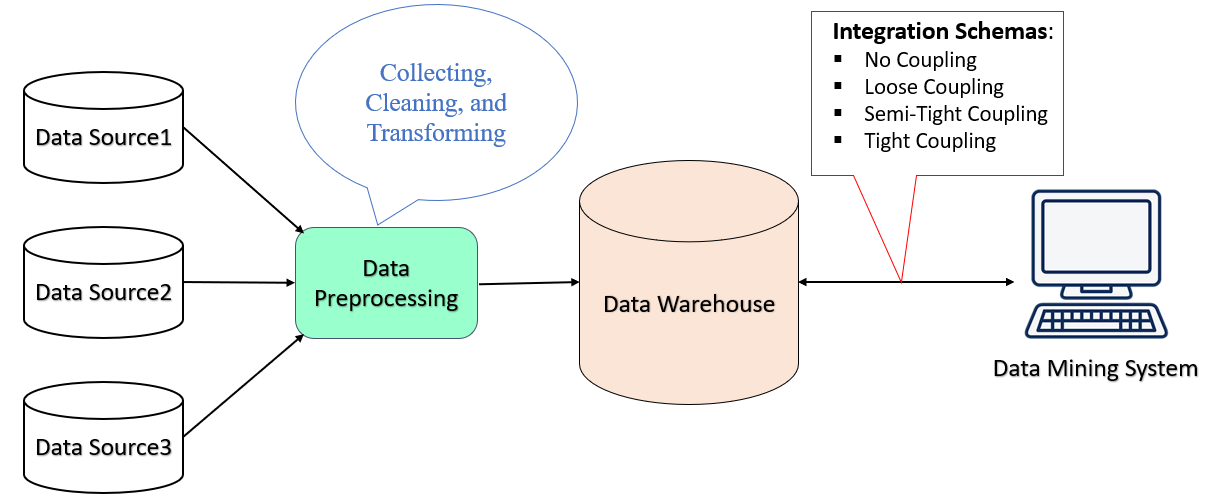
DW is a system used for reporting and data analysis and is considered a core component of business intelligence. Data warehouses are centralized repositories of integrated data from one or more disparate sources. They store current and historical data in one single place that are used for creating analytical reports for workers throughout the enterprise.
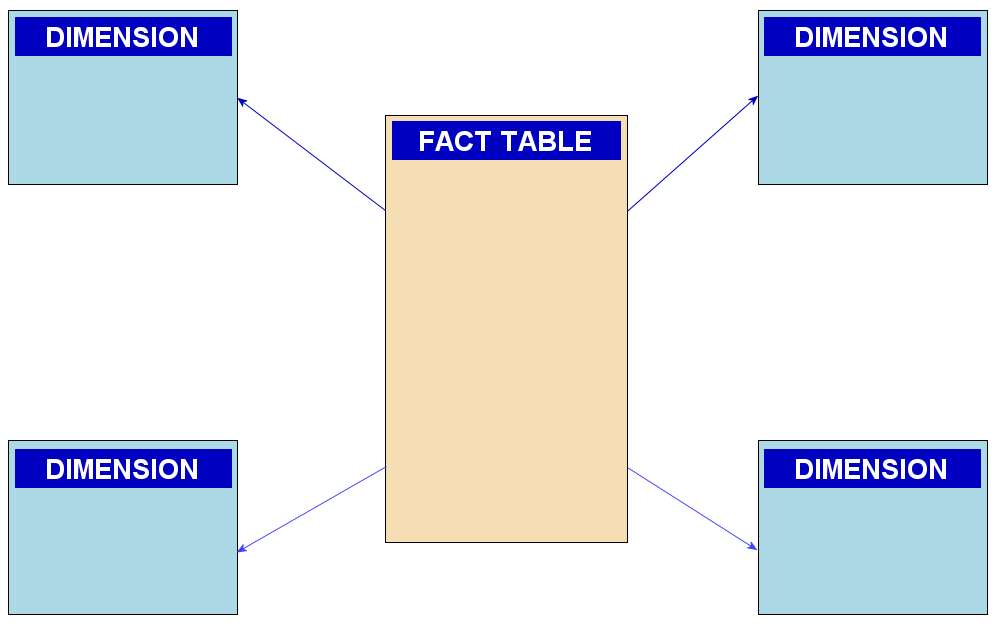
ETL based data warehouse uses staging, data integration, and access layers to house its key functions. The staging layer or staging database stores raw data extracted from each of the disparate source data systems. The integration layer integrates disparate data sets by transforming the data from the staging layer, often storing this transformed data in an ODS database. The integrated data are then moved to yet another database, often called the data warehouse database, where the data is arranged into hierarchical groups, often called dimensions, and into facts and aggregate facts. The combination of facts and dimensions is sometimes called a star schema.
ELT based data warehousing gets rid of separate ETL tool for data transformation. Instead, it maintains a staging area inside the data warehouse itself. In this approach, data gets extracted from heterogeneous source systems and are then directly loaded into the data warehouse, before any transformation occurs. All necessary transformations are then handled inside the data warehouse itself. Finally, the manipulated data gets loaded into target tables in the same data warehouse.
Web based information system
Structure of Web:
The bow tie structure of the Web provides a high level view of the Web’s structure, based on its reachability properties and how its strongly connected components fits together. If we consider web pages as vertices and hyperlinks as edges. Then, the web can be represented as a directed graph. Now, the question is what does the web graph look like?
Their finding included that the web contains a giant strongly connected component. A SCC is a region from which you can get from any point to any other point along a directed path. So in the context of the web graph, with this giant SCC, what this means is that from any webpage inside this blob, you can get to any other webpage inside this blob, just by traversing a sequence of hyperlinks.
The two regions of approximately equal size on the two sides of CORE are named as:
- IN: nodes that can reach the giant SCC but cannot be reached from it e.t. new web pages, and
- OUT: nodes that can be reached from the giant SCC but cannot reach it e.g. corporate websites
This structure of web is known as the Bowtie structure.
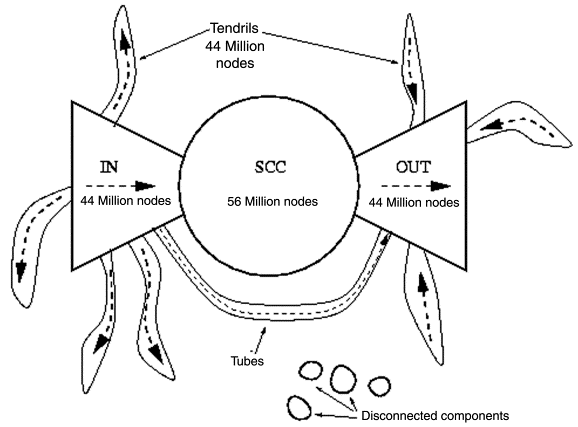
There are pages that belong to node of IN, OUT, or the giant SCC i.e. they can neither reach the giant SCC nor be reached from it. These are classified it:
- Tendrils: the nodes reachable from IN that can’t reach the giant SCC, and the nodes that can reach OUT but can’t be reached from the giant SCC. If a tendril nodes satisfies both conditions then it’s part of a tube that travels from IN to OUT without touching the giant SCC, and
- Disconnected: nodes that belong to none of the previous categories.
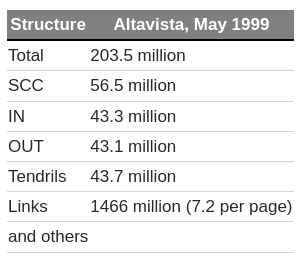
The study collected the following data:
Link analysis:
Link analysis is a powerful data analysis technique rooted in network theory, focusing on examining and understanding the relationships or connections between nodes within a network. These nodes could represent various entities such as individuals, organizations, or transactions.
Knowledge discover is an iterative and interactive process used to identify, analyze and visualize patterns in data. Network analysis, link analysis and social network analysis are all methods of knowledge discovery, each a corresponding subset of the prior method.
Link analysis is used for 3 primary purposes:
- Find matches in data for known patterns of interest;
- Find anomalies where known patterns are violated;
- Discover new patterns of interest (social network analysis, data mining)
Applications:
- Web Optimization: Link analysis helps in identifying authoritative and relevant web sources, contributing to the development of more efficient search engines.
- Identification of Hubs and Authorities: Within the context of web pages, link analysis categorizes pages as hubs (which link to many authorities) and authorities (which are linked from many hubs).
- Community Detection: Enables the identification of communities or clusters of pages focusing on similar topics, indicating characteristic patterns of linkage.
Ex: Pagerank
Google web crawling and indexing and ranking
From a distributed systems perspective, Google provides a fascinating case study with extremely demanding requirements, particularly in terms of
- scalability,
- reliability,
- performance and
- openness
The Google search engine: The role of the Google search engine is, as for any web search engine, to take a query and return an ordered list of the most relevant results that match that query by searching the content of the Web. The challenges stem from the size of the Web and its rate of change, as well as the requirement to provide the most relevant results from the perspective of its users.
Crawling: The task of the crawler is to locate and retrieve the contents of the Web and pass the contents onto the indexing subsystem. This is performed by a software service called Googlebot, which recursively reads a given web page, harvesting all the links from that web page and then scheduling further crawling operations for the harvested links (a technique known as deep searching that is highly effective in reaching practically all pages in the Web). In the past, because of the size of the Web, crawling was generally performed once every few weeks. However, for certain web pages this was insufficient. For example, it is important for search engines to be able to report accurately on breaking news or changing share prices. Googlebot therefore took note of the change history of web pages and revisited frequently changing pages with a period roughly proportional to how often the pages change. With the introduction of Caffeine in 2010, Google has moved from a batch approach to a more continuous process of crawling intended to offer more freshness in terms of search results.
Indexing: The role of indexing is to produce an index for the contents of the Web that is similar to an index at the back of a book, but on much larger scale. More precisely, indexing produces what is known as an inverted index mapping appearing in web pages and other textual web resources (including documents in .pdf, .doc and other formats) onto the positions where they occur in documents, including the precise position in the document and other relevant information such as the font size and capitalization (which is used to determine importance, as will be seen below). The index is also sorted to support efficient queries for words against locations.
Example: This inverted index will allow us to discover web pages that include the search terms ‘distributed’, ‘systems’ and ‘book’ and, by careful analysis, we will be able to discover pages that include all of these terms. The search engine will be able to identify that the three terms can all be found in amazon.com, cdk5.net and indeed many other web sites. Using the index, it is therefore possible to narrow down the set of candidate web pages from billions to perhaps tens of thousands, depending on the level of discrimination in the keywords chosen.
Ranking: : The problem with indexing on its own is that it provides no information about the relative importance of the web pages containing a particular set of keywords – yet this is crucial in determining the potential relevance of a given page. All modern search engines therefore place significant emphasis on a system of ranking whereby a higher rank is an indication of the importance of a page and it is used to ensure that important pages are returned nearer to the top of the list of results than lower-ranked pages. PageRank is inspired by the system of ranking academic papers based on citation analysis. In the academic world, a paper is viewed as important if it has a lot of citations by other academics in the field. Similarly, in PageRank, a page will be viewed as important if it is linked to by a large number of other pages (using the link data mentioned above). PageRank also goes beyond simple ‘citation’ analysis by looking at the importance of the sites that contain links to a given page. For example, a link from bbc.co.uk will be viewed as more important than a link from Gordon Blair’s personal web page.
Web mining
Web mining is the use of data mining techniques to extract knowledge from web data. Web data includes:
- web documents
- hyperlinks between documents
- usage logs of web sites
The WWW is huge, widely distributed, global information service center and, therefore, constitutes a rich source for data mining.
Web structure mining:
Web structure mining is the process of discovering structure information from the web. The structure of typical web graph consists of Web pages as nodes, and hyperlinks as edges connecting between two related pages. Web structure mining aims to generate structural summary about web sites and web pages.
Algorithms:
- Page rank
- HITS algorithm
- Weighted page rank algorithm
- Distance rank algorithm
- Weighted page content rank algorithm
- Eigen rumor algorithm
- Time rank algorithm
- Query dependent ranking algorithm
Example:
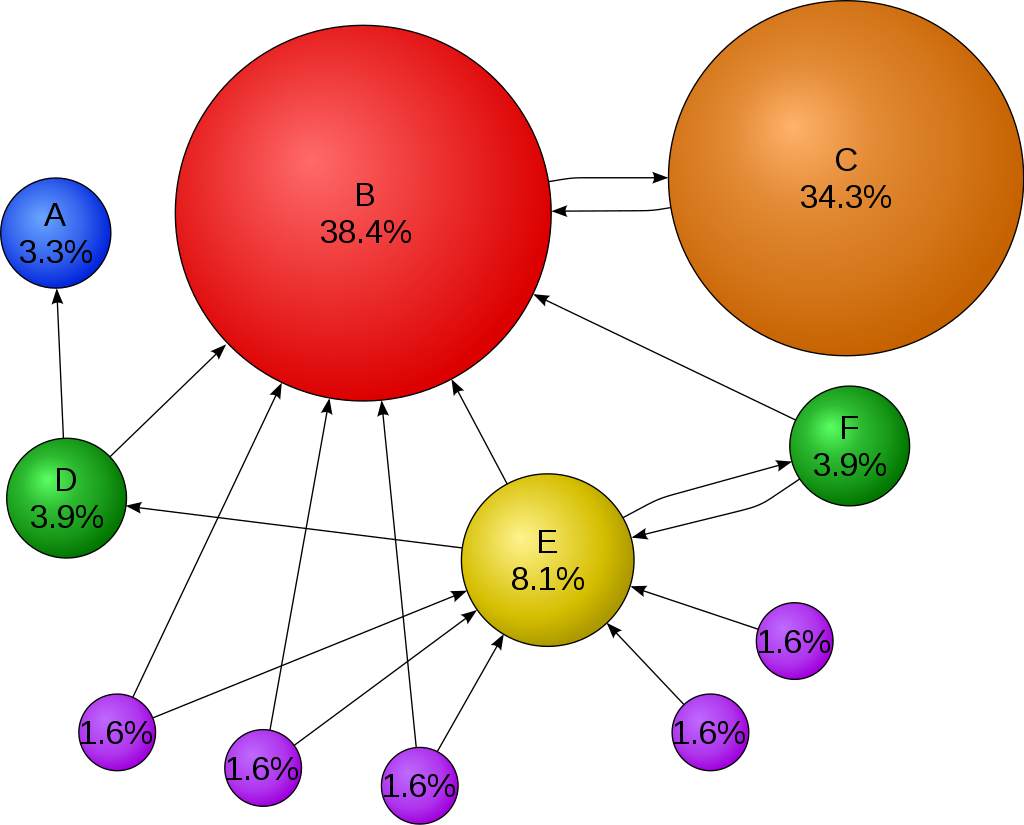
A page’s importance increases with the number of backlinks it has. Not all backlinks contribute equally; links from more important pages carry more weight.
- PR(i): PageRank of a page that links to the target page .
- Ni: The total number of outbound links from page .
- : A damping factor, typically set between and , to prevent the algorithm from inflating the PageRank scores artificially. It represents the probability of clicking on a link purely by chance.
- : A normalization term to ensure that the sum of all PageRanks across the web equals one, adding a probabilistic element to the model.
The percentage shows the perceived importance, and the arrows represent hyperlinks.
Web content mining:
Web Content Mining involves the process of extracting useful information, data, and knowledge from web page content. It’s distinct from traditional data mining (which deals with structured data) and text mining, primarily due to the nature of web data, which tends to be semi-structured or unstructured. Web content mining is the mining, scanning and extraction of text, videos, graphs and pictures from web documents. It is also known as text mining. Two types of approaches are used in web content mining. The two approaches are:
- the database approach and
- the agent based approach.
Agent based approach:
- Intelligent Search Agents: These agents search for specific characteristics within web content to organize and interpret information efficiently. They operate either autonomously or semi-autonomously on behalf of users.
- Information Filtering/Categorization: Utilizes information retrieval techniques to automatically retrieve, filter, and categorize web documents based on their characteristics. Tools like HyPursuit and BO (Bookmark Organizer) exemplify this approach.
- AI Systems Development: Sophisticated artificial intelligence systems are developed to discover and organize information, acting autonomously or semi-autonomously for users.
Database approach:
- Transformation of Data: Focuses on converting unstructured or semi-structured web data into structured forms that are easily analyzable with standard database and data mining tools.
- Multilevel Databases: These databases store semi-structured information at the lowest level, while higher levels contain generalizations from the lower levels organized into relations and objects, facilitating easier data retrieval and analysis.
- Web Query Systems: Involves the development of web-based query systems and languages (such as SQL and Natural Language Processing (NLP)) designed specifically for extracting data from the web.
Example:
- Topic modeling
- Trend analysis
Web usage mining:
Web Usage Mining is the process of extracting useful patterns from data generated by user interactions with web sites. This field focuses on understanding the behavior and preferences of web users to optimize web services and content. Here’s an overview of the process and its components:
Goals:
- Analyze User Behavior: To study how users interact with websites and identify behavioral patterns and profiles.
- Discover Patterns: To find collections of frequently accessed pages, objects, or resources by groups of users sharing common interests.
Data sources:
- Web Server Logs: Record of user requests to the server.
- Site Contents: The actual content of the web pages accessed by the users.
- Visitor Data: Information about visitors collected through external channels.
Three phases:
-
Pre-processing:
- Data cleaning, removing irrelevant log entires
- User identification, distinguishing users based on IP, browser type
- Transaction identification
-
Pattern discovery;
- Clustering and classification
- Sequential patterns
- Association rules
-
Pattern analysis:
- Validation
- Interpretation
(example ma website wala lekhdinxu lmao)
Recommender system
Recommender system predicts user’s preferences for items (e.g. movies, music, products) by filtering large datasets to identify user preferences. Widely used in various domains including
- e-commerce (Amazon),
- streaming services (Netflix, Youtube),
- social matching (Tinder),
- news, gaming, and financial services.
The long tail stuffs
Utility matrix:
In a recommendation-system application there are two classes of entities, which we shall refer to as users and items. Users have preferences for certain items, and these preferences must be teased out of the data. The data itself is represented as a utility matrix, giving for each user-item pair, a value that represents what is known about the degree of preference of that user for that item
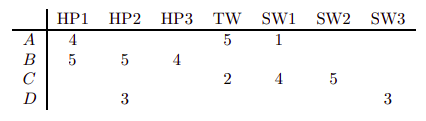
Notice that most user-movie pairs have blanks, meaning the user has not rated the movie. The goal of a recommendation system is to predict the blanks in the utility matrix. For example, would user A like SW2?
Types:
Content based filtering: focus on properties of items. Similarity of items is determined by measuring the similarity in their properties.
- We must construct for each item a profile, which is a record or collection of records representing important characteristics of what item. For example, consider the features of a movie that might be relevant to a recommendation system - the set of actors, the director, the genre.
- We imagined a vector of 0’s and 1’s, where a 1 represented the occurrence of a high-TF.IDF word in the document. Since features for documents were all words, it was easy to represent profiles this way.
- We not only need to create vectors describing items; we need to create vectors with the same components that describe the user’s preferences. We have the utility matrix representing the connection between users and items. Recall the nonblank matrix entries could be just 1’s representing user purchases or a similar connection, or they could be arbitrary numbers representing a rating or degree of affection that the user has for the item.
- With profile vectors for both users and items, we can estimate the degree to which a user would prefer an item by computing the cosine distance between the user’s and item’s vectors.
Note: TF-IDF is a measure of importance of a word to a document in a collection or corpus adjusted for the fact that some words appear more frequently in general.
Collaborative filtering: We shall now take up a significantly different approach to recommendation. Instead of using features of items to determine their similarity, we focus on the similarity of the user ratings for two items. That is, in place of the item-profile vector for an item, we use its column in the utility matrix. Further, instead of contriving a profile vector for users, we represent them by their rows in the utility matrix. Users are similar if their vectors are close according to some distance measure such as Jaccard or cosine distance. Recommendation for a user U is then made by looking at the users that are most similar to U in this sense, and recommending items that these users like. The process of identifying similar users and recommending what similar users like is called collaborative filtering.
(is a method of making automatic predictions (filtering) about the interests of a user by collecting preferences or taste from many other users (collaborating) The underlying assumption of the collaborative filtering approach is that if a person A has the same opinion as a person B on an issue, A is more likely to have B’s opinion on a different issue than that of a randomly chosen person.)
(Recommends items by identifying similarities among users or items based on their interactions. Known for needing substantial data to function effectively but can face the cold start problem with new users or items.)
-
Item-item collaborative filtering: Recommends items similar to those a user has liked before, used by Amazon: “if people like X, they also like item Y, since you like item X you should try item Y”
-
User-user collaborative filtering: Clusters users with similar tastes and recommends items liked by those in the same cluster. (this is the real one i guess) “person have liked similar items as you, since person A has liked this item, you should try this”
Typically, the workflow of a collaborative filtering system is:
- A user expresses his or her preferences by rating items (e.g. books, movies, or music recordings) of the system. These ratings can be viewed as an approximate representation of the user’s interest in the corresponding domain.
- The system matches this user’s ratings against other users’ and finds the people with most “similar” tastes.
- With similar users, the system recommends items that the similar users have rated highly but not yet being rated by this user (presumably the absence of rating is often considered as the unfamiliarity of an item)
Hybrid Systems: Combines collaborative filtering and content-based methods to overcome the limitations of both.
Challenges:
Cold start problem: Difficulty in recommending items to new users or offering new items because of a lack of data. Solutions include clustering similar attributes or asking users upfront about their preferences to bootstrap the recommendation process.
Content-based limitations: Can be overly narrow in recommendations. Solutions involve using user interactions to diversify recommendations.
Collective Intelligence
Collective intelligence refers to the enhanced intellectual capability that emerges when people work together, often facilitated by technology, particularly the internet.
- Openness: Encourages the sharing of ideas and intellectual property openly, fostering innovation and improvement through collective input.
- Peering: Supports collaborative efforts where individuals can modify and develop projects with the condition of making these advancements available to others.
- Sharing: Emphasizes the balance between open sharing of certain ideas while retaining control over others, which companies increasingly adopt.
- Acting Globally: Utilizes the internet’s reach to overcome geographical limitations, allowing for the global exchange of ideas, markets, and technologies.
Example:
A shoe company might use social media to post images of different shoe designs, monitoring which options garner the most positive engagement. This collective feedback can guide the company toward which product line might sell best, providing insights that are potentially more accurate than those derived from a handful of decision-makers.
Politics:
Cloud Computing
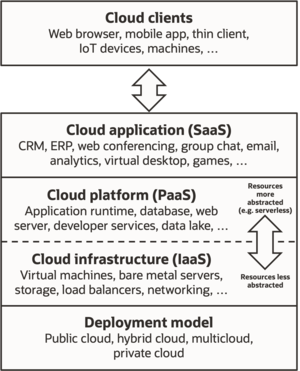
Cloud computing is on-demand availability of computer system resources, especially data storage and computing power without direct active management by the user. Cloud computing revolutionizes how hardware and software resources are utilized, offering them over the internet as managed services. This approach enables access to high-powered computing and advanced applications without the need for significant physical infrastructure on the user’s part.
Large clouds often have functions distributed over multiple locations, each of which is a data center.
Five essential characteristics:
- On demand self service
- Broad network access: available over the network and accessed through standard mechanisms
- Resource pooling: providers resources are pooled to serve mulitple consumers using a multi tenant model
- Rapid elasticity: capabilities can be elastically released, to scale demand
- Measured service: metering acapability
Associated technologies:
Virtualization: The creation of a virtual rather than actual version of something, including virtual computer hardware platforms, storage devices, and computer network resources.
Containerization: A lightweight alternative to full machine virtualization that involves encapsulating an application in a container with its own operating environment. Docker and Kubernetes are leading technologies in this space.
Serverless computing: A cloud-computing execution model where the cloud provider runs the server and dynamically manages the allocation of machine resources. Pricing is based on the actual amount of resources consumed by an application.
Microservices architecture: A method of developing software systems that focus on building single-function modules with well-defined interfaces and operations.
-
Software as a Service (SaaS)
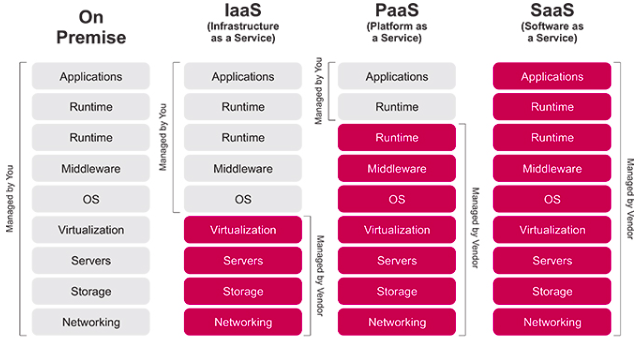
- Providing applications over the Internet to multiple users. In the software as a service (SaaS) model, users gain access to application software and databases. Cloud providers manage the infrastructure and platforms that run the applications. SaaS is sometimes referred to as “on-demand software” and is usually priced on a pay-per-use basis or using a subscription fee. In the SaaS model, cloud providers install and operate application software in the cloud and cloud users access the software from cloud clients. Cloud users do not manage the cloud infrastructure and platform where the application runs. This eliminates the need to install and run the application on the cloud user’s own computers, which simplifies maintenance and support.
- Example: Google docs, Myspace
- Features:
- Runs on cloud infrastructure
- Accessed through a web browser
- Suitable for customer resource management (CRM) applications
- Supports a multi-tenant environment
-
Platform as a Service (PaaS)
- PaaS vendors offer a development environment to application developers. The provider typically develops toolkit and standards for development and channels for distribution and payment. In the PaaS models, cloud providers deliver a computing platform, typically including OS, programming language execution environment, database, and the web server. Application developers develop and run their software on a cloud platform instead of directly buying and managing the underlying hardware and software layers. With some PaaS, the underlying computer and storage resources scale automatically to match application demand so that the cloud user does not have to allocate resources manually
- Force.com, Google App Engine, Azure, Salesforce.com.
- Features:
- Supports web service standards
- Dynamically scalable
- Supports a multi-tenant environment
-
Infrastructure as a Service (IaaS)
- Virtual storage and server options that allow for the creation of a virtual data center. IaaS refers to online services that provide high level APIs used to abstract various low level details of underlying network infrastructure like physical computing resources, location, data partitioning, scaling, security, backup etc.
- Examples: Rackspace.com, GoGrid.com.
- Features:
- Users utilize resources without controlling the underlying infrastructure.
- Pay-per-use model.
- Flexible and scalable infrastructure.
Deployment models:
Private: Private cloud is cloud infrastructure operated solely for a single organization, whether managed internally or by a third party, and hosted either internally or externally. Undertaking a private cloud project requires significant engagement to virtualize the business environment, and requires the organization to reevaluate decisions about existing resources. It can improve business, but every step in the project raises security issues that must be addressed to prevent serious vulnerabilities. They have a significant physical footprint, requiring allocations of space, hardware, and environmental controls. These assets have to be refreshed periodically, resulting in additional capital expenditures. They have attracted criticism because users “still have to buy, build, and manage them” and thus do not benefit from less hands-on management, essentially the economic model that makes cloud computing such as intriguing concept
Public: Cloud services are considered “public” when they are delivered over the public Internet, and they may be offered as a paid subscription, or free of charge. Architecturally, there are few differences between public- and private-cloud services, but security concerns increase substantially when services (applications, storage, and other resources) are shared by multiple customers. Most public-cloud providers offer direct-connection services that allow customers to securely link their legacy data centers to their cloud-resident applications.
Hybrid: cloud is a composition of public cloud and a private environment, such as a private cloud or on-premises resources, that remain distinct entities but are bound together, offering benefits of multiple deployment models. Gartner defines a hybrid cloud service as a cloud computing service that is composed of some combination of private, public and community cloud services, from different service providers.
Benefits:
- Reduced Cost: Cloud services are paid for incrementally, often resulting in cost savings.
- Increased Storage: Offers more storage capacity than private computer systems.
- Highly Automated: Reduces the need for manual updates and maintenance.
- Flexibility: Provides more flexibility in computing methods.
- Mobility: Allows employees to access information from anywhere, not just at their desks.
- Shift in IT Focus: Frees up IT departments to concentrate on innovation rather than maintenance.
Issues:
- Security and privacy
- Compliance
- Performance and bandwidth
- Vendor lock in
- Cost management
- Data management
Big data and Hadoop
Go to Google Case Study