From a terminal, install gnupg and curl if they are not already available:
sudo apt-get install gnupg curl
To import the MongoDB public GPG key, run the following command:
curl -fsSL https://www.mongodb.org/static/pgp/server-7.0.asc | \
   sudo gpg -o /usr/share/keyrings/mongodb-server-7.0.gpg \
   --dearmor
Create a list file for MongoDB: Add the MongoDB repo to list of sources from which Ubuntu can fetch packages.
sudo apt-get update
You can either install the latest stable version of MongoDB or a specific version of it:
sudo apt-get install -y mongodb-org
The data directory /var/lib/mongodb and the log directory /var/log/mongodb are created during installation. By default, MongoDB runs using the mongodb user account. If you change the user that runs the MongoDB process, you must also modify the permission to the data and log directories to give this user access to those directories.
The official MongoDB package includes a configuration file (/etc/mongod.conf). These settings (such as the data directory and log director specifications) take effect upon startup. That is, if you change the configuration file while the MongoDB instance is running, you must restart the instance for the changes to take effect.
Start the mongod process by issuing the following command:
sudo systemctl start mongod
Verify that MongoDB has started successfully:
sudo systemctl status mongod
You can restart the mongod process by issuing the following command:
sudo systemctl restart mongod
Start a mongosh session on the same host machine as the mongod. You can run mongosh without any command line options to connect to a mongod that is running on your localhost with default 27017.
mongosh
Operations
To display the database you are using, type db:
db
The operation should return test, which is the default database. Two switch databases, issue the use <db> helper. For example, the following commands create both the database myNewDatabase and the collection myCollection using the insertOne() operation. Note: A grouping of MongoDB documents is a collection. A collection is the equivalent of an RDBMS table. A collection is in a single database. Collections do no enforce a schema. Documents in a collection can have different fields. Typically, documents in a collection have a similar or related purpose.
Also, document is a record in a MongoDB collection and the basic unit of data in MongoDB. Documents are analogous to JSON objects but exist in the database in a more type-rich format known as BSON.
use myNewDatabase
db.myCollection.insertone( {x: 1} );
MongoDB stores data as BSON documents. BSON is a binary representation of JSON documents, though it contains more data types than JSON.
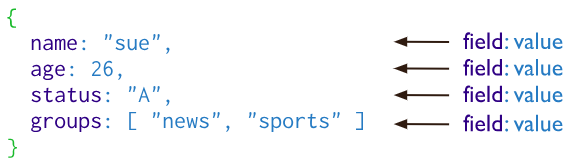
Querying:
Use the db.collection.find() method in the MongoDB Shell to query documents in a collection.
use sample_mflix

db.movies.find()
is equivalent to the following SQL statement:
SELECT * FROM movies
To select documents which match an equality condition, specify the condition as a <field>:<value> pairs:
db.movies.find( {"title": "Titanic"} )
is equivalent to:
SELECT * FROM movies WHERE title = "Titanic"
To perform more complex comparisons and evaluations: {<field1>: { <operator1>: <value1> }, ...}
db.movies.find( {rate: { $in: ["PG", "PG-13] } } )
is same as:
SELECT * FROM movies WHERE rated in ("PG", "PG-13")
(some more weird operators)