Formatted string literals let you include the value of Python expressions inside a string by prefixing the string with f and writing expressions as {expression}. An optional format specifier can follow the expression. This allows greater control over how the value is formatted. The = specifier can be sued to expand an expression to the text of the expression, an equal sin, then the representation of the evaluated expression.
{str:10}; {int:10d}; {float:.10f}

{count=}
The open() returns a file object, and is most commonly used with two positional arguments and one keyword argument: open(filename, mode, encoding=None). The first argument is a string containing the filename. The second argument is another string containing a few characters describing the way in which the file will be used. mode can be 'r' when the file will only be read, 'w' for only writing (an existing file with the same name will be erased), and 'a' opens the file for appending; any data written to the file is automatically added to the end. 'r+' opens the file for both reading and writing. The mode argument is optional; 'r' will be assumed if it’s omitted.
Normally, files are opened in text mode, that means, you read and write strings from and to the file, which are encoded in a specific encoding. If encoding is not specified, the default is platform dependent. Because UTF-8 is modern de-facto standard, encoding='utf-8' is recommended. Appending a b to the mode opens the file in binary model. Binary mode data is read and written as bytes objects. You can not specify encoding when opening file in binary mode.
It is a good practice to use the with keyword when dealing with file objects:
with open('workfile', 'r', encoding='utf-8') as f:
	read_data = f.read()
Strings can be easily be written to and read from a file. Numbers take a bit more effort, since the read() method only returns strings. Rather than having users constantly writing and debugging code to save complicated data types to files, Python allows you to use the popular data interchange format called JSON. The standard module called json can take Python data hierarchies, and convert them to string representations; this process is called serializing. Reconstructing the data from the string representation is called deserializing.
Note: JSON files must be encoded in UTF-8.
import json
json.dumps(x)
json.dum(x, f)
x = json.load(f)
Contrary to JSON, pickle is a protocol which allows the serialization of arbitrarily complex Python objects. As such, it is specific to Python and cannot be used to communicate with applications written in other languages. It is also insecure by default: deserializing pickle data coming from an untrusted source can execute arbitrary code, if the data was crafted by a skilled attacker.
Python data model:
Objects are Python’s abstraction for data. All data in a Python program is represented by objects or by relations between objects. (In a sense, and in conformance to Von Neumann’s model of a “stored program computer”, code is also represented by objects.)
For CPython, id(x) is the memory address where x is stored.
interface that we use to make our own objects play with the most idiomatic language features:
-
emulating numeric types operators:
add(self, other) -
boolean value:
bool(self) -
string:
repr(self) -
implementing collections:
.png)
len:
reversed: reversed
contains: in op
getitem: index op
iter: returns iterator that implements next
Sequences
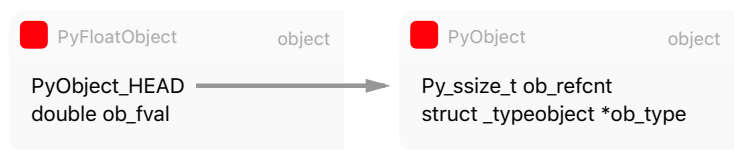
In Python, everything is an object. Every python object in memory has a header with metadata. The simplest Python object, a float, has a value field and two metadata fields:
- ob_refcnt: the object’s reference count
- ob_type: a pointer to the object’s type
- ob_fval: a C double holding the value of the float On a 64-bit build, each of these fields take 8 bytes.
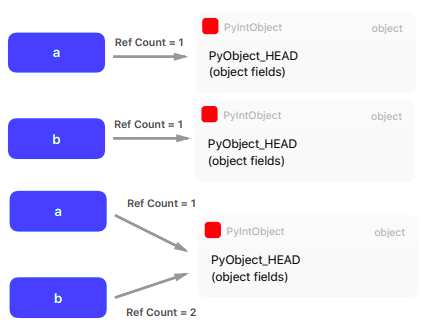
A typical Python program spend much of its time allocating/deallocating integers. CPython then caches the small integers.
a = 200; b = 200; a is b #True
a = 300; b = 300; a is b #False
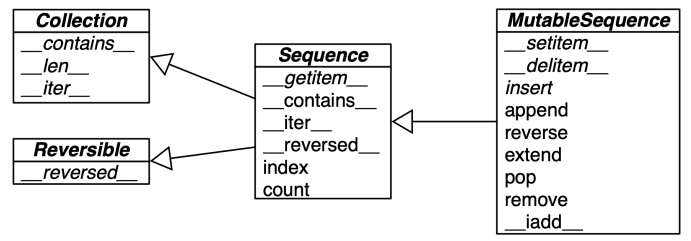
flat sequences: str bytes array.array hold items of one simple type in its own memory space
container sequences: list tuple collections.deque hold references to objects that it contains including nested containers
mutable: list, array.array, collections.deque immutable: tuple, str, bytes
Others:
collections.deque: removing at 0-index is costly in memory
collections.namedtuple: Point = namedtuple(‘Point’, x, y) p = Point(a, b) p.x p.y
List comprehension: a quick way to build a lists from other sequences or any iterable type by filtering and transforming items
[*output* for i in *iterable* if *condition*]
Generator expression: (one time iterators) saves memory as yields items one by one instead of building a whole list just to feed another constructor
(*output* for i in *iterable* if *condition*)
Unpacking:
parallel assignment: a, b = a_sequence
swapping: b, a = a, b
extended unpacking: a, b, *rest = a_sequence
Built-in helpers: range, zip, enumerate etc.
Itertools:
Infinite iterators:
count(start, [,step])cycle(p)repeat(elem, $[,n])
Combinatoric iterators:
cartesian product, equivalent to a nested for-loop
product(p, q, ... [repeat=1])
r-length tuples, all possible orderings, no repeated elements
permutations(p, $[$,r$]$)
r-length tuples, in sorted order, no repeated elements
combinations(p, r)
r-length tuples, in sorted order, with repeated elements
combinations_with_replacement(p, r)
Applications:
Square analogy:
| Which | Part of square |
|---|---|
| Product | Full |
| Permutations | Except diagonal |
| Combinations with replacement | Upper triangular part |
| Combinations | Upper triangular part (except diagonal) |
Possible subarrays:
for i, j in combinations(range(len(p)), 2):
	p[i:j]
Possible subsets:
for i in range(len(nums)+1):
	for subset in itertools.combinations(nums,i):
		subsets.append(subset)
Mappings and sets
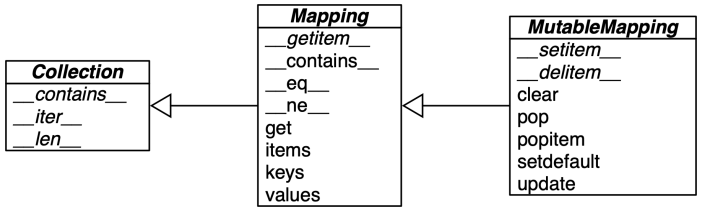
Hashability: numerics types and recursively immutables
collections.defaultdict: p = defaultdict(int) p?
Sets:
Functions
Python treats functions as first-class citizens. This means it supports passing functions as arguments to other functions, returning them as the values from other functions, and assigning them to variables or storing them in data structures.
Variable references look in the following order:
- local symbol table
- symbols of enclosing functions
- global symbol table
- finally in the table of built-in names
When a function calls another function, or calls itself, a new local symbol table is crated for that call.
Note: Global variables and variables of enclosing functions cannot be directly assigned a value within a function (unless, for global variables, named in a global statement, or, for variables of enclosing functions, named in a nonlocal statement), although they may be referenced.
Default arguments:
The most useful form is to specify a default value for one or more arguments. This creates a function that can be called with fewer arguments than it is defined to allow.
The default values are evaluated at the point of function definition in the defining scope, so that:
i = 5
def f(arg=i):
	print(arg)
i = 6
f()

#will print 5
The default value is evaluated only once. This makes a difference when the default is a mutable object such as a list, dictionary, or instances of most classes. For example, the following function accumulates the arguments passed to it on subsequent calls:
def f(a, L=[]):
	L.append(a)
	return L

print(f(1))
print(f(2))
print(f(2))

#will print [1], [1,2], [1,2,3]
Keyword arguments:
Functions can also be called using keyword arguments of the form kwarg=value. In a function call, keyword arguments must follow positional arguments. All the keyword arguments passed must match one of the arguments accepted by the function. No argument may receive a value more than once.
Specials parameters:
def f(pos1, pos2, /, pos_or_kwd, *, kwd1, kwd2)
Looking in a bit more detail, it is possible to mark certain parameters as positional-only. If positional-only, the parameters’ order matters, and the parameters cannot be passed by keyword. Positional-only parameters are placed before a / (forward-slash). The / is used to logically separate the positional-only parameters from the rest of the parameters. If there is no / in the function definition, there are no positional-only parameters. To mark parameters as keyword-only, indicating the parameters must be passed by keyword argument, place * in the arguments list just before the first keyword-only parameter.
Arbitrary argument lists:
Finally, the least frequently used option is to specify that a function can be called with an arbitrary number of arguments. These arguments will be wrapped up in a tuple. Before the variable number of arguments, zero or more normal arguments may occur.
Normally, these variadic arguments will be last in the list of formal parameters, because they scoop up all remaining input arguments that are passed to the function. Any formal parameters which occur after the *args parameter are ‘keyword-only’ arguments, meaning that they can only be used as keywords rather than positional arguments.
The reverse situation occurs when the arguments are already in a list or tuple but need to be unpacked for a function call requiring separate positional arguments.
In the same fashion, dictionaries can deliver keyword arguments with the **-operator
Generator functions:
def f(): for i in range(10): yield i' The code does not return. The function returns the generator object. The first time the for` calls the generator object, it will run the code from the beginning until it hits yield, then it’ll return the first value of the loop. Then, each subsequent call will run another iteration of the loop you have written in the function and return the next value. This will continue until the generator is considered empty.
Type hinting:
func(arg1: type1, arg2: type2, ...) -> return_type:
x: int = ?
Lambda functions: anonymous functions restricted to contain pure expressions
lambda arguments: expession
map, filter, reduce:
- maps a function onto a sequence of objects
map(f, L) - filters a sequence of objects with a boolean function
filter(f, L) - reduces a sequence of objects to a single with a func that combines two arguments
reduce(f, L)
Closures:
(Objects are data with methods attached, closures are functions with data attached)
Closures is a term for what is really just defining functions on the fly with some saved state. The intuition behind the concept of a closure lies in the understanding of the fact that closure is a mechanism by which an inner function will have access to the variables defined in its outer function’s lexical scope even after the outer function has returned.
def counter(start_at = 0):
	count = start_at
	def incr():
		nonlocal count
		count += 1
		return count
	return incr

xf = counter(start_at = 10)
#counter returns but xf maintains a state of count at 10
Decorators:
The Python functions that allow to wrap another function as an input and modify its behavior without altering the wrapped function’s code. They are an excellent way to apply reusable functionality across multiple functions, such as timing, caching, logging, or authentication.
def wrapper(func):
	def inner(x, y):
		print("The result is:", func(x,y))

@wrapper
def add(x, y): return x+y

@wrapper
def mul(x, y): return x*y
Functools:
Currying/partial:
The partial() is used for partial function application which freezes some portion of a function’s arguments and/or keywords resulting in a new object with a simplified signature.
bt = partial(int, base=2)The partial called in a class definition will create a staticmethod, while partialmethod will create a new bound method which when called will be passed self as the first argument.
@cache:
Simple lightweight unbounded function cache. Returns same as lru_cache(maxsize=None), creating a thin wrapper around a dictionary lookup for the function arguments. Because it never needs to evict old values, this is smaller and faster than lru_cache() with a size limit.
@cache
def factorial(n): return n*factorial(n-1) if n else 1

factorial(10) #initially, makes 11 calls
factorial(5)  #looks up
factorial(15) #makes another 5 recursive calls
Classes and protocols
Classes provide a means of bundling data and functionality together. Creating a new class creates a new type of object, allowing new instances of that type to be made. Each class instance can have attributes attached to it for maintaining its state. Class instances can also have methods for modifying its state.
class Dog:
	kind = 'canine'
	def __init__(self, name):
self.name = name- Normally class members (including the data members) are public (except private variables)
- All member functions are virtual
- There are no shorthands for referencing the object’s members from its methods: the method function is declared with an explicit first argument representing the object, which is provided implicitly by the call.
- Built-in types can be used as base classes for extension by the user.
Private variables:
Private instance variables that cannot be accessed except from inside an object don’t exist in Python. However, there is a convention that is followed by most Python code: a name prefixed with an underscore (e.g. _spam) should be treated as a non-public part of the API. It should be considered an implementation detail and subject to change without notice.
Since there is a valid use-case for class-private members (namely to avoid name clashes of names with names defined by subclasses), there is limited support for such a mechanism, called name mangling. Any identifier of the form __spam (at least two leading underscores, at most one trailing underscore) is textually replaced with _classname__spam, where classname is the current class name with leading underscore(s) stripped. This mangling is done without regard to the syntactic position of the identifier, as long as it occurs within the definition of a class.
The purpose of __ is class local reference making sure that the self that refers to you. Most of the time, self means you are your children but occasionally, you need it to be you. People mistake it for privacy. Python is not for privacy. It’s actually about freedom. It makes your sub classes free to override one method without breaking the others (when others call the one).
Inheritance:
isinstance(obj, int)to check an instance’s typeissubclass(bool, int)to check class inheritance
Virtual functions:
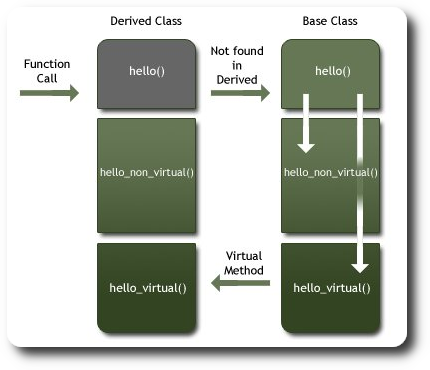 The recommended exception to raise on pure virtual methods is
 raise NotImplementedError()
class super: returns a proxy object that delegates method calls to a parent or sibling class of type.
@classmethod
A class method receives class as an implicit first argument, just like an instance method receives instance. An usual way an object instance calls a method is a.foo(1). The object instance, a, is implicitly passed as the first argument. With class methods, the class of the object instance is implicitly passed as the first argument instead of self. You can also call class_foo using the class, in fact, if you define classmethod, it is probably because you intend to call it from the class rather than from a class instance.
One use people have found for class methods is to create inheritable alternative constructors. Not as static methods because we need class name to know which class to construct.
@staticmethod
A static method can be called either on the class (such as C.f()) or on an instance (such as C().f()). With staticmethods, neither self (the object instance) nor cls (the class) is implicitly passed as the first argument. They behave like plain functions except that you can call them from an instance or the class. Staticmethods are used to group functions which have some logical connection with a class to the class.
The purpose of static methods is to attach functions to classes. This is done to improve the searcability of the functions and to ensure that it is used in appropriate context.
@property
The property decorator turns a method into a getter for a read-only attribute with the same name:
class C:
	def __init__(self, name):
		self._name = name

	@property
	def name(self):
		return self._name
(Use case: we used radius in our code but government says to change your internal implementation to diameter, so you made a radius method and you decorate it with property, which requires no change to any other places)
getattr(object, name, default)
Return the value of the named attribute of object. name must be a string. If the string is the name of one of the object’s attribute, the result is the value of that attribute. For example, getattr(x, 'foobar') is equivalent to x.foobar. If the named attribute does not exist, the default returned if provided, otherwise AttributeError is raised.
setattr(object, name, value)
The is the counterpart of getattr(). The arguments are an object, a string, and an arbitrary value. The string may name an existing attribute or a new attribute. The function assigns the value to the attribute, provided the object allows it. For example setattr(x, 'foobar', 123) is equivalent to x.foobar=123.
Note: Since private name mangling happens at compilation time, one must manually mangle a private attribute’s (attributes with two leading underscores) name in order to set it with setattr().
slots:
(at last)
Error Handling
Even if a statement or expression is syntactically correct, it may cause an error when an attempt is made to execute it. Errors detected during execution are called exceptions and are not unconditionally fatal.
try:
except:
finally:
The try statement works as follows:
- First, the
tryclause is executed. - If no exception occurs, the
exceptclause is skipped and execution oftrystatement is finished. - If an exception occurs during execution of the
tryclause, the rest of the clause if skipped. Then, if its types matches the exception named after the except keyword, theexceptclause is executed, and then execution continues after the try/except block. - If an exception occurs which does not match the exception named in the
exceptclause, it is passed on to outertrystatements; if no handler is found, it is an unhandled exception and execution stops with an error message.
Modules
A module can contain executable statements as well as function definitions. These statements are intended to initialize the module. They are executed only the first time the module name is encountered in an import statement. Each module has its own private namespace, which is used as the global namespace by all functions defined in the module. Thus, the author of a module can use global variables in the module without worrying about accidental clashes with a user’s global variables. On the other hand, if you know what you are doing you can touch a module’s global variables with the same notation used to refer to its functions, modname.itemname. Within a module, the module’s name (as a string) is available as the value of the global variable __name__
There is a variant of the import statement that import names from a module directly into the importing module’s namespace. This does not introduce the module name from which the imports are taken in the local namespace.
from fibo import fib1 fib2
There is even a variant to import all names that a module defines:
from fibo import *
This imports all names except those beginning with an underscore (_). In most cases Python programmers do not use this facility since it introduces an unknown set of names into the interpreter, possibly hiding some things you have already defined.
When you a run a Python module with: python fibo.py <arguments> the code in the module will be executed, just as if you imported it, but with the __name__ set to __main__. That means that by adding this code at the end of your module, you can make the file usable as a script as well as an importable module.
The module search path:
When a module named spam is imported, the interpreter first searches for a built-in module with that name. These module names are listed in sys.builtin_module_names. If not found, it then searches for a file named spam.py in a list of directories given by the variable sys.path. sys.path is initialized from these locations:
- The directory containing the input script (or current directory when no file is specified).
- PYTHONPATH (a list of directory names, with the same syntax as the shell variable PATH).
What is pycache?
To speed up loading modules, Python caches the compiled version of each module in the __pycache__ directory under the name module.version.pyc, where the version encodes the format of the compiled file; it generally contains the Python version number.
Packages:
The __init__.py files are required to make Python treat directories containing the file as packages. This prevents directories with a common name, such as string, from unintentionally hiding valid modules that occur later on the module search path.